


finally got all my screens...2 pics


finally got all my screens...2 pics
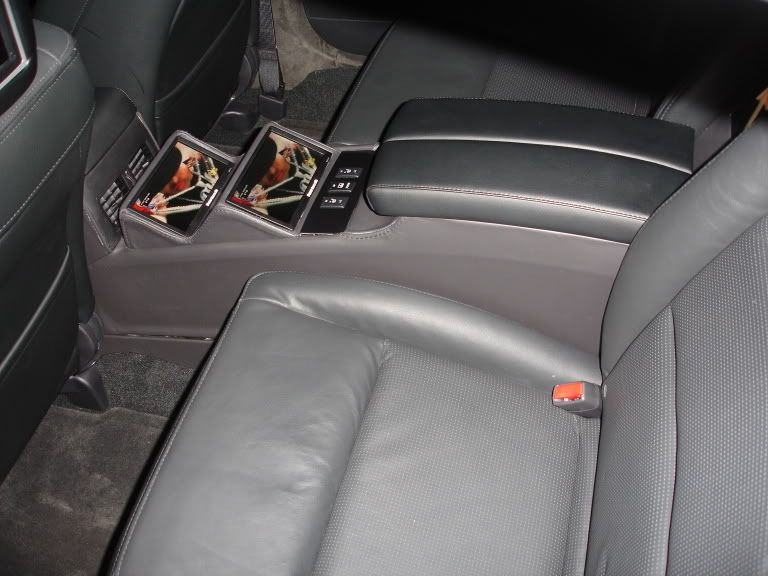
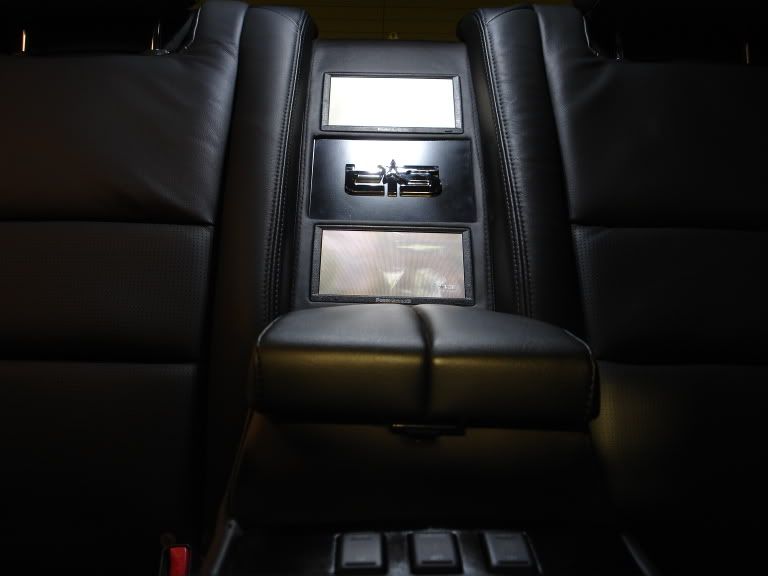
well this is pretty much what i've been waiting/working on for like 4 months or something. after i finally got the installation at CarTronics, one of my headrest monitors did not work, took about 5 weeks but just got a new working one from them today for free. i also added the screen on top and moved the info screen to the bottom myself. now i feel like a man 'cause i've been able to tear down and put back up this car more than once now while getting the screens installed...anyways, here's what it looks like so far, i think that's how its going to stay for now at least....


what do you think?
what do you think?


i got them from www.mp3playerstore.com
they're Innovatek IN909's in black. they're 9" and come with everything you need for $320 shipped 2-day with DHL. one of them was defective like i said, and they replaced it with a new one in about a month (most of which was the way up to and from canada so about 2 weeks for them...anyways, they're great for the price i think:-)
they're Innovatek IN909's in black. they're 9" and come with everything you need for $320 shipped 2-day with DHL. one of them was defective like i said, and they replaced it with a new one in about a month (most of which was the way up to and from canada so about 2 weeks for them...anyways, they're great for the price i think:-)




Originally Posted by pikers
How did you do the frame on the lower monitor?
Originally Posted by UnMaTcHeD
Looks great man, I am impressed!!

Originally Posted by pikers
How did you do the frame on the lower monitor?
Originally Posted by jsmithsole
Looks good! I have the same headrests but in 7"...nice work!

though i admit, i think these 9" monitors might be just a tad big...hehe, should have gone with 8".
Originally Posted by TrojanNemo
well man you were my inspiration! the installer had just left the kenwood in the middle and the OEM screen on top. after your recommendation to get the Nesa monitor, i bought it that same day and did the rest of the work myself. and up until yesterday i had the nesa screen resting in the bracket, and was trying to figure out how you had it flush with the bezel until i read you had it attached to it...i opened up the dash and boom, now it's sitting flush and looking better than ever
though i admit, i think these 9" monitors might be just a tad big...hehe, should have gone with 8".
Glad to be of service!!! Enjoy it.
dont have them yet. i like them a lot because everything comes already setup. they come with the headrest in matching black leather (matches closely enough i think) and they're comfortable, believe it or not, just can't angle it as much as the oem one but hey...
i dont know whether they're "truly" 16:9 but they do have the option to set them from 4:3 to 16:9 which is how i have all 4 screens and they all have the same picture, nothing gets cut off or anything. looks wide to me:-)
i dont know whether they're "truly" 16:9 but they do have the option to set them from 4:3 to 16:9 which is how i have all 4 screens and they all have the same picture, nothing gets cut off or anything. looks wide to me:-)

Senior Member
Joined: Aug 2006
Posts: 276
Originally Posted by TrojanNemo
dont have them yet. i like them a lot because everything comes already setup. they come with the headrest in matching black leather (matches closely enough i think) and they're comfortable, believe it or not, just can't angle it as much as the oem one but hey...
i dont know whether they're "truly" 16:9 but they do have the option to set them from 4:3 to 16:9 which is how i have all 4 screens and they all have the same picture, nothing gets cut off or anything. looks wide to me:-)
i dont know whether they're "truly" 16:9 but they do have the option to set them from 4:3 to 16:9 which is how i have all 4 screens and they all have the same picture, nothing gets cut off or anything. looks wide to me:-)

dont be inspired by that. there are better ways to do this. i was just scared a carputer would be too hard to install and get working but thinking back on it, that's definetively teh best way to do it. if you want to do it the way i did, however, then i would recommend one of those dvd players that the screen comes in and out, because there is NO kit for what i did, i had to cut my oem bezel and i dont recommend that!
Originally Posted by TrojanNemo
dont be inspired by that. there are better ways to do this. i was just scared a carputer would be too hard to install and get working but thinking back on it, that's definetively teh best way to do it. if you want to do it the way i did, however, then i would recommend one of those dvd players that the screen comes in and out, because there is NO kit for what i did, i had to cut my oem bezel and i dont recommend that!
Don't sell yourself short, you've got a good setup (maybe becuase it's the same that I have!!) But on the carputer note, that will definitely be the way I go on my next car and in 2 years (or less when I get a new car) just think of what we will be able to do with those things. Heck might even be able to get a "MAC Mobile"!!!
Went to autozone, they had this trim thing that has chrome strips on the top and bottom and faux black leather in the middle, and just cut it to that size. i'm not quite 100% satisfied with that part, because i didnt have the proper cutting tools, i'm going to redo it in the future...for now, it's staying like that.
went to autozone to find something similar but couldnt find anything could someone shoot me a link or pic of what im looking for ?

Senior Member
Joined: Jan 2006
Posts: 145
You can already get the "MAC Mobile" My buddy has the Mac Mini in his car and I went with the Mini pc (same set just windows based). If you want the Biggest Bang for the buck, A carpc is the only way to go. My basic set up has DVD,Mp3's,wireless internet, game emulators, Bluetooth, GPS... The system set me back about $1100 and I installed everything myself. Not to difficult.
Nice job on the screens. I'm installing mine on Friday and connecting one input to my PS2 and another to DVD
Nice job on the screens. I'm installing mine on Friday and connecting one input to my PS2 and another to DVD

Junior Member
Joined: Nov 2006
Posts: 17
Very nice setup. I've read that moving the original top screen to the bottom slot is very easy as there is just enough wiring. Is that true?
Instead of rear headrest lcd's, is there a way I can install a single screen in the rear center console (I have the Elite) that pops up?
Instead of rear headrest lcd's, is there a way I can install a single screen in the rear center console (I have the Elite) that pops up?
Guest
Posts: n/a
Originally Posted by pirates
Very nice setup. I've read that moving the original top screen to the bottom slot is very easy as there is just enough wiring. Is that true?
Instead of rear headrest lcd's, is there a way I can install a single screen in the rear center console (I have the Elite) that pops up?
Instead of rear headrest lcd's, is there a way I can install a single screen in the rear center console (I have the Elite) that pops up?



Thread
Thread Starter
Forum
Replies
Last Post
BPuff57
Advanced Suspension, Chassis, and Braking
33
Apr 16, 2020 05:15 AM
bigfrank
4th Generation Maxima (1995-1999)
2
Oct 1, 2015 12:51 PM