


Stock Info Screen


Thread Starter
Member
Joined: Nov 2006
Posts: 47
Stock Info Screen
does anyone know what the source cable for the stock info screen on the 04-06 maxima is and is there a converter possibly that can convert whatever source cable the stock info screen is to AV (composite) so I could just get rid of the stock info screen and just have that info show on whatever input on my headunit I plug it into i.e. av1 or av2 please and make it display on an OEM LCD screen please let me know, thanks

Pretty sure that cant happen. The stock screen is an LED, similar to a calculator. It wouldnt send the type of signal needed for an LCD monitor. Someone chime in if I'm wrong, or who may know of a work around.

Thread Starter
Member
Joined: Nov 2006
Posts: 47
o ok, so then question and im assuming the answer is no, but is the stock info screen even needed at all say if u wanted 2 just not use it, like does the screen have to be connected for the climate control to work? or is it just for display purposes?

Thread Starter
Member
Joined: Nov 2006
Posts: 47
yea I have seen many people on here just move the info screen down to where the storage is in front of the shifter but 1 i dont like how it looks with 3 screens in the console and 2 i actually use that storage for cd's and such but you dont know if its actually needed or not?

Yea I made a thread about this a while ago and I was told its best to move the screen down, since there is ample wiring to do so. Its your best bet I even tried calling the dealership for a nav install, they simply werent interested.
Guest
Posts: n/a
Originally Posted by 06maxSE
o ok, so then question and im assuming the answer is no, but is the stock info screen even needed at all say if u wanted 2 just not use it, like does the screen have to be connected for the climate control to work? or is it just for display purposes?
Its for display purposes. With some good wiring fabrication you can put it where ever you want. Get creative. If I had it I would've put it up where the sunglass holder is an have it flip down or fabbed it right into the headliner itself.....but I get a little crazy sometimes when it comes to monitors...lol
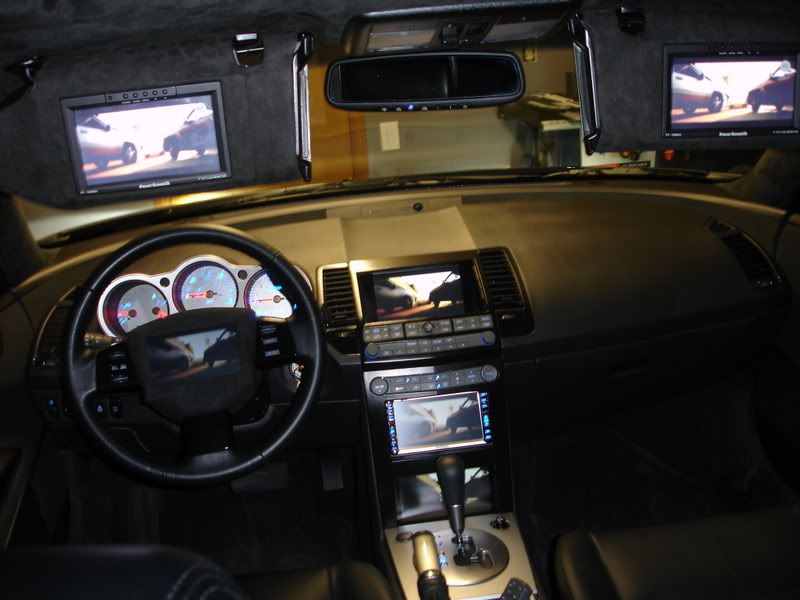

when i did my HU install back last year the installer told me he had this company that made a box that would translate the RGB signal from the non-navi screen into a usable AV signal that could be passed through to the HU. he wasn't able to get it for me at the time and I think i only saw it online one time.
i would love it if we could figure out a way to do it then i'd take mine out of the storage space and just throw it another LCD
i would love it if we could figure out a way to do it then i'd take mine out of the storage space and just throw it another LCD

With the screen unplugged the controls don't work. If I remember correctly air just blows from the vents (different from the setting it was on when it was plugged in) Never tried changing the settings though, it's worth a try, but then you'll never know what temp/setting you have it on.

Originally Posted by jsmithsole
With the screen unplugged the controls don't work. If I remember correctly air just blows from the vents (different from the setting it was on when it was plugged in) Never tried changing the settings though, it's worth a try, but then you'll never know what temp/setting you have it on.
Originally Posted by TrojanNemo
when i did my HU install back last year the installer told me he had this company that made a box that would translate the RGB signal from the non-navi screen into a usable AV signal that could be passed through to the HU. he wasn't able to get it for me at the time and I think i only saw it online one time.
i would love it if we could figure out a way to do it then i'd take mine out of the storage space and just throw it another LCD
i would love it if we could figure out a way to do it then i'd take mine out of the storage space and just throw it another LCD
well let me bring up a point that hasn't been mentioned, and is majorly why i'm sure there is a way of doing is. the info screen is LED, the stock navi is NOT, is RGB. so, how does Nissan get the same info that we get on our info LED screens into their navi screens? either the signal can be converted or nissan themselves have a different connection that would work with RGB...
now its up to someone with the stock navi to see if the connection is the same or not as the one for non-navi systems.
now its up to someone with the stock navi to see if the connection is the same or not as the one for non-navi systems.
Originally Posted by TrojanNemo
well let me bring up a point that hasn't been mentioned, and is majorly why i'm sure there is a way of doing is. the info screen is LED, the stock navi is NOT, is RGB. so, how does Nissan get the same info that we get on our info LED screens into their navi screens? either the signal can be converted or nissan themselves have a different connection that would work with RGB...
now its up to someone with the stock navi to see if the connection is the same or not as the one for non-navi systems.
now its up to someone with the stock navi to see if the connection is the same or not as the one for non-navi systems.
Thread Starter
Member
Joined: Nov 2006
Posts: 47
Originally Posted by gec
Its for display purposes. With some good wiring fabrication you can put it where ever you want. Get creative. If I had it I would've put it up where the sunglass holder is an have it flip down or fabbed it right into the headliner itself.....but I get a little crazy sometimes when it comes to monitors...lol

Senior Member
Joined: Aug 2006
Posts: 276
This is basically what i've been trying to get to the bottom to with my NAV version though.
I'd like to keep the AC output and place it on an aftermarket screen...
I'd think it's easier in Nav as opposed to non nav, due to the fact that we have LCD screens and not the LED based screen.
I'd like to keep the AC output and place it on an aftermarket screen...
I'd think it's easier in Nav as opposed to non nav, due to the fact that we have LCD screens and not the LED based screen.
Guest
Posts: n/a
Originally Posted by 06maxSE
question, on your car u have a screen down by the shifter, but it seems u have video playing on it, is that your stock info screen or, where is your stock screen or did u have a factory navigation system?
Thread Starter
Member
Joined: Nov 2006
Posts: 47
Originally Posted by Omarvelous
This is basically what i've been trying to get to the bottom to with my NAV version though.
I'd like to keep the AC output and place it on an aftermarket screen...
I'd think it's easier in Nav as opposed to non nav, due to the fact that we have LCD screens and not the LED based screen.
I'd like to keep the AC output and place it on an aftermarket screen...
I'd think it's easier in Nav as opposed to non nav, due to the fact that we have LCD screens and not the LED based screen.


Thread
Thread Starter
Forum
Replies
Last Post
Omar Abdurrahman Siddiqi
5th Generation Maxima (2000-2003)
33
Aug 26, 2016 05:18 PM