


After-market Double Din Radios


Thread Starter
Newbie - Just Registered
Joined: May 2013
Posts: 2
From: Philadelphia, PA
 After-market Double Din Radios
Hello everyone,
I just purchased my certified pre-owned '09 Max, 3.5 S model about 3 months ago and I'm lovin' this ride. Prior to that, I owned 2 Toyota Camry's over the years; from 4 cylinder to 6 cylinder and the variable shifter is DEFINITELY a PLUS for me. The first thing I did to the car was got the windows tinted and added a Bazooka 12" sub-woofer (I love my music, so the system has to sound good), prior to that I had three 10" JL Audio sub-woofer's in my Camry's. The system in the S model isn't the Bose system, however it sounds really good. Now I want to possibly change the factory radio unit out. I saw a post on here from 2010 whereas though someone changed from the factory system to a Pioneer system and it looked great. Upon further review of that particular Pioneer system, the navigation wasn't that great. A co-worker suggested the Pioneer X940BT (Double Din), but I dunno if I wanna spend up to $600 dollars on system; I don'tall need the bells & whistles like DVD player or rear camera.
I just want to be able to sync my phone via Bluetooth (in case there is no Aux input), Navigation would be a plus (but not required) because most Smart phones have decent navi (Google Maps); and do I lose the 6 disc capability with after-market radios??? What about the steering wheel controls with an after-market system??? I hope that I didn't bore you guy (and girls), but I need HELP please O_O. Thanks!!!
kdm
I just purchased my certified pre-owned '09 Max, 3.5 S model about 3 months ago and I'm lovin' this ride. Prior to that, I owned 2 Toyota Camry's over the years; from 4 cylinder to 6 cylinder and the variable shifter is DEFINITELY a PLUS for me. The first thing I did to the car was got the windows tinted and added a Bazooka 12" sub-woofer (I love my music, so the system has to sound good), prior to that I had three 10" JL Audio sub-woofer's in my Camry's. The system in the S model isn't the Bose system, however it sounds really good. Now I want to possibly change the factory radio unit out. I saw a post on here from 2010 whereas though someone changed from the factory system to a Pioneer system and it looked great. Upon further review of that particular Pioneer system, the navigation wasn't that great. A co-worker suggested the Pioneer X940BT (Double Din), but I dunno if I wanna spend up to $600 dollars on system; I don'tall need the bells & whistles like DVD player or rear camera.
I just want to be able to sync my phone via Bluetooth (in case there is no Aux input), Navigation would be a plus (but not required) because most Smart phones have decent navi (Google Maps); and do I lose the 6 disc capability with after-market radios??? What about the steering wheel controls with an after-market system??? I hope that I didn't bore you guy (and girls), but I need HELP please O_O. Thanks!!!
kdm

Junior Member
Joined: Mar 2013
Posts: 36
From: Maryland
I did the Avic-x940bt in my 09 max and I love it there's so much control to make the sound of the music perfect I also didn't cause I have a custom trunk and need a good radio to control it lol. As for the steering wheel controls you still keep them it's an extra part I think like 50 bucks or so but you buy that and all your steering wheel controls will still work.

Senior Member
Joined: Jun 2012
Posts: 696
From: Honolulu, Hawaii
I just want to be able to sync my phone via Bluetooth (in case there is no Aux input), Navigation would be a plus (but not required) because most Smart phones have decent navi (Google Maps); and do I lose the 6 disc capability with after-market radios??? What about the steering wheel controls with an after-market system??? I hope that I didn't bore you guy (and girls), but I need HELP please O_O. Thanks!!!
kdm
kdm
You lose the 6 disc capability as the S model's stock receiver takes care of all the disc changing.
I opted for a single din setup, installing a Pioneer DEH-80PRS. Just put it in this week, still messing with all the bells and whistles. Lovely system so far.
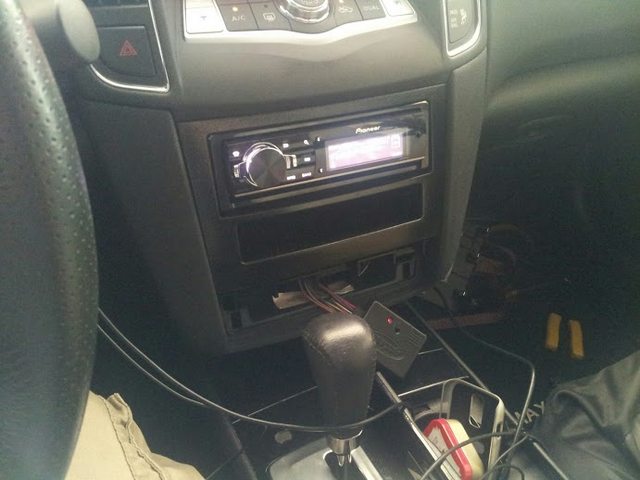
If you're dead set on a double din and don't need the navigation (you could just put a tablet in the top area later, hehe), Consider the Pioneer FH-X700BT. It's decently priced system which should suit most of your needs and would look snazzy in the max. I almost picked this one up myself. There are cheaper touch screen double din setups than the Pioneer X940BT. They usually start in the $300+ range if you are dead set on that. Take a look at the Pioneer AVH line. Those are pretty popular and seem to be great systems.
As for the steering controls, you will need an adapter but note that they do not always work or sometimes need to be programmed manually. I've learned that on my own the hard way. Just look up steering wheel audio adapters and make sure they're compatible with your car and the stereo.

Member
Joined: Aug 2012
Posts: 160
From: Houston, Tx
I have the pioneer AVH-x2500bt. I'm happy with it.
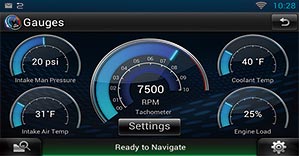
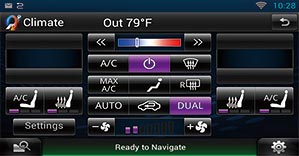
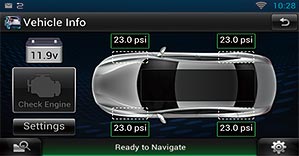
Bluetooth, pandora, Dvd, mp3, back up camera, and if you own an iphone, you could get navigation through app mode buying a special cable. If I had to do it all over again, I would get a radio with an HDMI input to mirror a smartphone on your radio. Look for videos on AR liberator. Only wish no rooting was required.
Bluetooth, pandora, Dvd, mp3, back up camera, and if you own an iphone, you could get navigation through app mode buying a special cable. If I had to do it all over again, I would get a radio with an HDMI input to mirror a smartphone on your radio. Look for videos on AR liberator. Only wish no rooting was required.




Member
Joined: Aug 2009
Posts: 179
From: Houston


Senior Member
Joined: Jun 2014
Posts: 561
Any chance you could give some info on the set up you have? Just looking at options for my SV without navi and like the extra screen up top. Did you install yourself? As much info as possible would be great. Thanks so much.

Junior Member
Joined: Sep 2012
Posts: 50
You could honestly do a lot of different setups. You could put a regular 7" monitor on the top where your climate control is and a double din on the bottom or instead of a monitor you could go with a tablet that has an SD card slot so you store all your movies and music in there and control it through there. And if you have a kid maybe if hes sitting in the front you could connect some bluetooth headphones to the tablet and they could watch a movie while you're listening to your music on the radio. I personally have a samsung tablet 7" in my car and a double din.

Senior Member
Joined: May 2014
Posts: 302
From: Houston, TX
If I ever have the guts to open up my interior, I will be putting a tablet in the center stack where the original radio and climate controls. As to answer your question, there are a couple of people who have moved the climate control display into the upper shelf of the glovebox, or at the bottom where the original radio controls were.
To confirm, you do have the amber display in your SV? If not, then I think you will not be able to perform this mod. Am I correct? I recall reading this on the forum.
To confirm, you do have the amber display in your SV? If not, then I think you will not be able to perform this mod. Am I correct? I recall reading this on the forum.
Junior Member
Joined: Sep 2012
Posts: 50

Newbie - Just Registered
Joined: Jan 2015
Posts: 4


Thread
Thread Starter
Forum
Replies
Last Post
worldwiderecognized
6th Generation Maxima (2004-2008)
0
Sep 30, 2015 01:16 PM