


G/D O2Simulator Dual output


Headers Y pipe, catback. Two sensors moved behind the cat in they y pipe.
My headers. I don't believe the simulators go in here though
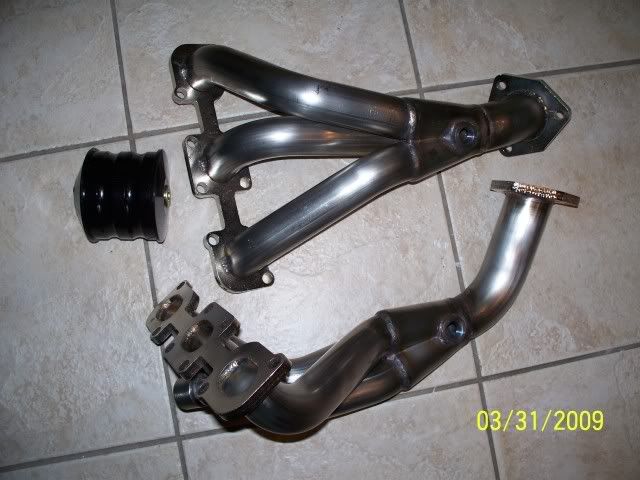
I think they go here in the Y-Pipe - - - So maybe I do need two. Pretty much need what the other 6thgen guys are getting.
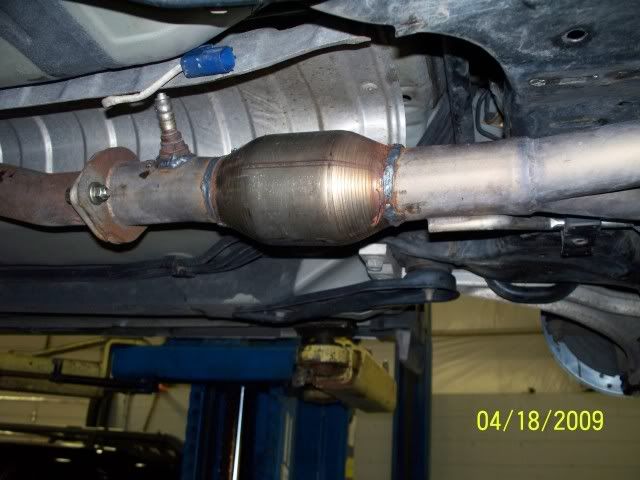
My headers. I don't believe the simulators go in here though
I think they go here in the Y-Pipe - - - So maybe I do need two. Pretty much need what the other 6thgen guys are getting.

Headers / Y Pipe / Catback. I have two sensors that are plugged in behind the catalytic converter in the Y-pipe. Those two previously were in the stock manifolds before I got the headers. So is one enough or do I need two?
one should be find since they are dual output. that way you can bypass the secondary's, the sims im selling are dual output


I got mine today, just hoping that they are ok since they come in a regular mail envolpe. It was pretty beat up.
How do you install these? There is no instructions or labels on the wires. Thanks.
Ferhan
How do you install these? There is no instructions or labels on the wires. Thanks.
Ferhan


-The harness you need is under the carpet under the driver's seat. Remove the seat to get better access. The harness will be a 4-wire connector beneath the big hole in the carpet.
-Note: Do all connections in FRONT of the connector, where the wires are distinctively color-coded. There are four wires: black, white, red, and red/black.
1. The black wire from the o2 simulator TAPS into the black wire on the harness.
2. The red wire from the o2 simulator TAPS into the red/black wire on the harness.
3. The white wire from the o2 simulator (these simulators have two white wires for dual output, just use one and disregard the other. i just cut the extra off) INTERCEPTS the white wire on the harness.
4. The red wire on the harness is left untouched.
5. Make sure to plug the harness back into the o2 sensor so the heater on the o2 works, otherwise you'll throw a CEL for a heater malfunction code.
-Turn the key to "on" and makes sure the little LED on the simulator blinks. Solder all connections, wrap them up, tuck everything under the carpet, reinstall driver's seat. Done!
-Note: This was done on a '97, may be different for other years but I doubt it.
-Note: Do all connections in FRONT of the connector, where the wires are distinctively color-coded. There are four wires: black, white, red, and red/black.
1. The black wire from the o2 simulator TAPS into the black wire on the harness.
2. The red wire from the o2 simulator TAPS into the red/black wire on the harness.
3. The white wire from the o2 simulator (these simulators have two white wires for dual output, just use one and disregard the other. i just cut the extra off) INTERCEPTS the white wire on the harness.
4. The red wire on the harness is left untouched.
5. Make sure to plug the harness back into the o2 sensor so the heater on the o2 works, otherwise you'll throw a CEL for a heater malfunction code.
-Turn the key to "on" and makes sure the little LED on the simulator blinks. Solder all connections, wrap them up, tuck everything under the carpet, reinstall driver's seat. Done!
-Note: This was done on a '97, may be different for other years but I doubt it.
and for those not installing on these makes or models :

http://i80.photobucket.com/albums/j1.../o2install.jpg
http://i80.photobucket.com/albums/j1.../o2install.jpg
hope that these help guys
o and the packaging, yea, these little things are very durable so packing bubbles are not necessary. Unless they threw it off a building and rolled over it while it was standing on its side
-Jared
o and the packaging, yea, these little things are very durable so packing bubbles are not necessary. Unless they threw it off a building and rolled over it while it was standing on its side
-Jared
Yeah, no offense but dang, they could have at least put it in some bubble wrap. It's a tiny circuit board. I'd have paid an extra dollar for shipping, to have it wrapped in something more protective than a plastic bag. Mine is a little scratched up, even the bag has some tear in it. I hope it works.
Thanks for posting instruction, took me a minute to even figure out what it was.
Here is what I got off O2simulator.com
There is Nissan specific instructions.
http://www.o2simulator.com/index.php...id=6&chapter=0
Ferhan
There is Nissan specific instructions.
http://www.o2simulator.com/index.php...id=6&chapter=0
Ferhan
-Jared

-Jared
It's an honest mistake man. Thanks. Do you know if these will work for an audi too?

Newbie - Just Registered
Joined: Apr 2008
Posts: 10
From: Utica, NY
Are these simulators still available? I need this ASAP. From what I've gathered, this is what I need, I have headers with no cats and my CEL is on. Need to get the car inspected this month or New York State will basically own me and impound my car.

ahhh! cliMAX!

Joined: May 2005
Posts: 792
Got mine as well 
And just my luck, check engine turns off before i even get to install it!
Next time it goes on, I will install.
Does anyone have better instructions on how to install? The OP says under the seat, whereas the link above says in the engine bay
???
And just my luck, check engine turns off before i even get to install it!
Next time it goes on, I will install.
Does anyone have better instructions on how to install? The OP says under the seat, whereas the link above says in the engine bay
???
you can mount anywhere you would like i prefer the under seat install it is cleaner and no one has to know that you have it...... that is the reason that you got it in the first place right? 


Okay so if I understand correctly
This definitely work on a 97 Maxima.
This is for the 5th gen Maxima
This is for the 6thgen Maxima or any other year not listed above? Has anyone with a 6thgen installed these yet? Pics? Write up?
This definitely work on a 97 Maxima.
-The harness you need is under the carpet under the driver's seat. Remove the seat to get better access. The harness will be a 4-wire connector beneath the big hole in the carpet.
-Note: Do all connections in FRONT of the connector, where the wires are distinctively color-coded. There are four wires: black, white, red, and red/black.
1. The black wire from the o2 simulator TAPS into the black wire on the harness.
2. The red wire from the o2 simulator TAPS into the red/black wire on the harness.
3. The white wire from the o2 simulator (these simulators have two white wires for dual output, just use one and disregard the other. i just cut the extra off) INTERCEPTS the white wire on the harness.
4. The red wire on the harness is left untouched.
5. Make sure to plug the harness back into the o2 sensor so the heater on the o2 works, otherwise you'll throw a CEL for a heater malfunction code.
-Turn the key to "on" and makes sure the little LED on the simulator blinks. Solder all connections, wrap them up, tuck everything under the carpet, reinstall driver's seat. Done!
-Note: This was done on a '97, may be different for other years but I doubt it.
-Note: Do all connections in FRONT of the connector, where the wires are distinctively color-coded. There are four wires: black, white, red, and red/black.
1. The black wire from the o2 simulator TAPS into the black wire on the harness.
2. The red wire from the o2 simulator TAPS into the red/black wire on the harness.
3. The white wire from the o2 simulator (these simulators have two white wires for dual output, just use one and disregard the other. i just cut the extra off) INTERCEPTS the white wire on the harness.
4. The red wire on the harness is left untouched.
5. Make sure to plug the harness back into the o2 sensor so the heater on the o2 works, otherwise you'll throw a CEL for a heater malfunction code.
-Turn the key to "on" and makes sure the little LED on the simulator blinks. Solder all connections, wrap them up, tuck everything under the carpet, reinstall driver's seat. Done!
-Note: This was done on a '97, may be different for other years but I doubt it.
and for those not installing on these makes or models :
http://i80.photobucket.com/albums/j1.../o2install.jpg
http://i80.photobucket.com/albums/j1.../o2install.jpg


