


Monitor and dvd questions

Guest
Posts: n/a
Monitor and dvd questions
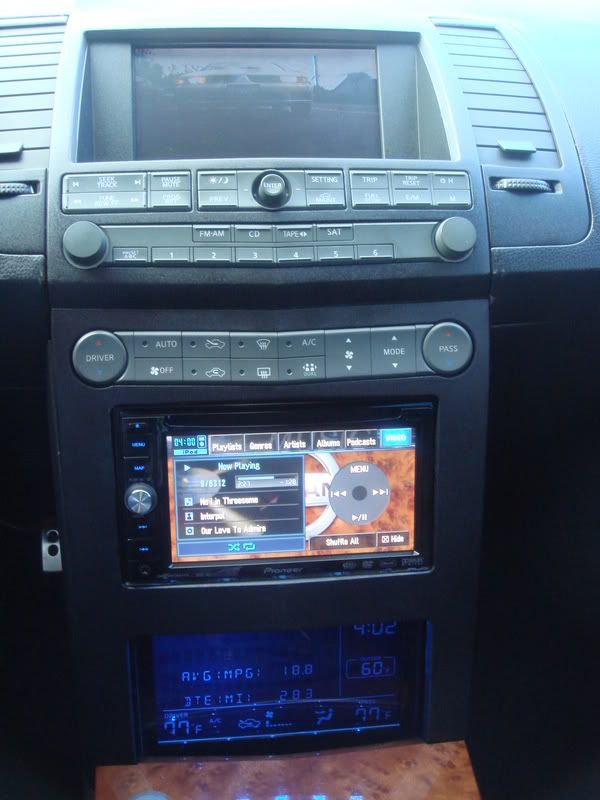
So I took apart my dash apart today, and I was surprised how easy it was (about 5 mins of work). I'd like to keep the Bose System in my car but would like to move the info screen down to the capartment opening and replace up top with a 7in (?) screen and put a dvd player in my console.
Anyone know what screen would have the best oem fitment and how do I get the monitor and dvd player to work through the head unit.
Since I used to do stereo orinated hobbies, I feel like I can easily install this setup if i was guided with the proper products to purchase.
I would need a monitor, a dvd player and a pac converter and some rca's, I'm i missing anything? How would the DVD function work, throught the satellite option?
Any answers would be a start.
Anyone know what screen would have the best oem fitment and how do I get the monitor and dvd player to work through the head unit.
Since I used to do stereo orinated hobbies, I feel like I can easily install this setup if i was guided with the proper products to purchase.
I would need a monitor, a dvd player and a pac converter and some rca's, I'm i missing anything? How would the DVD function work, throught the satellite option?
Any answers would be a start.


Senior Member
Joined: Oct 2005
Posts: 619
I am also interested in doing something similar. I definately want to move the info screen to the bottom. I forgot who, but another person on this forum said that it is easy and it just wedges in the opening. No need for drilling holes or using any hard ware. As for replacing the screen on the top, I also want to know what would fit best? And also since I am keeping my stock system, how would I get the sound from an aftermarket dvd player or tv tuner (if I get one and replace the top screen) into my stereo? I have also seen some aftermarket navigation systems that actually have the screen and dvd player all built in one unit. I was thinking if I could just place a unit like this where the info screen goes and how it would work or fit. Any thoughts on any of these things I said?? Thanks

Originally Posted by andymax95
So I took apart my dash apart today, and I was surprised how easy it was (about 5 mins of work). I'd like to keep the Bose System in my car but would like to move the info screen down to the capartment opening and replace up top with a 7in (?) screen and put a dvd player in my console.
Anyone know what screen would have the best oem fitment and how do I get the monitor and dvd player to work through the head unit.
Since I used to do stereo orinated hobbies, I feel like I can easily install this setup if i was guided with the proper products to purchase.
I would need a monitor, a dvd player and a pac converter and some rca's, I'm i missing anything? How would the DVD function work, throught the satellite option?
Any answers would be a start.
Anyone know what screen would have the best oem fitment and how do I get the monitor and dvd player to work through the head unit.
Since I used to do stereo orinated hobbies, I feel like I can easily install this setup if i was guided with the proper products to purchase.
I would need a monitor, a dvd player and a pac converter and some rca's, I'm i missing anything? How would the DVD function work, throught the satellite option?
Any answers would be a start.
Andrew,
The screens that Corey from Redlinemax sells are similar to the one I put in and it fits perfectly.
http://forums.maxima.org/showthread.php?t=381818
Sounds like you know what you're doing for the rest...
Guest
Posts: n/a
Here's something to think about?
dvd player has line outs (red, yellow white), while the video in goes to the monitor and with the pac adaptor installed into the satellite the audio will come from the dvd player to the head unit.
So to get sound from the dvd player through Bose, I assume you would use the Sat. button on the head unit?
Now that makes some sense, but how about power to the 7" monitor, were does it come from. Dvd players have power cord adpaters to plug into the socket, but no idea how to charge up the monitor, do i have to splice into an accessory wire to power it, if so which one, i assume the one that powers the head unit?
Best place to but the dvd player, under the seat, glove box or in the center console?
How about mounting the monitor, how do u fix it into place?
Finally, with this setup, and the pac adaptor ( which i assume has more then one rca outputs) So if one rca output(red and white) gets used up by the dvd player and the other for the ipod, how do i change between these options when wanting to use one or the other. Even through they are both hooked up to the sat. button, does it just work under the descretion of what product is on. Can they both work at the same time?
Once these questions have some more explanation, the set-up and install shouldn't be to diffucult.
Anyone with knowledge feel free to chime in
dvd player has line outs (red, yellow white), while the video in goes to the monitor and with the pac adaptor installed into the satellite the audio will come from the dvd player to the head unit.
So to get sound from the dvd player through Bose, I assume you would use the Sat. button on the head unit?
Now that makes some sense, but how about power to the 7" monitor, were does it come from. Dvd players have power cord adpaters to plug into the socket, but no idea how to charge up the monitor, do i have to splice into an accessory wire to power it, if so which one, i assume the one that powers the head unit?
Best place to but the dvd player, under the seat, glove box or in the center console?
How about mounting the monitor, how do u fix it into place?
Finally, with this setup, and the pac adaptor ( which i assume has more then one rca outputs) So if one rca output(red and white) gets used up by the dvd player and the other for the ipod, how do i change between these options when wanting to use one or the other. Even through they are both hooked up to the sat. button, does it just work under the descretion of what product is on. Can they both work at the same time?
Once these questions have some more explanation, the set-up and install shouldn't be to diffucult.
Anyone with knowledge feel free to chime in
Originally Posted by andymax95
Here's something to think about?
dvd player has line outs (red, yellow white), while the video in goes to the monitor and with the pac adaptor installed into the satellite the audio will come from the dvd player to the head unit.
So to get sound from the dvd player through Bose, I assume you would use the Sat. button on the head unit?
Now that makes some sense, but how about power to the 7" monitor, were does it come from. Dvd players have power cord adpaters to plug into the socket, but no idea how to charge up the monitor, do i have to splice into an accessory wire to power it, if so which one, i assume the one that powers the head unit?
Best place to but the dvd player, under the seat, glove box or in the center console?
How about mounting the monitor, how do u fix it into place?
Finally, with this setup, and the pac adaptor ( which i assume has more then one rca outputs) So if one rca output(red and white) gets used up by the dvd player and the other for the ipod, how do i change between these options when wanting to use one or the other. Even through they are both hooked up to the sat. button, does it just work under the descretion of what product is on. Can they both work at the same time?
Once these questions have some more explanation, the set-up and install shouldn't be to diffucult.
Anyone with knowledge feel free to chime in
dvd player has line outs (red, yellow white), while the video in goes to the monitor and with the pac adaptor installed into the satellite the audio will come from the dvd player to the head unit.
So to get sound from the dvd player through Bose, I assume you would use the Sat. button on the head unit?
Now that makes some sense, but how about power to the 7" monitor, were does it come from. Dvd players have power cord adpaters to plug into the socket, but no idea how to charge up the monitor, do i have to splice into an accessory wire to power it, if so which one, i assume the one that powers the head unit?
Best place to but the dvd player, under the seat, glove box or in the center console?
How about mounting the monitor, how do u fix it into place?
Finally, with this setup, and the pac adaptor ( which i assume has more then one rca outputs) So if one rca output(red and white) gets used up by the dvd player and the other for the ipod, how do i change between these options when wanting to use one or the other. Even through they are both hooked up to the sat. button, does it just work under the descretion of what product is on. Can they both work at the same time?
Once these questions have some more explanation, the set-up and install shouldn't be to diffucult.
Anyone with knowledge feel free to chime in
1.) SAT button sounds right, same as you would for the IPOD with the PAC.
2.) I tapped into my head unit power for my screen, not sure how to tap into the stock HU.
3.)DVD player, I'd say glove for easy access, center might be too much modifying (and you lose that storage)
4.) The monitor (at least the one I got) fit in there like it was made for that area. I did rig it a bit and use duct tape to hold the screen tight in place. But then it fit right in between the 2 stock brakcet that held the old info screen.
5.)PAC, not to familar with them...
Hope this helps at least a bit!!
J

Senior Member
Joined: May 2003
Posts: 2,085
my 7" Microvision LCD did not fit perfectly. The plastic housing had to be removed and even with that, there is a noticeable cut off line at the top and bottom of the screen when it's covered with the stock cover. I'd recommend a 6.5" without any buttons on the front of the screen. Good luck. CHeck out my homepage for more pics.
My Nesa fit perfectly (I did remove the stock cover), here's the info:
NESA NRM-7002
NESA NRM-7002
Guest
Posts: n/a
Thank you guys for the help. I think i'm gonna go with the screen that u have J, just for the fact that u said install and mounting is pretty easy.
minsbang, it looks like i'm going with the setup you have, since u have the stock headunit, how did u get power to the screen and were did u put your dvd player?
One more question, when moving the info screen down to the bottome capartment, do u just detach the door off or do u have to cut off the cubby hole portion? And with the screen moved, how does it stay in place.( screws, tape, pressure, etc.)
Is it the same Pac converter everyone is using with the ipod (converts HU to have rca outs)?
Sorry for all the questions, I just need to do this cause i have to many road trips planned out
minsbang, it looks like i'm going with the setup you have, since u have the stock headunit, how did u get power to the screen and were did u put your dvd player?
One more question, when moving the info screen down to the bottome capartment, do u just detach the door off or do u have to cut off the cubby hole portion? And with the screen moved, how does it stay in place.( screws, tape, pressure, etc.)
Is it the same Pac converter everyone is using with the ipod (converts HU to have rca outs)?
Sorry for all the questions, I just need to do this cause i have to many road trips planned out
Originally Posted by andymax95
Thank you guys for the help. I think i'm gonna go with the screen that u have J, just for the fact that u said install and mounting is pretty easy.
minsbang, it looks like i'm going with the setup you have, since u have the stock headunit, how did u get power to the screen and were did u put your dvd player?
One more question, when moving the info screen down to the bottome capartment, do u just detach the door off or do u have to cut off the cubby hole portion? And with the screen moved, how does it stay in place.( screws, tape, pressure, etc.)
Is it the same Pac converter everyone is using with the ipod (converts HU to have rca outs)?
Sorry for all the questions, I just need to do this cause i have to many road trips planned out
minsbang, it looks like i'm going with the setup you have, since u have the stock headunit, how did u get power to the screen and were did u put your dvd player?
One more question, when moving the info screen down to the bottome capartment, do u just detach the door off or do u have to cut off the cubby hole portion? And with the screen moved, how does it stay in place.( screws, tape, pressure, etc.)
Is it the same Pac converter everyone is using with the ipod (converts HU to have rca outs)?
Sorry for all the questions, I just need to do this cause i have to many road trips planned out
Just remove the door, and the screen just kind of fits in there perfectly, you'll see. I think I used a couple of pieces of folded up cardboard to snug it in place...
Senior Member
Joined: May 2003
Posts: 2,085
andy, the dvd player is placed underneath the front passenger's seat, facing the back. I'm 5'10" so it's not too difficult for me to reach back there to insert/remove discs.
good luck with the install. I did not install it myself but paid a member to do it. PM me if you need more info or want that person's info.
-Min-
good luck with the install. I did not install it myself but paid a member to do it. PM me if you need more info or want that person's info.
-Min-
Guest
Posts: n/a
So I ordered my screen and dvd player, which means i should be installing it next week. Downfall, I'm unable to find a store that sells the Pac AAI NIS, everyone is out of stock of it till mid January. This reall puts a dampen to my plans.
But since I've just learned about T-Taps, I'm going to hard wire the dvd player to the cig lighter in my center console and T-tap the monitor to the head unit or the Info screen.
I'll most likely do the install withouth the pac adaptor, which should only mean no sound. But who needs sound when i'm watching **** and blasting the punk music!
But since I've just learned about T-Taps, I'm going to hard wire the dvd player to the cig lighter in my center console and T-tap the monitor to the head unit or the Info screen.
I'll most likely do the install withouth the pac adaptor, which should only mean no sound. But who needs sound when i'm watching **** and blasting the punk music!
Senior Member
Joined: May 2003
Posts: 2,085
Originally Posted by andymax95
So I ordered my screen and dvd player, which means i should be installing it next week. Downfall, I'm unable to find a store that sells the Pac AAI NIS, everyone is out of stock of it till mid January. This reall puts a dampen to my plans.
But since I've just learned about T-Taps, I'm going to hard wire the dvd player to the cig lighter in my center console and T-tap the monitor to the head unit or the Info screen.
I'll most likely do the install withouth the pac adaptor, which should only mean no sound. But who needs sound when i'm watching **** and blasting the punk music!
But since I've just learned about T-Taps, I'm going to hard wire the dvd player to the cig lighter in my center console and T-tap the monitor to the head unit or the Info screen.
I'll most likely do the install withouth the pac adaptor, which should only mean no sound. But who needs sound when i'm watching **** and blasting the punk music!
...blasting moaning sound on every toll booth is freakin funny... my friends couldn't hold their laughter.

Originally Posted by andymax95
So I ordered my screen and dvd player, which means i should be installing it next week. Downfall, I'm unable to find a store that sells the Pac AAI NIS, everyone is out of stock of it till mid January. This reall puts a dampen to my plans.
But since I've just learned about T-Taps, I'm going to hard wire the dvd player to the cig lighter in my center console and T-tap the monitor to the head unit or the Info screen.
I'll most likely do the install withouth the pac adaptor, which should only mean no sound. But who needs sound when i'm watching **** and blasting the punk music!
But since I've just learned about T-Taps, I'm going to hard wire the dvd player to the cig lighter in my center console and T-tap the monitor to the head unit or the Info screen.
I'll most likely do the install withouth the pac adaptor, which should only mean no sound. But who needs sound when i'm watching **** and blasting the punk music!
I have not ordered from them before...I just google the pac unit and this store came up as one that has it in stock.
Guest
Posts: n/a
Originally Posted by wesallenjr
Don't sweat it, just check here; http://www.sjgreatdeals.com/pacaainis.html
I have not ordered from them before...I just google the pac unit and this store came up as one that has it in stock.
I have not ordered from them before...I just google the pac unit and this store came up as one that has it in stock.
I wish your link was true. I googled that one also and it says in stock to your click on the order button and then the shopping cart is empty. The place I purchased my monitor and dvd player deals directly with Pac and he called them and said mid January.
Hopefully I'll do a write-up for a sticky cause everyone should do this mod and its easily obtainable for around 400 bucks



Interior LED swap:
http://forums.maxima.org/6th-generat...-led-modd.html
Are far as changing the setup up, search around there's plenty of threads on it. Basic HU install with screen swap...


Newbie - Just Registered
Joined: Aug 2008
Posts: 6
Where did you get the mounting kit.
I am looking to install a IVA-W505 (http://www.alpine-usa.com/US-en/prod...model=IVA-W505) but it is a double din. Everywhere I have looked online, no one sells the kit. I was wondering if anyone Had any leads on where I could go...

I am looking to install a IVA-W505 (http://www.alpine-usa.com/US-en/prod...model=IVA-W505) but it is a double din. Everywhere I have looked online, no one sells the kit. I was wondering if anyone Had any leads on where I could go...

Newbie - Just Registered
Joined: Jul 2009
Posts: 12
From: North Carolina
okay..i have an 07 with the stock navigation unit in it..i wanna take that out and put in a touch screen dvd player..has anybody done this before? and if so can you pm me so we can talk..thanks


Senior Member
Joined: May 2006
Posts: 2,460
From: Bremerton, WA
stock nav is a touch screen dvd player. You just have to get the hack for it which allows use of the Nav while driving and the option for dvd while driving. shoot that nav system is like $2k to have installed, plus the screen is allready there. just buy the hack. do a search for hacking stock navigation system. if you need help let us know and also I recommend posting in the audio section, those guys are pretty smart in there and probably allready have the link on the back burner for these situations. GL
Newbie - Just Registered
Joined: Jul 2009
Posts: 12
From: North Carolina
stock nav is a touch screen dvd player. You just have to get the hack for it which allows use of the Nav while driving and the option for dvd while driving. shoot that nav system is like $2k to have installed, plus the screen is allready there. just buy the hack. do a search for hacking stock navigation system. if you need help let us know and also I recommend posting in the audio section, those guys are pretty smart in there and probably allready have the link on the back burner for these situations. GL
thanks alot man. so once i get the hack. it'll turn touch screen? and ill be able to play dvds on it?
Senior Member
Joined: May 2006
Posts: 2,460
From: Bremerton, WA
I appologize I am not 100% sure that the screen is touch screen. I don't have stock Navi, but I am 100% sure that the hack will allow you to play DVDs while driving and use the Navi while driving. If you are still wanting to change out the stock Navi for a touch screen I recommend you chek out my GPS for <$200 thread. Well worth the cash and plays DVDs, Navi, and Games. It is customizable as well. Let me know I can help you with it. You will have to move your stock navi down to the cubby hole next to the shifter. Easy to do. Let me see if I can find that hack for you.
Senior Member
Joined: May 2006
Posts: 2,460
From: Bremerton, WA
http://www.ambientweather.com/ptpacvcinis1.html. I think this is what you need. Also check the 7th gen threads they have done the hack for their NAV system which is pretty similar. Just need to compare wiring diagrams to ensure you get the right wires.

Thread
Thread Starter
Forum
Replies
Last Post
Unclejunebug
5th Generation Maxima (2000-2003)
10
Apr 2, 2016 05:42 AM