


Carputer install



Originally Posted by wesallenjr
I am going to be at the local meet for NYCmaximas on the 18th of this month so if you are there you will be able to see it in person.






[QUOTE=wesallenjr]
BTW
I did not tell her the entire truth about the full cost of this project [/QUOTE]
I love this setup and thanks for adding the extra pictures. If my wife knew how much money I put in my car, I would be killed. lol
BTW
I did not tell her the entire truth about the full cost of this project
[/QUOTE]I love this setup and thanks for adding the extra pictures. If my wife knew how much money I put in my car, I would be killed. lol

Originally Posted by wesallenjr
queenambeach last week I took a trip from New York - Atlanta - Orlando - New York and having the navigation system made my trip so much easier.
Would having the camera there be any more beneficial than looking our your shoulder? Another solution to the drilling issue is to buy a licence plate frame camera...no drilling necessary.
Goodluck on your install.
Would having the camera there be any more beneficial than looking our your shoulder? Another solution to the drilling issue is to buy a licence plate frame camera...no drilling necessary.
Goodluck on your install.
Originally Posted by queenambeach
No, I don't use the reverse camera while driving. Only when reversing. I still look behind me when I reverse, just use the camera to have an extra precautionary measure to make sure nothing is behind me. Now with the Navi, it's not totally out the picture, just not needed right now. I'll use the streets and tips installed on the CPU, for driving directions, but I might purchase the navi receiver later on. We'll see. I'll also look into the camera plate.
Do you know where I can get one? When I'm finished, I'll post pics!

I30"T"

Joined: Apr 2005
Posts: 101
OMG OMG OMG............i saw ur sig in another post just stood there staring at it tryin to digest the thought.................man that is one nice job..........and i thought i was hot with my microvision and pioneer dvd headunit........i must have a carputer now.........dam the org for makin me spend all my paychecks on my car..........seriously nice job tho.....very clean and thorough and mad credit to ur installers.

Member
Joined: Feb 2006
Posts: 32
Your carputer is awesome to say the least. I noticed you mentioned it having bluetooth and wanted to ask if you have tried pairing it with a bluetooth phone to take calls? I would imagine this would work out as I can do this with my laptop and phone. My laptop acts as the microphone and speakers for my calls. Again, great job on this awesome mod.
Originally Posted by Losito
Your carputer is awesome to say the least. I noticed you mentioned it having bluetooth and wanted to ask if you have tried pairing it with a bluetooth phone to take calls? I would imagine this would work out as I can do this with my laptop and phone. My laptop acts as the microphone and speakers for my calls. Again, great job on this awesome mod.
That is actually why I got the bluetooth card, however I have been playing with everything else so much that I have not even looked into it yet...what program do you use for the pairing?

 HOLY FRIGGIN CRAP!!!! YOU ARE GOING TO BREAK ME FOR SURE.... CHA-CHING!!! I have been looking at this for a while, and both of those sites you listed, i have read alot about it..but to actually see it,k the way i drew it up in my head, man it looks great... As for the powermate.. were did you get that? Thanks for the input and the pics... Look forward about hearing more of this project... LAter....
i just added a rating to it....5*****
I got it from the same place where I bought my carputer from, www.carcpu.com. I have not used my cd changer since having this installed. My wife complaints that I spend too much time in the car when I come home from work.
Originally Posted by wesallenjr
I got it from the same place where I bought my carputer from, www.carcpu.com. I have not used my cd changer since having this installed. My wife complaints that I spend too much time in the car when I come home from work.

Originally Posted by OG MAXima
can i play compter games on it
Originally Posted by Tek-Niq
looks like it has the video slot, but no opening to pug the monitor to it, like a normal pc. unless it can be done internally..
If he meant computer games then yes, you can load and play games, I could connect a usb controller if I choose to. Additionally I could connect a video game system via the connections from the tv tuner card; The third picture in this post.
Originally Posted by wesallenjr
The touchscreen actually requires two connections; usb and vga.
If he meant computer games then yes, you can load and play games, I could connect a usb controller if I choose to. Additionally I could connect a video game system via the connections from the tv tuner card; The third picture in this post.
If he meant computer games then yes, you can load and play games, I could connect a usb controller if I choose to. Additionally I could connect a video game system via the connections from the tv tuner card; The third picture in this post.
Originally Posted by SmokeMaximus
It kills me when I had a thread on my carputer install it gets moved but this one stays. Favoritism anyone?

Donating Maxima.org Member
Joined: Aug 2005
Posts: 140
Originally Posted by wesallenjr
A simple pm to one of the mods would not have sufficed?
Who knows, I see threads moved all the time by people that don't post a whole lot but posts stay when there started by frequent posters.. If you understand what I'm saying.. Nice install by the way. I would show you mine but its been moved and who the hell knows where it is now!! lol
I have seen your install and actually posted a comment in your original thread.
BTW it was moved to the Members Rides forum
My only guess about the move was that you posted a link to pictures of your install and asked for comments whereas I posted pictures and specifics about mine.
Thanks for the kind comment.
BTW it was moved to the Members Rides forum
My only guess about the move was that you posted a link to pictures of your install and asked for comments whereas I posted pictures and specifics about mine.
Thanks for the kind comment.

Senior Member
Joined: Jan 2006
Posts: 145
CarPc
Good work on the pc. I've been working on mine for about 2 months, Here's the set up I'm running
Pandora Mini
1.7 Pentium M
512 Megs
80 gig drive
Wifi
Iguidance
BU-353
DVD/combo Drive
RR Front End with Alpline Amber skin and Nissan logo
External Sound card
MTX 680 watts 4 channel amp
I'm just about to connect my amp but the people over at Circuit City are feeding me all kinds of lines telling me that it can't be done without losing my factory radio, you and I both know thats not the case
Pandora Mini
1.7 Pentium M
512 Megs
80 gig drive
Wifi
Iguidance
BU-353
DVD/combo Drive
RR Front End with Alpline Amber skin and Nissan logo
External Sound card
MTX 680 watts 4 channel amp
I'm just about to connect my amp but the people over at Circuit City are feeding me all kinds of lines telling me that it can't be done without losing my factory radio, you and I both know thats not the case



Supporting Maxima.org Member
Joined: Nov 2005
Posts: 380
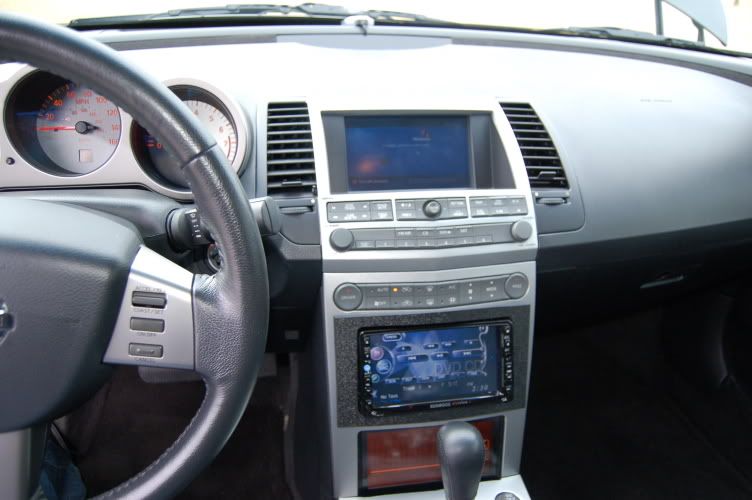
Get Job wes..... there are so many different ways of getting this done. The one i built wich is now for sale, fits in the dash behind the bottom screen. It has all the goodies and i have recently just added voice command to it so you can pretty much access anything on the carputer with just the sound of your voice. I like the pre fabed one like yours but it was way to bulky for what my setup was going to be, my trunk is full and i like for my equipent not to be seen but look clean and factory like.
I am palnning on selling these and setting them up per customer order, i have been keeping it on the DL until i have all the bugs worked out on it, and now its been several weeks and i have had 0 problems. There is just so much more to this than what has been seen....until now. Keep up the great work wes.......it is a very clean install!
Keep krusin,
Chef
I am palnning on selling these and setting them up per customer order, i have been keeping it on the DL until i have all the bugs worked out on it, and now its been several weeks and i have had 0 problems. There is just so much more to this than what has been seen....until now. Keep up the great work wes.......it is a very clean install!
Keep krusin,
Chef
I love Road Runner. I was in the process of testing out a few frontends, but stopped when I reached RR. It's very easy to use and the tech support is great. Thanks to BourneJ I just changed to the LSX skin it has built in support for iguidance and even has cool logos...touch the screen once it will display the nissan logo, touch it again and it will display a fully functionable analog clock.
Originally Posted by hpric
Yea, Liquid Smoke is a nice skin alright. I have it installed but can't get it configured right, just need to play around with it a little more.

Member
Joined: Nov 2004
Posts: 33
From: Senoia, GA
I like this set-up. How did you handle the venting issues with the PC inside the dash? I had planned to install the Mac Mini in the dash but can't keep it cool. The temps in the dash can get up there!
Please advise & can i get a list of what you plan to provide
Please advise & can i get a list of what you plan to provide
Originally Posted by maxchef
Get Job wes..... there are so many different ways of getting this done. The one i built wich is now for sale, fits in the dash behind the bottom screen. It has all the goodies and i have recently just added voice command to it so you can pretty much access anything on the carputer with just the sound of your voice. I like the pre fabed one like yours but it was way to bulky for what my setup was going to be, my trunk is full and i like for my equipent not to be seen but look clean and factory like.
I am palnning on selling these and setting them up per customer order, i have been keeping it on the DL until i have all the bugs worked out on it, and now its been several weeks and i have had 0 problems. There is just so much more to this than what has been seen....until now. Keep up the great work wes.......it is a very clean install!
Keep krusin,
Chef
I am palnning on selling these and setting them up per customer order, i have been keeping it on the DL until i have all the bugs worked out on it, and now its been several weeks and i have had 0 problems. There is just so much more to this than what has been seen....until now. Keep up the great work wes.......it is a very clean install!
Keep krusin,
Chef
Supporting Maxima.org Member
Joined: Nov 2005
Posts: 380
MIMAX...I have not encountered any overheating issues, the mother board just sits behind the lower screen. Long with the hard drive and power supply. I will provide everything to make it work, If you need an os or a formated hard drive i can do that. Its really all up to what and how you want it set up and what you are planning on doing with it. Lets say for example, if you just want to store and play music then i would not set it up with Nav or internet or blue tooth. The options are limitless!!!.I just need to know what you are planning on doing with it. And i do supply the touch screen as well if you so choose.
So here is a list>>
Mother board/CPU/Fan
Hard drive/different sizes
Power supply
WIFI/Blue Tooth
Nav+software
Windows OS/XP/2000/etc.etc.etc
Wireless Keyboard/Mouse/Air Mouse
Disc Drive/dvd/cdRW
Preloaded Front End.
7"touch screen
This is just a small list of options, i can do just about anything you want.
Let me know.
Chef
So here is a list>>
Mother board/CPU/Fan
Hard drive/different sizes
Power supply
WIFI/Blue Tooth
Nav+software
Windows OS/XP/2000/etc.etc.etc
Wireless Keyboard/Mouse/Air Mouse
Disc Drive/dvd/cdRW
Preloaded Front End.
7"touch screen
This is just a small list of options, i can do just about anything you want.
Let me know.
Chef
Supporting Maxima.org Member
Joined: Nov 2005
Posts: 380
In my head unit.LOL!!...My kenwood and carputer are linked together sorta speak. I play dvd's through the head unit and its output is either the touch screen up top or the head unit or both. When i have software or any type of change to the puter i use a USB stick and just plug it in to one of the ports i istalled into the dash. Make sense?
Chef
Chef