


Carputer install

Originally Posted by krazyflipj
is powermate and the Pac unit included in the package? if not how much did it cost? how much does it cost for roadrunner program? i'm a newbie so don't know much. BTW i love wat u did wid ur car. thanks
Originally Posted by BourneJ
unmatched - i'm glad to hear you got the skin working & are happy with it 
After testing almost all available front ends, RR is definitely the best for my needs.
After testing almost all available front ends, RR is definitely the best for my needs.
Hope you don't mind, I posted a link to your "carputer thread" on nycmaximas.org.

Originally Posted by OmarBadu
have you guys seen the flashdeck skin preview? it will be the new lsx 
taken off of streetdeck
taken off of streetdeck


Originally Posted by black1993max
That carputer setup looks cool. Thanks for the info on the Powermate and Grinder. I've been tempted to buy a Powermates for a while. Maybe the Grinder software will give me the reason to. Do you have a link to Grinder?
K.I.M.
Girder is not an easy program to learn, but learning it will give you the ability to create personalized commands for any pc input device.

Senior Member
Joined: Apr 2005
Posts: 248
Originally Posted by UnMaTcHeD
Thanks again BourneJ LSX is truely the best available RR skin, I love how it intergrates with Iguidance.
Hope you don't mind, I posted a link to your "carputer thread" on nycmaximas.org.
Hope you don't mind, I posted a link to your "carputer thread" on nycmaximas.org.

Originally Posted by krazyflipj
maxchef, did you install that screen you have yourself?

Junior Member
Joined: Mar 2006
Posts: 19
Originally Posted by KUBLKMAX
yes he did. and I have seen his system first hand and it is sweet. I wish I would have thought of the carputer before I bought my AVN

Supporting Maxima.org Member

Joined: Nov 2005
Posts: 380
WHAT UP KUBLKMAX???....Hey Thanks for the props, we need to get together again soon! I noticed you got your car up on the domain page....looks Great Budd! Give a friend a call somtime.....i know you cant be too busy!!.LOL!!!......I notices also that you have got all your equipment in, is it installed yet?
Chef
Chef


Junior Member
Joined: Apr 2006
Posts: 28
The Touchscreen that comes in the bundle in the link that you provided is the one that you have on your car right?.....I build computers for myself, so I just want to know how the computer goes connected to the car power wise can you let me know cause like that i can build myself one and have it with the stuff i want in it.

Originally Posted by n33d45p33d
I just want to know how the computer goes connected to the car power wise can you let me know cause like that i can build myself one and have it with the stuff i want in it.
As long as you keep an eye on your components, you can get a 120W or 150W Opus for $100-125 and power up everything you need in a carpc. I've seen people do it with 90W M1-ATXs too, just a straight swap of the regular ATX power supply. Only thing to remember is that you don't have all the extra juice, so it's better if you use laptop CD/DVD/hard drives, not-so-power-hungry video cards, etc.
Junior Member
Joined: Apr 2006
Posts: 28
Originally Posted by viguera
I don't know for sure, but it looks like the box comes with an off-the-shelf Opus 150W DC-DC power supply. It hooks up to your car's electrical and splits it up into the 3.3/5/12V rails that a regular PC PSU has. The advantage is that it has a programmable controller that senses ACC to switch the PC on/off automatically, supports delayed shutdown, low battery shutdown, etc.
As long as you keep an eye on your components, you can get a 120W or 150W Opus for $100-125 and power up everything you need in a carpc. I've seen people do it with 90W M1-ATXs too, just a straight swap of the regular ATX power supply. Only thing to remember is that you don't have all the extra juice, so it's better if you use laptop CD/DVD/hard drives, not-so-power-hungry video cards, etc.
As long as you keep an eye on your components, you can get a 120W or 150W Opus for $100-125 and power up everything you need in a carpc. I've seen people do it with 90W M1-ATXs too, just a straight swap of the regular ATX power supply. Only thing to remember is that you don't have all the extra juice, so it's better if you use laptop CD/DVD/hard drives, not-so-power-hungry video cards, etc.
Junior Member
Joined: Apr 2006
Posts: 28
This is the Motherboard and Tower I plan on using:
http://www.newegg.com/Product/Produc...82E16856101238
This is the Processor I plan on using:
http://www.newegg.com/Product/Produc...82E16819104251
This is the Ram I plan on using:
http://www.newegg.com/Product/Produc...82E16820161678
This is the Hard Drive I plan on using:
http://www.newegg.com/Product/Produc...82E16822148097
This is the DVD/CD Drive I plan on using:
http://www.newegg.com/Product/Produc...82E16827106034
Will this power supply work good with all the sutff I plan on putting on the computer?
http://www.mp3car.com/store/product_...products_id=32
Maybe won't use these exact products but this is more or less what I have in mind.
Another thing does that processor have the features like other ones do that when you turn on your car the carputer turns on or when you turn it off the carputer turns off?
http://www.newegg.com/Product/Produc...82E16856101238
This is the Processor I plan on using:
http://www.newegg.com/Product/Produc...82E16819104251
This is the Ram I plan on using:
http://www.newegg.com/Product/Produc...82E16820161678
This is the Hard Drive I plan on using:
http://www.newegg.com/Product/Produc...82E16822148097
This is the DVD/CD Drive I plan on using:
http://www.newegg.com/Product/Produc...82E16827106034
Will this power supply work good with all the sutff I plan on putting on the computer?
http://www.mp3car.com/store/product_...products_id=32
Maybe won't use these exact products but this is more or less what I have in mind.
Another thing does that processor have the features like other ones do that when you turn on your car the carputer turns on or when you turn it off the carputer turns off?

Originally Posted by n33d45p33d
Ok what I have in mind is building a regular desktop pc with the smallest case I can find...
http://www1.us.dell.com/content/prod...iewstab#tabtop
TADA!


Newbie - Just Registered
Joined: Apr 2006
Posts: 1
Hi Guys,
im about to start the carputer install on my 2004 maxima. Has anyone had a any problems with the following parts?
I started this right after I saw UnMaTcHeD's sweet install, thanks BRO!
==============
Xenarc 700TSV USB 7’’ TFT LCD Monitor w/ VGA & Touch Screen
VoomPC Car PC Aluminum Enclosure
VIA EPIA M 10000 1GHz Nehemiah
M1-ATX DC-DC ATX auto car PC power supply 90 W
SAMSUNG 1GB PC2100
Toshiba 2.5" 40GB Hard Drive
2.5" HD to 3.5" IDE Hard Drive Adapter
Dual Layer Very Slim External USB DVD +/- RW
GlobalSat SiRF III GPS Receiver
Hauppauge WinTV-PVR2-USB
Alpine SIR-ALP1 sirius tuner
Sirius TM to USB Interface
PAC AAI-NIS2 Nissan Infinity Auxiliary Input
Fast Speed 4-Port USB 2.0 Powered Hub
VGA/SVGA MONITOR EXTENSION CABLE M/F 15 FT
EXTENSION USB CABLE MALE TO FEMALE M/F 15
Coax RG6 Video Cable 15 ft
BNC to Motorola Adapter
BNC T-Adapter
Gold-Plated "F" Connector to BNC Jack
BNC to Motorola Plug Adapter
im about to start the carputer install on my 2004 maxima. Has anyone had a any problems with the following parts?
I started this right after I saw UnMaTcHeD's sweet install, thanks BRO!
==============
Xenarc 700TSV USB 7’’ TFT LCD Monitor w/ VGA & Touch Screen
VoomPC Car PC Aluminum Enclosure
VIA EPIA M 10000 1GHz Nehemiah
M1-ATX DC-DC ATX auto car PC power supply 90 W
SAMSUNG 1GB PC2100
Toshiba 2.5" 40GB Hard Drive
2.5" HD to 3.5" IDE Hard Drive Adapter
Dual Layer Very Slim External USB DVD +/- RW
GlobalSat SiRF III GPS Receiver
Hauppauge WinTV-PVR2-USB
Alpine SIR-ALP1 sirius tuner
Sirius TM to USB Interface
PAC AAI-NIS2 Nissan Infinity Auxiliary Input
Fast Speed 4-Port USB 2.0 Powered Hub
VGA/SVGA MONITOR EXTENSION CABLE M/F 15 FT
EXTENSION USB CABLE MALE TO FEMALE M/F 15
Coax RG6 Video Cable 15 ft
BNC to Motorola Adapter
BNC T-Adapter
Gold-Plated "F" Connector to BNC Jack
BNC to Motorola Plug Adapter

Senior Member
Joined: Jun 2003
Posts: 409
From: Queens NY
Originally Posted by MIMAX
I like this set-up. How did you handle the venting issues with the PC inside the dash? I had planned to install the Mac Mini in the dash but can't keep it cool. The temps in the dash can get up there!
Please advise & can i get a list of what you plan to provide
Please advise & can i get a list of what you plan to provide
can you tell me if the pioneer would fit on top instead.
is it deep enough ?
i'm thinking about installing a pioneer AVIC-D2 6.5 screen with a 7" in chassis.
..thanks

Senior Member
Joined: Jun 2003
Posts: 409
From: Queens NY
Originally Posted by maxchef
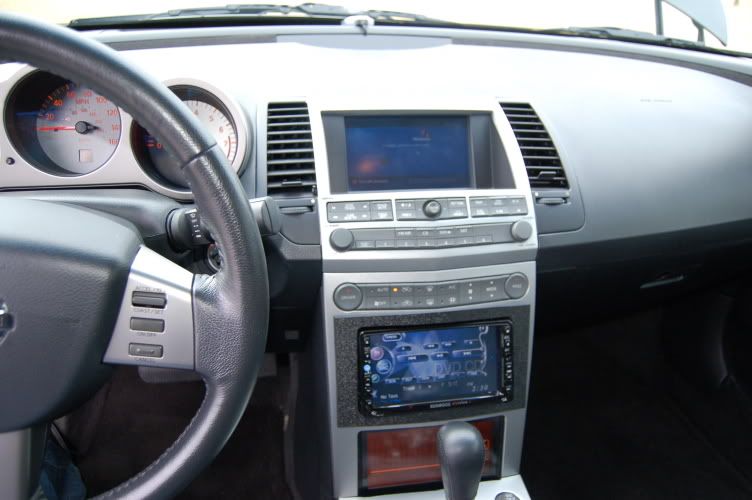
Get Job wes..... there are so many different ways of getting this done. The one i built wich is now for sale, fits in the dash behind the bottom screen. It has all the goodies and i have recently just added voice command to it so you can pretty much access anything on the carputer with just the sound of your voice. I like the pre fabed one like yours but it was way to bulky for what my setup was going to be, my trunk is full and i like for my equipent not to be seen but look clean and factory like.
I am palnning on selling these and setting them up per customer order, i have been keeping it on the DL until i have all the bugs worked out on it, and now its been several weeks and i have had 0 problems. There is just so much more to this than what has been seen....until now. Keep up the great work wes.......it is a very clean install!
Keep krusin,
Chef
I am palnning on selling these and setting them up per customer order, i have been keeping it on the DL until i have all the bugs worked out on it, and now its been several weeks and i have had 0 problems. There is just so much more to this than what has been seen....until now. Keep up the great work wes.......it is a very clean install!
Keep krusin,
Chef
I'm thinking of doing the same thing. I'm leaving everything the same, just cut a double din opening and installing a new pioneer DD navigation system.
Supporting Maxima.org Member
Joined: Nov 2005
Posts: 380
Originally Posted by scrui
I really like your setup, specially the double din you installed in the middle, was it hard to install,?
I'm thinking of doing the same thing. I'm leaving everything the same, just cut a double din opening and installing a new pioneer DD navigation system.
I'm thinking of doing the same thing. I'm leaving everything the same, just cut a double din opening and installing a new pioneer DD navigation system.
nah..it was not that hard, it has changed alot since that post....whewww talk about a blast from the past.
here is an updated picture to see the finished product.
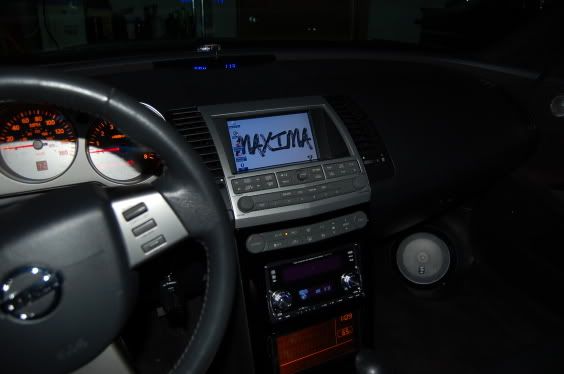
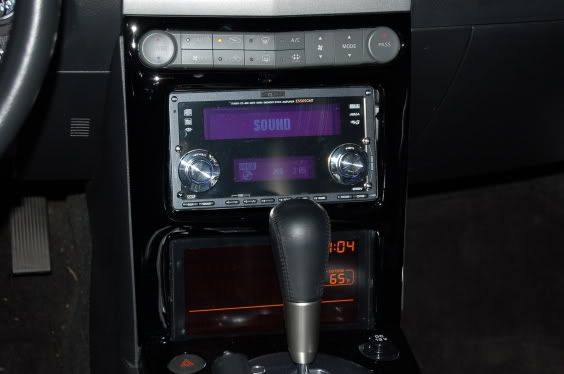
Thanks and good luck to you, if you need any help or if you have any questions .....let me know i am glad to help where i can!!
http://s32.photobucket.com/albums/d2...hef/?start=all
Chef
Senior Member
Joined: Jun 2003
Posts: 409
From: Queens NY
Originally Posted by maxchef
nah..it was not that hard, it has changed alot since that post....whewww talk about a blast from the past.
here is an updated picture to see the finished product.
Thanks and good luck to you, if you need any help or if you have any questions .....let me know i am glad to help where i can!!
http://s32.photobucket.com/albums/d2...hef/?start=all
Chef
here is an updated picture to see the finished product.
Thanks and good luck to you, if you need any help or if you have any questions .....let me know i am glad to help where i can!!
http://s32.photobucket.com/albums/d2...hef/?start=all
Chef
the pic i liked was IMG_1707.jpg
in your album, i'm going for that exact look.
I bought a complete dash kit ( with wire harness for easy wire instalation.) with single din and compartment. I'm thinking of just cutting the compartment off and making a double din.
what do you think ? i'd appreciate your input.
my main question is: was difficult cutting the opening ?
thanks

Supporting Maxima.org Member
Joined: Nov 2005
Posts: 380
Scrui, i am sorry i thought i aswered your question, it is not too difficult to cut the opening. I used a dremel tool with a cut off whell and poof...it was done. I followed that up with some fiberglass work and paint to finish it up. but other than that it really was pretty easy...careful though your dremel tool can get away from you, just make sure you measure twice and cut one though...LOL. Thanks for the props.
Which kit did you buy?...are you in a 6th gen?.i know you sig says a 1990 but is that correct? I am not to fimalar wiht the 3rd gen stuff but if you need help i can sure try.
Thanks again.
Chef
Which kit did you buy?...are you in a 6th gen?.i know you sig says a 1990 but is that correct? I am not to fimalar wiht the 3rd gen stuff but if you need help i can sure try.
Thanks again.
Chef
Senior Member
Joined: Jun 2003
Posts: 409
From: Queens NY
thanks for the dremel tip.
I have a 1990 and just bought a 2005 SE. this is for the 2005 of course. LOL.
here's the kit :
http://cgi.ebay.com/ws/eBayISAPI.dll...ayphotohosting
I have a 1990 and just bought a 2005 SE. this is for the 2005 of course. LOL.
here's the kit :
http://cgi.ebay.com/ws/eBayISAPI.dll...ayphotohosting
Supporting Maxima.org Member
Joined: Nov 2005
Posts: 380
Yes that is it. You just cut off the pocket and sand the sides down where the poket used to be.....like show in my poor illustration below.......
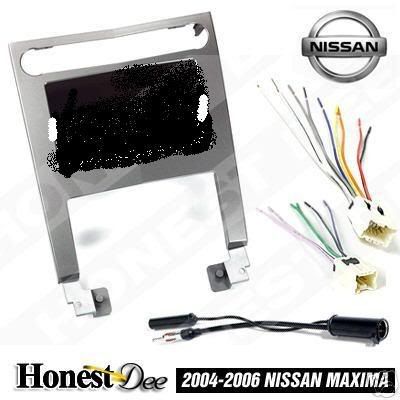
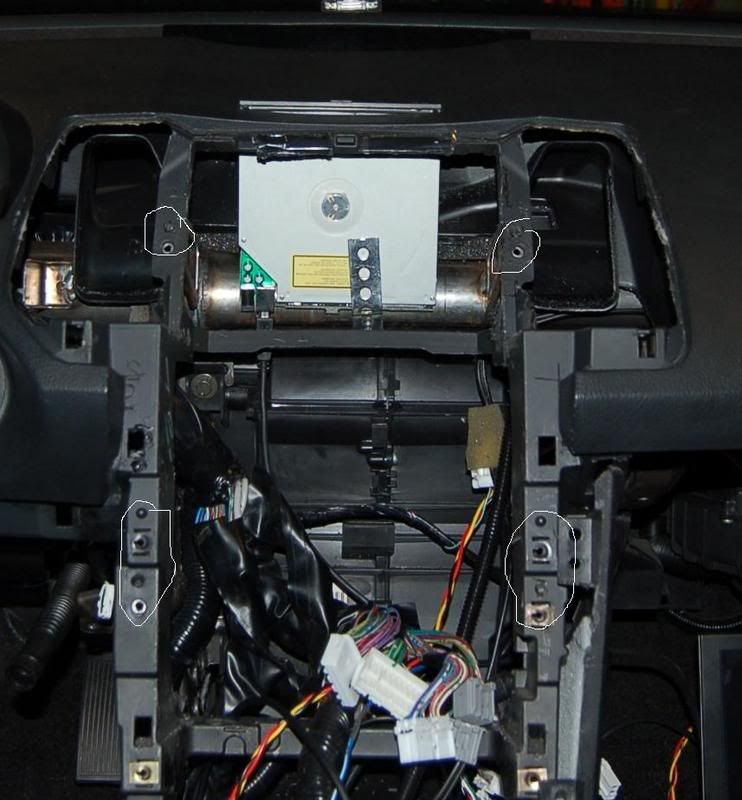
I would reccomend hand sanding these parts, cut it off pretty close and sand the rest of the way by hand. Are you gonna paint it? I used my factory bezel and just cut out the double din hole and the rest you already know, but i didnt know about this piece until i had already cut mine so yeah this is alot easier to do. You will have to fully remove the "cage" that the stock unit sets in but the cool this is that you can go iso with the new double din.meaning you wont have to use the metal cage that came with your new headunit. The factory screw will work just fine. See below inages, they might be a bit blurry but i had to do some work on them to get tehm cropped but you can get the idea.
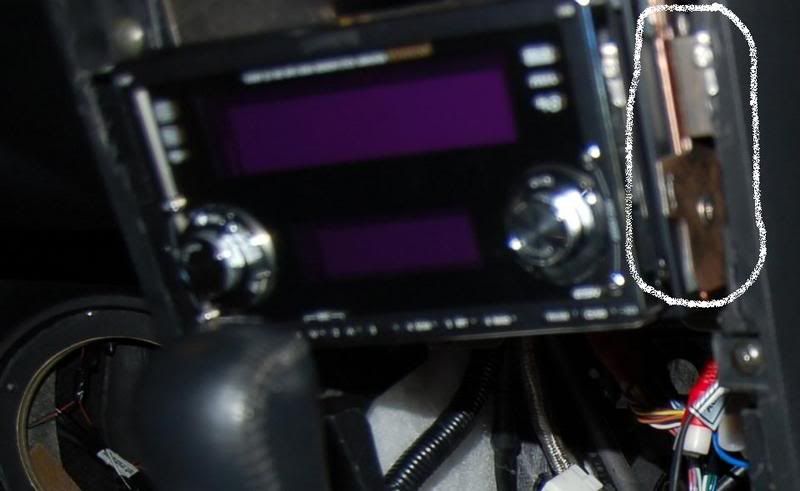
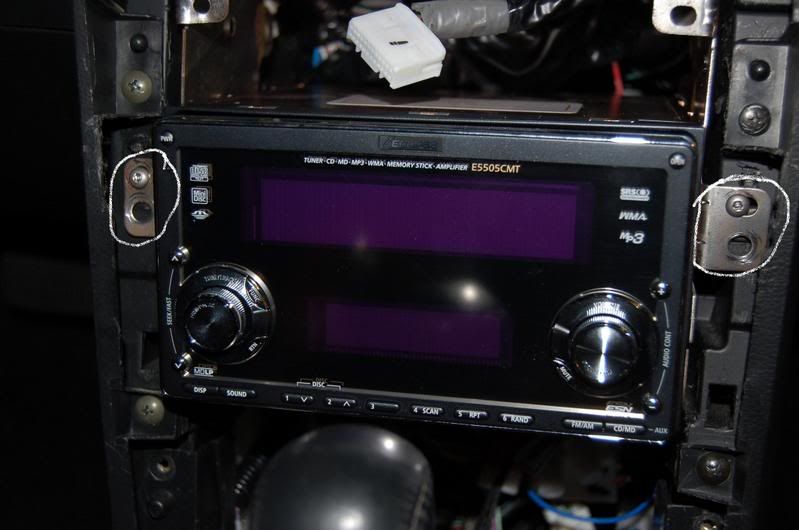
I hope this helps a little. Let me know!
Chef
I would reccomend hand sanding these parts, cut it off pretty close and sand the rest of the way by hand. Are you gonna paint it? I used my factory bezel and just cut out the double din hole and the rest you already know, but i didnt know about this piece until i had already cut mine so yeah this is alot easier to do. You will have to fully remove the "cage" that the stock unit sets in but the cool this is that you can go iso with the new double din.meaning you wont have to use the metal cage that came with your new headunit. The factory screw will work just fine. See below inages, they might be a bit blurry but i had to do some work on them to get tehm cropped but you can get the idea.
I hope this helps a little. Let me know!
Chef
Senior Member
Joined: Jun 2003
Posts: 409
From: Queens NY
Originally Posted by maxchef
Yes that is it. You just cut off the pocket and sand the sides down where the poket used to be.....like show in my poor illustration below.......
I would reccomend hand sanding these parts, cut it off pretty close and sand the rest of the way by hand. Are you gonna paint it? I used my factory bezel and just cut out the double din hole and the rest you already know, but i didnt know about this piece until i had already cut mine so yeah this is alot easier to do. You will have to fully remove the "cage" that the stock unit sets in but the cool this is that you can go iso with the new double din.meaning you wont have to use the metal cage that came with your new headunit. The factory screw will work just fine. See below inages, they might be a bit blurry but i had to do some work on them to get tehm cropped but you can get the idea.
I hope this helps a little. Let me know!
Chef
I would reccomend hand sanding these parts, cut it off pretty close and sand the rest of the way by hand. Are you gonna paint it? I used my factory bezel and just cut out the double din hole and the rest you already know, but i didnt know about this piece until i had already cut mine so yeah this is alot easier to do. You will have to fully remove the "cage" that the stock unit sets in but the cool this is that you can go iso with the new double din.meaning you wont have to use the metal cage that came with your new headunit. The factory screw will work just fine. See below inages, they might be a bit blurry but i had to do some work on them to get tehm cropped but you can get the idea.
I hope this helps a little. Let me know!
Chef
by the way, here's a link to the pioneer.
http://www.pioneerelectronics.com/pn...585964,00.html
Supporting Maxima.org Member
Joined: Nov 2005
Posts: 380
I am glad to be of some help, just take your time and you will be alright and remember if you have any questions let me know....Pm me if you need to.
I use 180 to sand plastic, then 360 and then finish with 0000 steel wool, but i am just an over acheiver......LOL! You basically just want to make sure that those little tabs are flush with the rest of your hole. You have more control by hand sanding but it is not impossiable to do it with your dremmel tool....my hands shake alot from drinking coffee so i prefer to do small things to perfection by hand..better off!!!
I use 180 to sand plastic, then 360 and then finish with 0000 steel wool, but i am just an over acheiver......LOL! You basically just want to make sure that those little tabs are flush with the rest of your hole. You have more control by hand sanding but it is not impossiable to do it with your dremmel tool....my hands shake alot from drinking coffee so i prefer to do small things to perfection by hand..better off!!!
Senior Member
Joined: Jun 2003
Posts: 409
From: Queens NY
me too , my hands shake alot from coffee too, so i had to switch to decaf. LOL
folgers decaf ( green can ) taste just like regular.
anyways, thanks so much for all your pics,tips and patience. not many people out there like you. so a very big THANK YOU !!!
I'm hope to start my new project real soon. will post some pics.
take care, Rui T.
folgers decaf ( green can ) taste just like regular.
anyways, thanks so much for all your pics,tips and patience. not many people out there like you. so a very big THANK YOU !!!
I'm hope to start my new project real soon. will post some pics.
take care, Rui T.

Member
Joined: Jan 2003
Posts: 70
From: Orange County, CA
Hi,
This looks awesome!
I am looking to buy a 2005 maxima ans will def consider installing a system like this but I would like to go with the laptop.
Could you guys post some pics and info of the system installed with the touchsceen and a laptop? I think it is easier and I could get a a sprint data card.
Thanks.
This looks awesome!
I am looking to buy a 2005 maxima ans will def consider installing a system like this but I would like to go with the laptop.
Could you guys post some pics and info of the system installed with the touchsceen and a laptop? I think it is easier and I could get a a sprint data card.
Thanks.
Senior Member
Joined: Jun 2003
Posts: 409
From: Queens NY
Originally Posted by maxchef
I am glad to be of some help, just take your time and you will be alright and remember if you have any questions let me know....Pm me if you need to.
I use 180 to sand plastic, then 360 and then finish with 0000 steel wool, but i am just an over acheiver......LOL! You basically just want to make sure that those little tabs are flush with the rest of your hole. You have more control by hand sanding but it is not impossiable to do it with your dremmel tool....my hands shake alot from drinking coffee so i prefer to do small things to perfection by hand..better off!!!
I use 180 to sand plastic, then 360 and then finish with 0000 steel wool, but i am just an over acheiver......LOL! You basically just want to make sure that those little tabs are flush with the rest of your hole. You have more control by hand sanding but it is not impossiable to do it with your dremmel tool....my hands shake alot from drinking coffee so i prefer to do small things to perfection by hand..better off!!!
I need your help, would you know were to find the speed sensor to connect the nav system.
thanks

Just read this and it looks awesome.
One link I found that might help if anyone wants to try this in a 5th gen:
http://www.mini-box.com/s.nl;jsessio...01&it=A&id=403
That is an ISO mount motorized VGA touch screen. Not a bad price either.
One link I found that might help if anyone wants to try this in a 5th gen:
http://www.mini-box.com/s.nl;jsessio...01&it=A&id=403
That is an ISO mount motorized VGA touch screen. Not a bad price either.

Thread
Thread Starter
Forum
Replies
Last Post
MaxLife17
8th Generation Maxima (2016-)
43
Jun 27, 2019 01:37 PM