


Adding a back up camera


Senior Member
Joined: Oct 2011
Posts: 552
From: Scottsdale,AZ
Little of topic but in the same direction...so I test drove the new JX35...and besides the back up camera they have a front+ side cameras...no i find no use for side, but if i could have a button to press for the front camera then i would fins that extremely usefull when front parking the car( lip+lowered)...so could the eletronic geniuses figure out how to hook up a camera through a switch in the SV cars?

Senior Member
Joined: Aug 2011
Posts: 636
From: MA/NH border
^ so any "back up" camera would work? and splice that into the back up camera with 3 way switch spliced into the "reverse" trigger?... can we develop a sketch how that woudl look? i would love to install that

Member
Joined: Oct 2011
Posts: 200
From: Miami, FL
to piggy back on this, i was gonna do this on my car since im lowered.. but its a 400$ project.. the camera i had inmind was the alpine (since i got the alpine ina-w910.. alpine hce-c200f is the cam.. and does that...
Senior Member
Joined: Aug 2011
Posts: 636
From: MA/NH border
hmm...i just did a search and didnt find any back up cameras, maybe all of the a crap, for more than $40...
^ why do you say its a $400 project?
Do we know the pixelations on our screens for compatibility/best resolution?
^ why do you say its a $400 project?
Do we know the pixelations on our screens for compatibility/best resolution?
Senior Member
Joined: Oct 2011
Posts: 552
From: Scottsdale,AZ
I got something in the works....give me some time. Gotta hold off on too many projects at once. Need to finish my orange to white LED swap first!

Senior Member
Joined: Oct 2011
Posts: 552
From: Scottsdale,AZ
If a car doesn't have the color monitor, adding a mirror is your only option aside from replacing the stock radio with an aftermarket screen. The downside no one will spend the real money on a factory replacement mirror w/ monitor and homelink system built in ($400-$500). So i don't think that the cheap mirror will *** value to the car.
My experience doing mobile electronics for a Cadillac Dealership, customers want factory integration, not a bunch of add on stuff that make the car look cheap. We have mentioned doing camera mirrors to customers and if they have the factory nav screen they ask "why can't it go through the screen I already have?" So I have to do the research to wire it and figure out how to get the cars to recognize it. and I actually have to program the factory radio for a back up camera.
Senior Member
Joined: Oct 2011
Posts: 552
From: Scottsdale,AZ
Senior Member
Joined: Aug 2011
Posts: 636
From: MA/NH border

Senior Member
Joined: Nov 2010
Posts: 4,020
From: Maryland
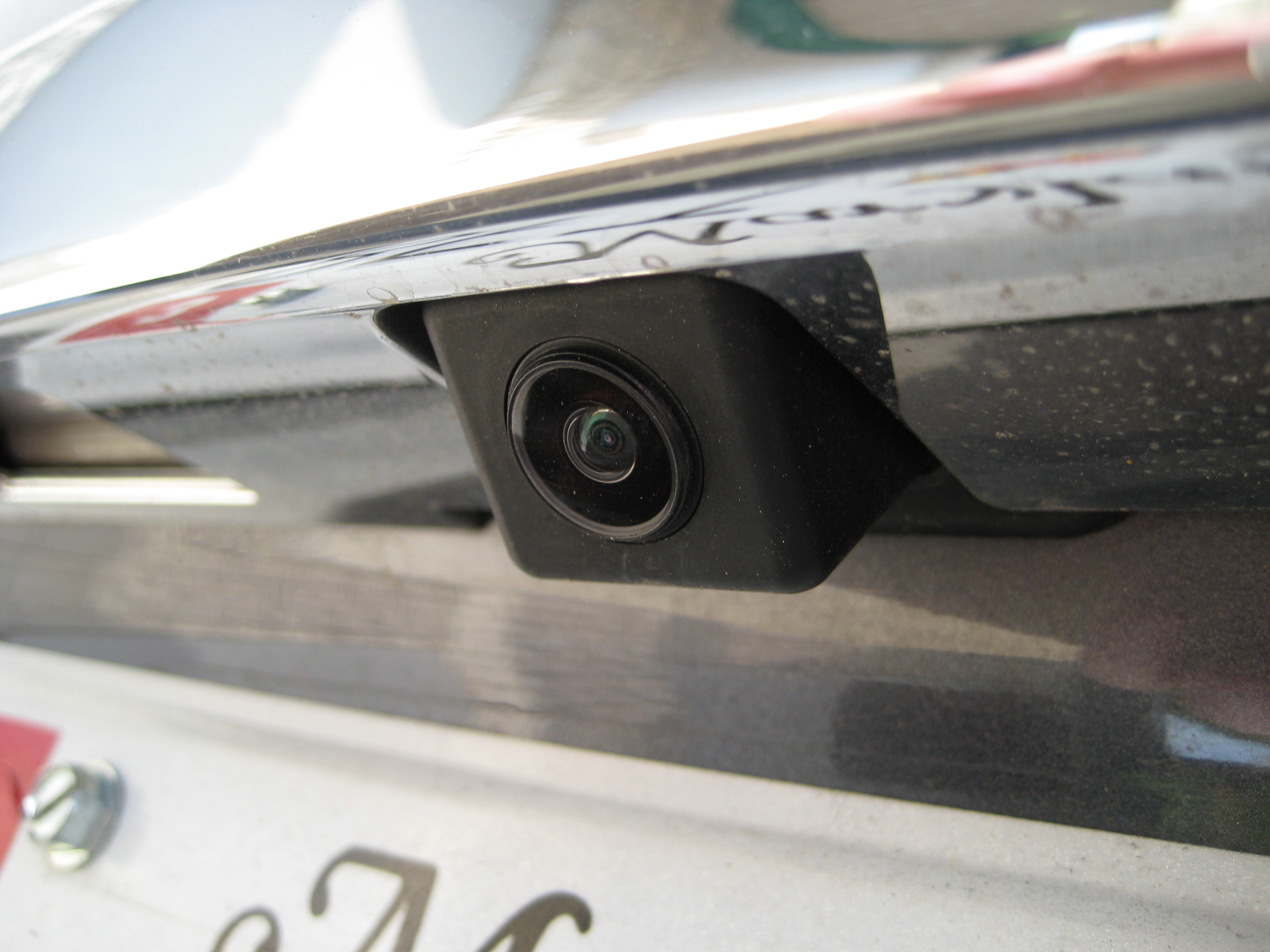
its mounted on the underside of the chrome trunk piece. look at this pic, see the black rectangle protruding from the bottom of the chrome trunk piece right above the license plate? thats the camera sticking out right there its obviously angled so you can see behind you instead of just the ground


Junior Member
Joined: Sep 2012
Posts: 50
You could get the Audiovox backup camera from like BestBuy or something and its like he said. 2 Wires and one super long component cable. Could wire the ground and accy to one of your tail lights reverse wire, send the composite to the front and behind the radio. But idk if the factory radio has an rca port for rear view in the back.....
Senior Member
Joined: Oct 2011
Posts: 552
From: Scottsdale,AZ
You could get the Audiovox backup camera from like BestBuy or something and its like he said. 2 Wires and one super long component cable. Could wire the ground and accy to one of your tail lights reverse wire, send the composite to the front and behind the radio. But idk if the factory radio has an rca port for rear view in the back.....

Senior Member
Joined: Oct 2011
Posts: 552
From: Scottsdale,AZ
The wires dont necessarily have to be there either. Just the locations have to be there. U can easily shove wires in there or get the pins from nissan and do it yourself. I have done this numerous times on the Cadillac CTS. Just the CTS runs mostly data so we have to reprogram the radio to kick the monitor on when in reverse. I dont think the max is like this since it actually has a spot for the reverse wire. Might be very simple to install if someone knows what they are doing with no module to purchase.

Thread Starter
Senior Member
Joined: Jul 2011
Posts: 613
From: Toronto, ON
Originally Posted by 20_Maxima_10
The wires dont necessarily have to be there either. Just the locations have to be there. U can easily shove wires in there or get the pins from nissan and do it yourself. I have done this numerous times on the Cadillac CTS. Just the CTS runs mostly data so we have to reprogram the radio to kick the monitor on when in reverse. I dont think the max is like this since it actually has a spot for the reverse wire. Might be very simple to install if someone knows what they are doing with no module to purchase.
Senior Member
Joined: Oct 2011
Posts: 552
From: Scottsdale,AZ
Probably wont have wires. So u will have to get power from the reverse light for the camera, ground should be in the taillight as well but u will have to run the video and a reverse signal wire to the back of the radio and put then in the pin locations. But the reverse pin needs to be tested to see if the screen will go into reverse mode before u go through running and installing anything.
Thread Starter
Senior Member
Joined: Jul 2011
Posts: 613
From: Toronto, ON
Originally Posted by 20_Maxima_10
Probably wont have wires. So u will have to get power from the reverse light for the camera, ground should be in the taillight as well but u will have to run the video and a reverse signal wire to the back of the radio and put then in the pin locations. But the reverse pin needs to be tested to see if the screen will go into reverse mode before u go through running and installing anything.
Also I have seen a vid somewhere on removing the trims and getting to the screen.. Anyone know where I can find that?
Thread Starter
Senior Member
Joined: Jul 2011
Posts: 613
From: Toronto, ON
Ok 20_Maxima_10, I finally got some time to take a look at that connector...here are some pics. Please let me know if this what you require...i really hope i can add the camera without the module 
Front View 1
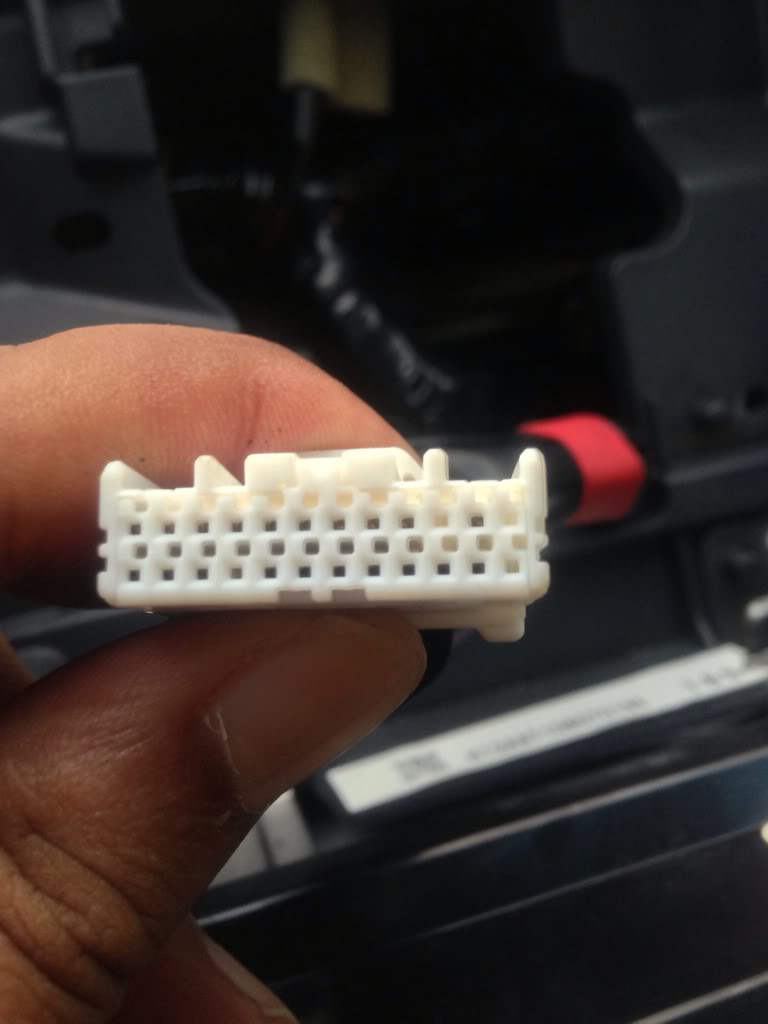
Front View 2
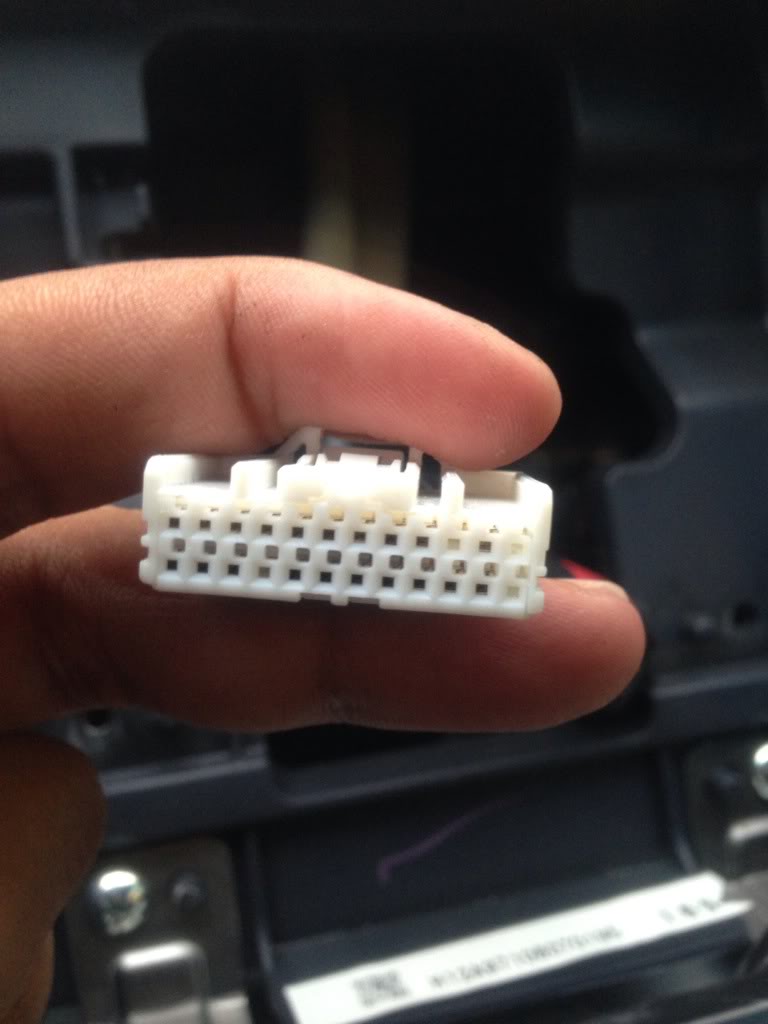
Top View 1
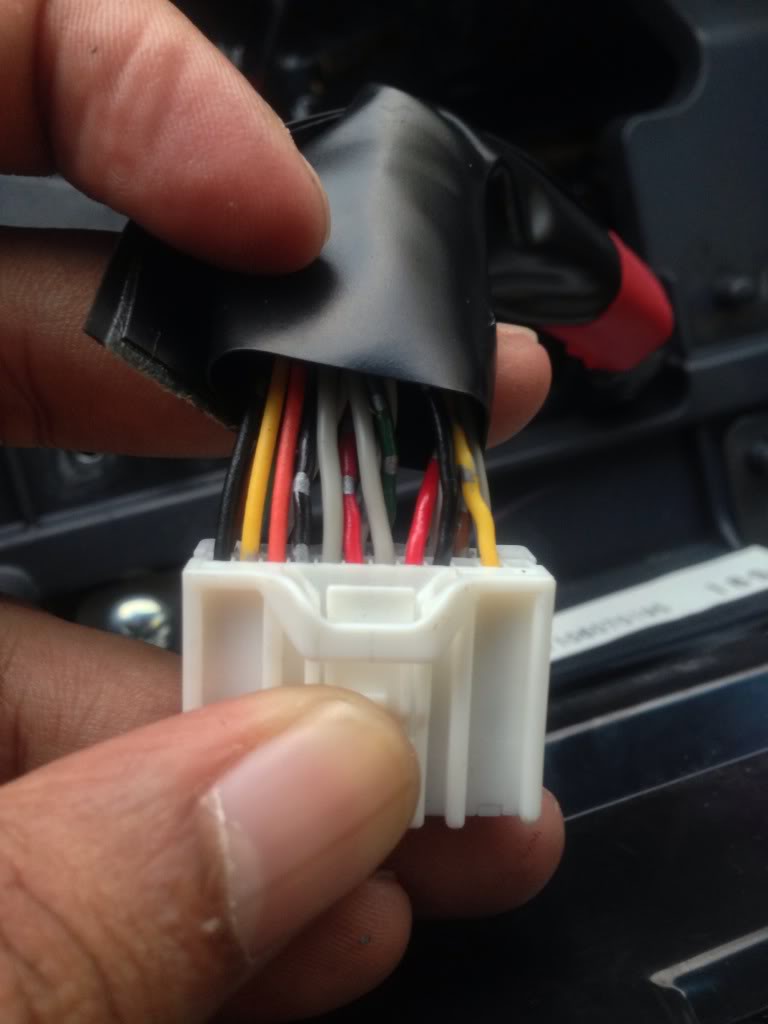
Top View 2
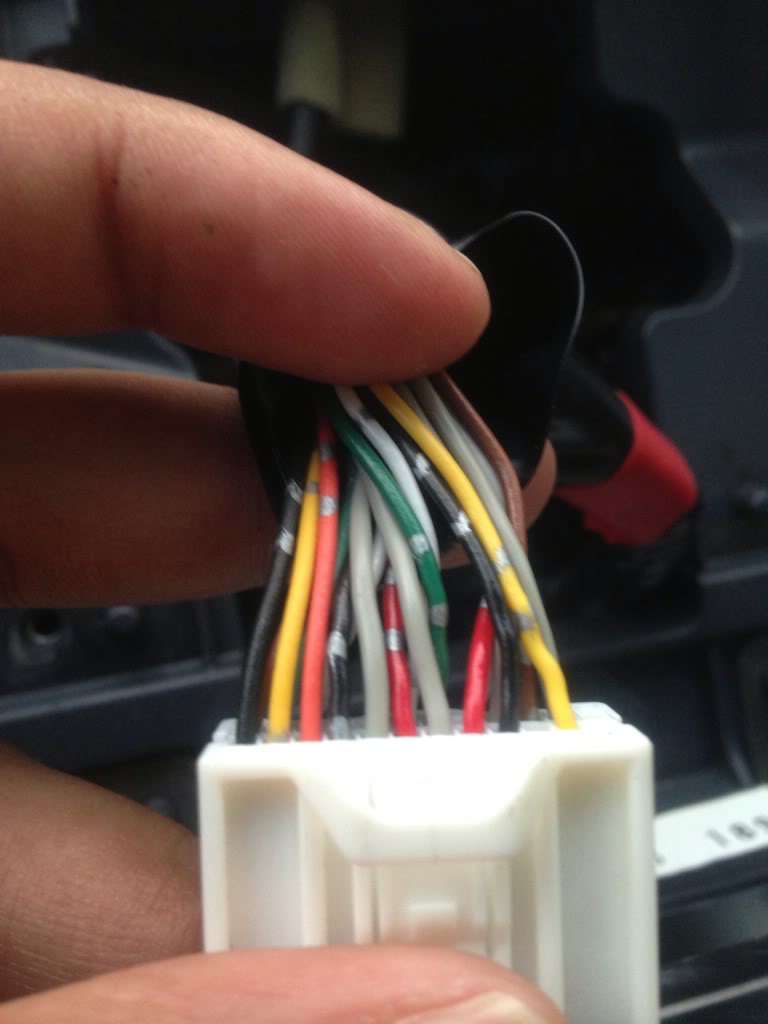
Bottom View 1
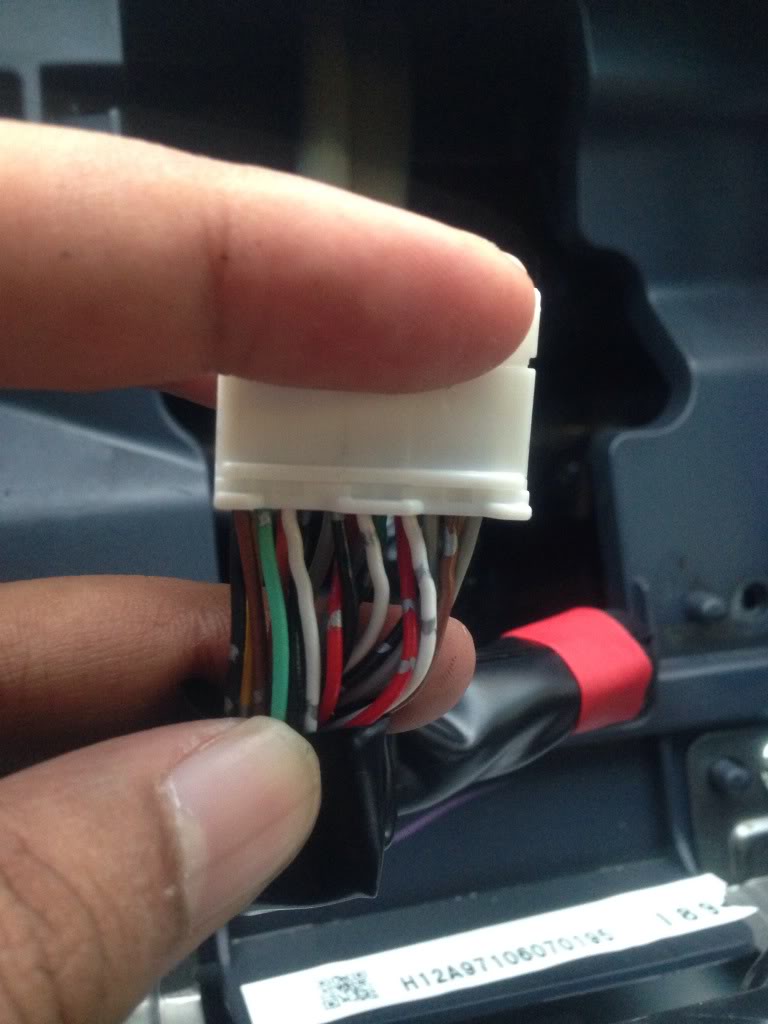
Bottom View 2
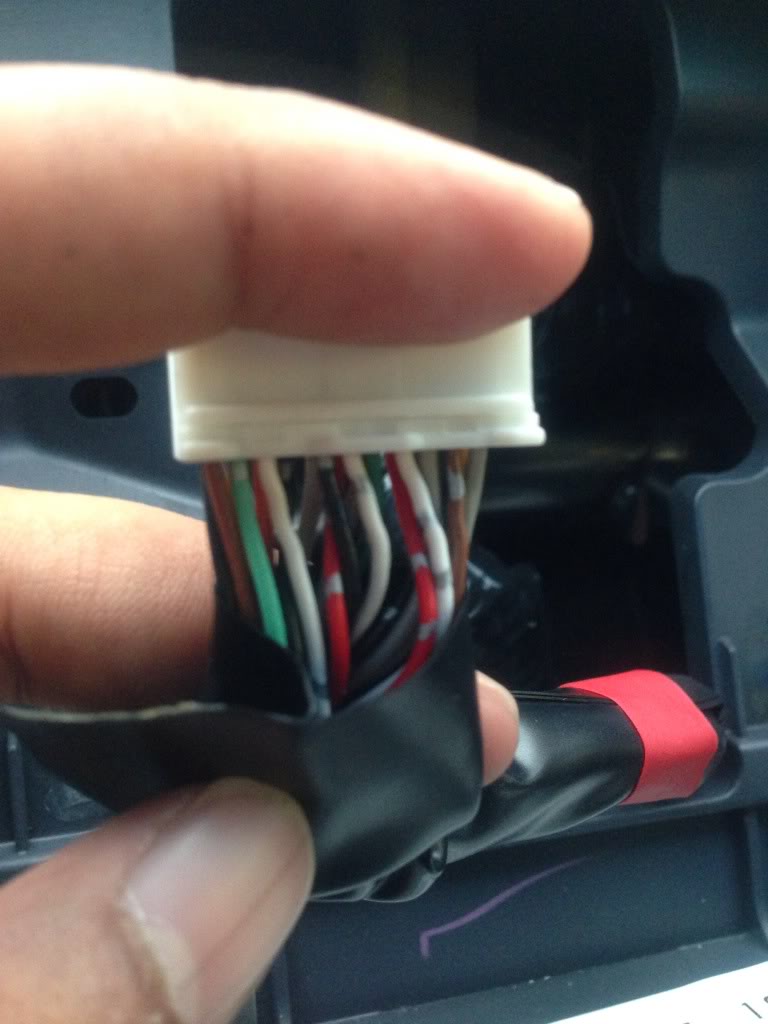
Front View 1
Front View 2
Top View 1
Top View 2
Bottom View 1
Bottom View 2
Thread Starter
Senior Member
Joined: Jul 2011
Posts: 613
From: Toronto, ON
Originally Posted by 20_Maxima_10
I hope u didnt already put it back together lol. I need to see a pic of the bottom of the connector but from the backside so I can see the locations the wires are going into.

Thread Starter
Senior Member
Joined: Jul 2011
Posts: 613
From: Toronto, ON
Originally Posted by 20_Maxima_10
I hope u didnt already put it back together lol. I need to see a pic of the bottom of the connector but from the backside so I can see the locations the wires are going into.
Senior Member
Joined: Aug 2011
Posts: 636
From: MA/NH border
Thread Starter
Senior Member
Joined: Jul 2011
Posts: 613
From: Toronto, ON
Hey there.. Ya sorry abt not posting the pics on the connector yet.. It's winter and I will probably freeze my fingers off while taking the dash apart..
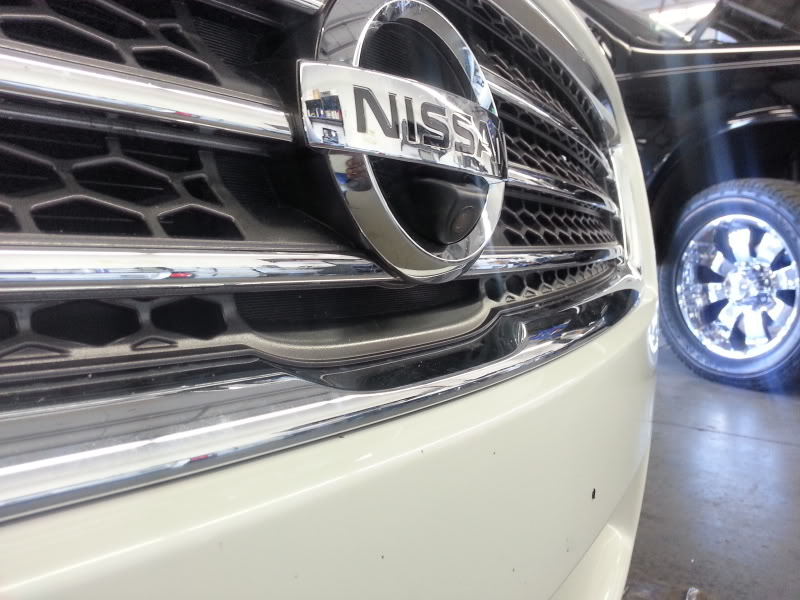
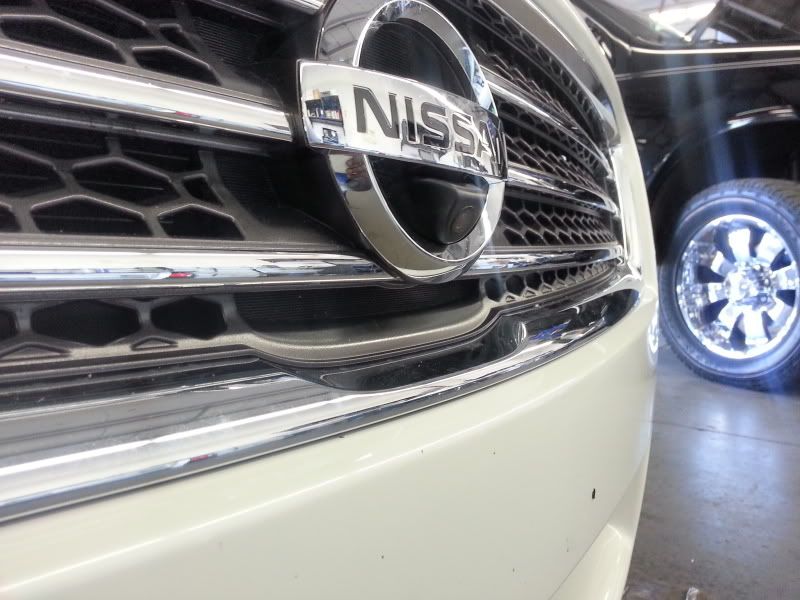
But ur frot camera looks cool.. Is that on the oem screen? What camera is that?
But ur frot camera looks cool.. Is that on the oem screen? What camera is that?
Senior Member
Joined: Aug 2011
Posts: 636
From: MA/NH border
Ok...it winter time anyways...hoping to get some progess in the spring! Looks good so far
Senior Member
Joined: Oct 2011
Posts: 552
From: Scottsdale,AZ


Junior Member
Joined: Aug 2009
Posts: 20
Thanks for your hard work, 20_Maxima_10 and funnyman82!
I did some more research, and I found someone successfully added an aftermarket rearview camera to the Nissan Leaf:
http://www.mynissanleaf.com/viewtopi...d32f70138a9757
So these are the 3 terminals on the Nissan Leaf:
Terminal 56 (on Nissan Leaf's M84 connector) = Ground
Terminal 59 (on Nissan Leaf's M84 connector) = Rearview Camera RCA Input (+ve)
Terminal 60 (on Nissan Leaf's M84 connector) = Rearview Camera RCA Input (-ve)
I think our Maxima should have the similar(if not same) logic. If that's the case, all we need to do is to find the above 3 corresponding terminals on our Maxima.
According to the 2010 Maxima service manual, on page AV-293, the terminals should be:
Terminal 71 (on 2010 Nissan Maxima's M155 connector) = "CAM GND", Color of Wire="V/G"
Terminal 65 (on 2010 Nissan Maxima's M155 connector) = "COMP2 IN+", Color of Wire="W"
Terminal 72 (on 2010 Nissan Maxima's M155 connector) = "COMP2 GND", Color of Wire="SHIELD"
Can anybody confirm the Terminals 71, 65, 72 on the Maxima's M155 connector are the corresponding Terminals 56, 59, 60 on the Leaf's M84 connector? If they are, then we can easily install a rearview camera to the Maxima (with colour display).
Thanks!
I did some more research, and I found someone successfully added an aftermarket rearview camera to the Nissan Leaf:
http://www.mynissanleaf.com/viewtopi...d32f70138a9757
So these are the 3 terminals on the Nissan Leaf:
Terminal 56 (on Nissan Leaf's M84 connector) = Ground
Terminal 59 (on Nissan Leaf's M84 connector) = Rearview Camera RCA Input (+ve)
Terminal 60 (on Nissan Leaf's M84 connector) = Rearview Camera RCA Input (-ve)
I think our Maxima should have the similar(if not same) logic. If that's the case, all we need to do is to find the above 3 corresponding terminals on our Maxima.
According to the 2010 Maxima service manual, on page AV-293, the terminals should be:
Terminal 71 (on 2010 Nissan Maxima's M155 connector) = "CAM GND", Color of Wire="V/G"
Terminal 65 (on 2010 Nissan Maxima's M155 connector) = "COMP2 IN+", Color of Wire="W"
Terminal 72 (on 2010 Nissan Maxima's M155 connector) = "COMP2 GND", Color of Wire="SHIELD"
Can anybody confirm the Terminals 71, 65, 72 on the Maxima's M155 connector are the corresponding Terminals 56, 59, 60 on the Leaf's M84 connector? If they are, then we can easily install a rearview camera to the Maxima (with colour display).
Thanks!
Last edited by GT4; Mar 12, 2013 at 06:54 AM.
Thread Starter
Senior Member
Joined: Jul 2011
Posts: 613
From: Toronto, ON
Thx for the post GT4.. Gives me hope that we can actually do this
I was looking online for some aftermarket cameras and came across these.. What do u think? I like the chrome angled one cause it will match with the chrome trunk piece.. Do you think the specs work? They have the resolution listed on there but not sure what are screens are.. Any ideas?
I was looking online for some aftermarket cameras and came across these.. What do u think? I like the chrome angled one cause it will match with the chrome trunk piece.. Do you think the specs work? They have the resolution listed on there but not sure what are screens are.. Any ideas?
Junior Member
Joined: Aug 2009
Posts: 20
Thx for the post GT4.. Gives me hope that we can actually do this
I was looking online for some aftermarket cameras and came across these.. What do u think? I like the chrome angled one cause it will match with the chrome trunk piece.. Do you think the specs work? They have the resolution listed on there but not sure what are screens are.. Any ideas?
I was looking online for some aftermarket cameras and came across these.. What do u think? I like the chrome angled one cause it will match with the chrome trunk piece.. Do you think the specs work? They have the resolution listed on there but not sure what are screens are.. Any ideas?
).As of the aftermarket camera, I personally prefer to make it look as OEM as possible, so I prefer black colour better. Also, those aftermarket cameras are not very high quality, so the chrome colour will fade eventually, and it will look pretty bad, in my opinion.
Also CCD image sensor is better than CMOS, but it's also more expensive. I bought the following CCD camera from ebay last year:
http://www.ebay.com/itm/Universal-Ge...E:L:OC:CA:3160
BUT, according to the instruction from the Nissan Leaf guy, the factory "distance guide lines" should be already displayed on the screen, so there's no need to buy the camera with the built-in "guide lines" (the one I bought has the built-in guide lines. Hopefully I can disable it). So when you buy the camera, make sure you're getting the one without the guide lines.
Senior Member
Joined: Oct 2011
Posts: 552
From: Scottsdale,AZ
No problem funnyman82. After reading the instruction from the Nissan Leaf guy, I think it's possible to do it on our car (keeping my fingers crossed ).
As of the aftermarket camera, I personally prefer to make it look as OEM as possible, so I prefer black colour better. Also, those aftermarket cameras are not very high quality, so the chrome colour will fade eventually, and it will look pretty bad, in my opinion.
Also CCD image sensor is better than CMOS, but it's also more expensive. I bought the following CCD camera from ebay last year:
http://www.ebay.com/itm/Universal-Ge...E:L:OC:CA:3160
BUT, according to the instruction from the Nissan Leaf guy, the factory "distance guide lines" should be already displayed on the screen, so there's no need to buy the camera with the built-in "guide lines" (the one I bought has the built-in guide lines. Hopefully I can disable it). So when you buy the camera, make sure you're getting the one without the guide lines.
).As of the aftermarket camera, I personally prefer to make it look as OEM as possible, so I prefer black colour better. Also, those aftermarket cameras are not very high quality, so the chrome colour will fade eventually, and it will look pretty bad, in my opinion.
Also CCD image sensor is better than CMOS, but it's also more expensive. I bought the following CCD camera from ebay last year:
http://www.ebay.com/itm/Universal-Ge...E:L:OC:CA:3160
BUT, according to the instruction from the Nissan Leaf guy, the factory "distance guide lines" should be already displayed on the screen, so there's no need to buy the camera with the built-in "guide lines" (the one I bought has the built-in guide lines. Hopefully I can disable it). So when you buy the camera, make sure you're getting the one without the guide lines.
Thread Starter
Senior Member
Joined: Jul 2011
Posts: 613
From: Toronto, ON
Thx for the replies everyone.. Gt4, are you planning to do this install soon? If so I will wait for you to confirm that camera works with what we want to do.. Have oh tried hooking it up and see how it looks? Also is it visible at night?
As 20_maxima_10 said , they usually have a loop of wire for the guidelines that can be cut if you don't want them..
As 20_maxima_10 said , they usually have a loop of wire for the guidelines that can be cut if you don't want them..