


Good Backup Cam+Nav?


Thread Starter
Newbie - Just Registered
Joined: Jun 2012
Posts: 2
Good Backup Cam+Nav?
Hey guys, just bought a 2010 SV and I love it so far.... I got a really good deal on it, but it's just the base SV. Not the Sport package or Premium (like I wanted, but like I said, I got a good deal on this).... I had a '07 6-speed Altima that got totaled by a lady and it had the Technology package on it.... I really got used to the Backup Camera and Navigation on it and I want it back!
I'd like to add Backup/Nav and I've got to get something to fit..... What are my options? What are the best units for our cars?
Issues that I don't know how to address:
1) The AC/Heat shows up on the middle panel that I would be replacing and I don't want to lose control of this
2) Steering controls, I'd like to keep them
What's the best options and products for my situation?
I'd like to add Backup/Nav and I've got to get something to fit..... What are my options? What are the best units for our cars?
Issues that I don't know how to address:
1) The AC/Heat shows up on the middle panel that I would be replacing and I don't want to lose control of this
2) Steering controls, I'd like to keep them
What's the best options and products for my situation?
Last edited by mahhddgtp; Jun 14, 2012 at 06:08 PM.


Senior Member
Joined: Oct 2011
Posts: 552
From: Scottsdale,AZ
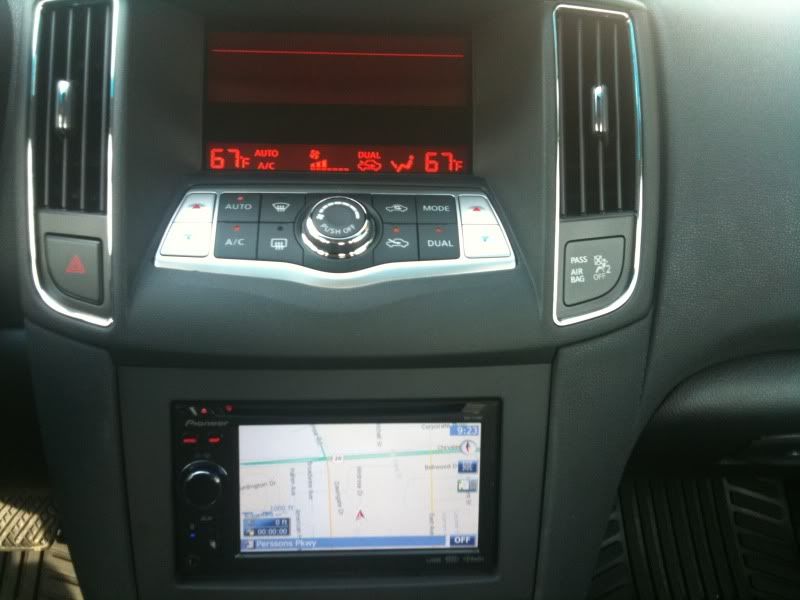
You won't be replacing the upper screen no matter what. The dash kit will replace the lower portion where the radio controls are (yes, you will have two screens).
Steering wheel controls are simple to keep. I personally like the Pioneer Avic-z140bh. I'm an installer and I work with this deck all the time and I love it. As far as a back-up camera, just get the matching pioneer camera.
That's my two cents, hope it helps.
Steering wheel controls are simple to keep. I personally like the Pioneer Avic-z140bh. I'm an installer and I work with this deck all the time and I love it. As far as a back-up camera, just get the matching pioneer camera.
That's my two cents, hope it helps.

Junior Member
Joined: Jun 2012
Posts: 23
It's controlled on top portion with non nav units. Here's what you need?
http://metraonline.com/part/95-7427B
http://metraonline.com/part/95-7427B

Member
Joined: Oct 2011
Posts: 118
From: Canada
Check out this link
http://www.youtube.com/watch?v=EX4Ne...e_gdata_player
http://www.youtube.com/watch?v=EX4Ne...e_gdata_player

Senior Member
Joined: Jan 2011
Posts: 324
From: VA
^^$500 for that mirror before install....http://www.vizualogic.com/shop/new-p...rip-gps-mirror

^^$500 for that mirror before install....http://www.vizualogic.com/shop/new-p...rip-gps-mirror

Junior Member
Joined: Jun 2012
Posts: 40
 This should work for you!!
Newbie - Just Registered
Joined: Jun 2011
Posts: 10
hello, i designed this kit for the non touch screen/color screen nissan systems. it adds touch controls, internet browser, navigation, radar detector, windows explorer and some other cool stuff. i am almost finished with the ANDROID version which will add full android to the OEM screen without affecting any of the factory setup. you can check out my company @ www.directusnav.com or www.intraphex.com but here is the video of the nissan setup
http://www.youtube.com/watch?v=2xoH-7zG_iM
http://www.youtube.com/watch?v=2xoH-7zG_iM
Senior Member
Joined: Oct 2011
Posts: 552
From: Scottsdale,AZ
hello, i designed this kit for the non touch screen/color screen nissan systems. it adds touch controls, internet browser, navigation, radar detector, windows explorer and some other cool stuff. i am almost finished with the ANDROID version which will add full android to the OEM screen without affecting any of the factory setup. you can check out my company @ www.directusnav.com or www.intraphex.com but here is the video of the nissan setup
http://www.youtube.com/watch?v=2xoH-7zG_iM
http://www.youtube.com/watch?v=2xoH-7zG_iM

Member
Joined: Oct 2011
Posts: 200
From: Miami, FL

Senior Member
Joined: Jul 2011
Posts: 613
From: Toronto, ON
Senior Member
Joined: Jul 2011
Posts: 613
From: Toronto, ON
Senior Member
Joined: Oct 2011
Posts: 552
From: Scottsdale,AZ
Senior Member
Joined: Jul 2011
Posts: 613
From: Toronto, ON

Senior Member
Joined: Jul 2011
Posts: 613
From: Toronto, ON
Junior Member
Joined: Jun 2012
Posts: 40
i have seen the factory set up put into the Glove box.... that might help with the Color set up, to be able to put a after market screen below...
http://www.youtube.com/watch?v=QXyOM-LQ3yc
^^kinda shown here, not so much the ipad.. but the set up in the glove box....
http://www.youtube.com/watch?v=QXyOM-LQ3yc
^^kinda shown here, not so much the ipad.. but the set up in the glove box....
Senior Member
Joined: Oct 2011
Posts: 552
From: Scottsdale,AZ
i have seen the factory set up put into the Glove box.... that might help with the Color set up, to be able to put a after market screen below...
http://www.youtube.com/watch?v=QXyOM-LQ3yc
^^kinda shown here, not so much the ipad.. but the set up in the glove box....
http://www.youtube.com/watch?v=QXyOM-LQ3yc
^^kinda shown here, not so much the ipad.. but the set up in the glove box....
U don't need to put the factory radio in the glovebox to do an aftermarket radio with the non color screen. That was just to do the I pad setup.
Can someone put up a decent pic of the color screen setup? I would like to see what the color screen looks like and where the buttons are located.
Last edited by 20_Maxima_10; Jun 17, 2012 at 08:42 PM.
Member
Joined: Oct 2011
Posts: 200
From: Miami, FL
for the controls.. they also sell a module that works with the radio so you keep the facttory controls.. everything in my car works.

Junior Member
Joined: Nov 2011
Posts: 86
From: The Great States
See the links on my reply to the OP of this thread:
http://forums.maxima.org/7th-generat...-question.html
http://forums.maxima.org/7th-generat...-question.html

Senior Member
Joined: Oct 2011
Posts: 552
From: Scottsdale,AZ
Senior Member
Joined: Oct 2011
Posts: 552
From: Scottsdale,AZ
No offense, but after doing these units in the Cadillac SRX and CTS I must say I'm not a fan of these units. I know those units are alot more complicated to install then the Nissan/Infiniti units but that's not where I'm going with this.
Although I love the concept of where you guys are headed, I must say that the interface and displays seem somewhat primitive to what's out nowadays. obviously there aren't any units like yours out on the market as far a factory integration but I would rather go completely aftermarket if I needed to do something with my Maxima.
I love the WiFi, radar, net browser features but with it running a windows CE and possibly a slower processor, it seems somewhat slow and laggy when switching applications. Also, the Nav display reminds of the very first generation Magellan nav units.
Just my two cents, but my opinion might not be valid to others as a it may be exactly what you're looking for.
Although I love the concept of where you guys are headed, I must say that the interface and displays seem somewhat primitive to what's out nowadays. obviously there aren't any units like yours out on the market as far a factory integration but I would rather go completely aftermarket if I needed to do something with my Maxima.
I love the WiFi, radar, net browser features but with it running a windows CE and possibly a slower processor, it seems somewhat slow and laggy when switching applications. Also, the Nav display reminds of the very first generation Magellan nav units.
Just my two cents, but my opinion might not be valid to others as a it may be exactly what you're looking for.
Senior Member
Joined: Oct 2011
Posts: 552
From: Scottsdale,AZ
http://www.ebay.com/itm/09-Nissan-Ma...r#ht_686wt_746
Decently priced but who knows what's missing other than the antenna.
Decently priced but who knows what's missing other than the antenna.

Senior Member
Joined: Dec 2011
Posts: 963
From: West Chester, PA
http://www.ebay.com/itm/09-Nissan-Ma...r#ht_686wt_746
Decently priced but who knows what's missing other than the antenna.
Decently priced but who knows what's missing other than the antenna.
Senior Member
Joined: Jul 2011
Posts: 613
From: Toronto, ON
Senior Member
Joined: Oct 2011
Posts: 552
From: Scottsdale,AZ