


Ipad Mini in dash install?


Thread Starter
Junior Member
Joined: Oct 2010
Posts: 21
From: Miami, Florida
Ipad Mini in dash install?
Hi, I was thinking if its possible to install a permanent ipad mini in the 2010 Nissan Maxima with Non Nav, Monochrome display with bose system. I think the screen just fits right in the radio/HVAC section, but then I would have to relocate those screens. I have seen people on the forums relocate the HVAC under the double din Navigation by modifying the plastic, but then I do not know what to do with the top radio screen portion or where to place it.
Or I can do it the other way around by not touching the radio/HVAC screens and remove the radio and insert a double din frame and modify it a little bit but then I do not know where to place the radio...
Anyone got any ideas?
Or I can do it the other way around by not touching the radio/HVAC screens and remove the radio and insert a double din frame and modify it a little bit but then I do not know where to place the radio...
Anyone got any ideas?

Senior Member
Joined: Jun 2012
Posts: 696
From: Honolulu, Hawaii
Hi, I was thinking if its possible to install a permanent ipad mini in the 2010 Nissan Maxima with Non Nav, Monochrome display with bose system. I think the screen just fits right in the radio/HVAC section, but then I would have to relocate those screens. I have seen people on the forums relocate the HVAC under the double din Navigation by modifying the plastic, but then I do not know what to do with the top radio screen portion or where to place it.
Or I can do it the other way around by not touching the radio/HVAC screens and remove the radio and insert a double din frame and modify it a little bit but then I do not know where to place the radio...
Anyone got any ideas?
Or I can do it the other way around by not touching the radio/HVAC screens and remove the radio and insert a double din frame and modify it a little bit but then I do not know where to place the radio...
Anyone got any ideas?
A lot of work but the results could be really cool.
I've seen this video before:
I'm still exploring this option as well among others. Might be more trouble than it's worth... might not be!

Member
Joined: Aug 2012
Posts: 160
From: Houston, Tx
We need a brave volunteer to try, but I don't see how it would work. The others mounted a farenheit monitor t-7000hr to the bracket that holds the amber screens, with an aftermarket unit or a jailbroken iphone. That should give you an idea of the dimensions. Yes, the AC controls can be relocated to the glove compartment or below, but I haven't seen anyone move the fm display.
Another member installed a screen protector and a suction cup mount over the amber screens, i never saw pictures. My two cents would be to get the pro clip mount or one from another manufacturer... unless you have money and time to do the "Maxipad" from ultra audio works (search youtube) or to replace the factory unit with another one like the mirrorlink. I wish there was a way to lose the amber display and keep the stock look of the factory unit, I regret to say it can't be done.
Another member installed a screen protector and a suction cup mount over the amber screens, i never saw pictures. My two cents would be to get the pro clip mount or one from another manufacturer... unless you have money and time to do the "Maxipad" from ultra audio works (search youtube) or to replace the factory unit with another one like the mirrorlink. I wish there was a way to lose the amber display and keep the stock look of the factory unit, I regret to say it can't be done.
Senior Member
Joined: Jun 2012
Posts: 696
From: Honolulu, Hawaii
We need a brave volunteer to try, but I don't see how it would work. The others mounted a farenheit monitor t-7000hr to the bracket that holds the amber screens, with an aftermarket unit or a jailbroken iphone. That should give you an idea of the dimensions. Yes, the AC controls can be relocated to the glove compartment or below, but I haven't seen anyone move the fm display.
Another member installed a screen protector and a suction cup mount over the amber screens, i never saw pictures. My two cents would be to get the pro clip mount or one from another manufacturer... unless you have money and time to do the "Maxipad" from ultra audio works (search youtube) or to replace the factory unit with another one like the mirrorlink. I wish there was a way to lose the amber display and keep the stock look of the factory unit, I regret to say it can't be done.
Another member installed a screen protector and a suction cup mount over the amber screens, i never saw pictures. My two cents would be to get the pro clip mount or one from another manufacturer... unless you have money and time to do the "Maxipad" from ultra audio works (search youtube) or to replace the factory unit with another one like the mirrorlink. I wish there was a way to lose the amber display and keep the stock look of the factory unit, I regret to say it can't be done.
Well, I'm in for looking into this concept. Challenge accepted =)
How hard is it to pop out the dash? I'm gonna give it a go after work but wanna be careful about damaging/scratching things.

Senior Member
Joined: Nov 2012
Posts: 545
From: Mass.
Saw this video a few weeks ago after I watched the "MaxiPAD" video. These guys did a Mini in a G35.
https://www.youtube.com/watch?v=9FqD...aMxGxg&index=5
Since that time I've had numerous dreams of having one installed ... though project 'minimax' will have to be put on hold as I have other priorities for my car at the moment.
https://www.youtube.com/watch?v=9FqD...aMxGxg&index=5
Since that time I've had numerous dreams of having one installed ... though project 'minimax' will have to be put on hold as I have other priorities for my car at the moment.
Thread Starter
Junior Member
Joined: Oct 2010
Posts: 21
From: Miami, Florida
Saw this video a few weeks ago after I watched the "MaxiPAD" video. These guys did a Mini in a G35.
https://www.youtube.com/watch?v=9FqD...aMxGxg&index=5
Since that time I've had numerous dreams of having one installed ... though project 'minimax' will have to be put on hold as I have other priorities for my car at the moment.
https://www.youtube.com/watch?v=9FqD...aMxGxg&index=5
Since that time I've had numerous dreams of having one installed ... though project 'minimax' will have to be put on hold as I have other priorities for my car at the moment.
What I had in mind is to use some sort of custom brackets to hold the ipad mini where the AMBER display is located. The button the and facetime camera will be useable by either drilling holes on the face plate or melting it and reshaping cylindrical holes to mimic what they did to the infinity g35. The idea of melting it because the face plate used in the infinity design is flat (So drilling holes is easier and the plate becomes perpendicular to the ipad mini's screen. Therefore dust will not get in) rather then our Maxima has an angled plastic plate going into the AMBER screen. If you drill holes dust will get in.
Then Instead of positioning the HVAC below the radio, I was thinking of placing it in front of the Automatic Shift **** and Placing the Top portion of the AMBER display below the radio by cutting out some of the face plate plastic.

Senior Member
Joined: Jun 2012
Posts: 696
From: Honolulu, Hawaii
I for one think the tablet idea is great. We have such advanced technology in this little tiny package that beats out a majority of double din headers in terms of functionality, it's no wonder why myself and others feel it's a great idea. Forget the carputer. It's all about the multimedia.
Until we can get a Roadie and Wheels type of carputers ala 80s cartoon Pole Position, no need one PC in car, brah.

Thread Starter
Junior Member
Joined: Oct 2010
Posts: 21
From: Miami, Florida
Well there are two options of prices I am assuming...Not sure if I am correct or not but these are estimates that I have come up with.
This option is the two screens and relocating HVAC ( I might of missed a few things, and also labor is not included assuming self install)
Top 7" LCD Display = 100.00
Good Navigation = 800.00 - 1200.00
Relocating the HVAC screen = 10.00 (Extra Wiring)
Steering Wheel Adapters + Antennas = 150 - 200
Double Din Frame = 40.00
Estimate = 1100 - 1550.00
_____________________________
Another Option is In-Dash Mounting the Ipad Mini in a double din frame. (The ipad mini actual screen is too wide for the AMBER display. I was not able to measure it because I forgot to bring the ruler, but I saw the Ipad Mini and it is huge for the AMBER 7" Display. I'm going to verify the dimensions tomorrow though.)
Double Din Frame = 40.00
Ipad Mini 16GB Cellular + Tax = 500.00
Black Spray Can + Gloss Coat Can = 5.00
Removing Stereo and Mounting it Somewhere else like glove box by extending wires = 10.00
Estimate = 555.00
_____________________________
This option is the two screens and relocating HVAC ( I might of missed a few things, and also labor is not included assuming self install)
Top 7" LCD Display = 100.00
Good Navigation = 800.00 - 1200.00
Relocating the HVAC screen = 10.00 (Extra Wiring)
Steering Wheel Adapters + Antennas = 150 - 200
Double Din Frame = 40.00
Estimate = 1100 - 1550.00
_____________________________
Another Option is In-Dash Mounting the Ipad Mini in a double din frame. (The ipad mini actual screen is too wide for the AMBER display. I was not able to measure it because I forgot to bring the ruler, but I saw the Ipad Mini and it is huge for the AMBER 7" Display. I'm going to verify the dimensions tomorrow though.)
Double Din Frame = 40.00
Ipad Mini 16GB Cellular + Tax = 500.00
Black Spray Can + Gloss Coat Can = 5.00
Removing Stereo and Mounting it Somewhere else like glove box by extending wires = 10.00
Estimate = 555.00
_____________________________
Senior Member
Joined: Nov 2012
Posts: 545
From: Mass.
Playing angry birds at a red light from your in-dash ipad ... priceless!
I don't think I have the experience/expertise to try this on my own and I wouldn't wanna screw something up. Then I'm prolly paying more to have someone fix my mistakes.
I realize this is a hypothetical question before I ask it but, any idea how much you'd expect to pay a quality shop to do it?
I don't think I have the experience/expertise to try this on my own and I wouldn't wanna screw something up. Then I'm prolly paying more to have someone fix my mistakes.
I realize this is a hypothetical question before I ask it but, any idea how much you'd expect to pay a quality shop to do it?
Nah man. What's your opinion on the matter? This is what a forum is for. Its good to get multiple perspectives.
I for one think the tablet idea is great. We have such advanced technology in this little tiny package that beats out a majority of double din headers in terms of functionality, it's no wonder why myself and others feel it's a great idea. Forget the carputer. It's all about the multimedia.
Until we can get a Roadie and Wheels type of carputers ala 80s cartoon Pole Position, no need one PC in car, brah.
I for one think the tablet idea is great. We have such advanced technology in this little tiny package that beats out a majority of double din headers in terms of functionality, it's no wonder why myself and others feel it's a great idea. Forget the carputer. It's all about the multimedia.
Until we can get a Roadie and Wheels type of carputers ala 80s cartoon Pole Position, no need one PC in car, brah.
On the other hand you have people who make a stop at Starbucks to get Frappuccino on their way to the Apple store to pick up an Ipad and car charger to shove into their dash.
At most all you have to figure out is how to mount the thing. And plus, Ipads aren't all that spectacular. The amount of storage they have on them isn't enough to store a decent music collection. They're not good for much else than surfing the interwaves or watching youtube videos. They're made for the computer illiterate like any other Apple product. I won't even get started on how Apple forces you to categorize and organize your music collection for use with their boring media player.
But, that said. It doesn't matter what I think. People are going to install Ipads in their cars. If that's your cup of soup than go for it.
Last edited by Hectic; Jan 4, 2013 at 10:42 PM.
Senior Member
Joined: Jun 2012
Posts: 696
From: Honolulu, Hawaii
On one hand you have people who spend thousands of hours creating an awesome PC, configuring software, writing scripts, testing and fully integrating it into a car, inventing parts, fabricating them, troubleshooting, wiring, and much more.
On the other hand you have people who make a stop at Starbucks to get Frappuccino on their way to the Apple store to pick up an Ipad and car charger to shove into their dash.
At most all you have to figure out is how to mount the thing. And plus, Ipads aren't all that spectacular. The amount of storage they have on them isn't enough to store a decent music collection. They're not good for much else than surfing the interwaves or watching youtube videos. They're made for the computer illiterate like any other Apple product. I won't even get started on how Apple forces you to categorize and organize your music collection for use with their boring media player.
But, that said. It doesn't matter what I think. People are going to install Ipads in their cars. If that's your cup of soup than go for it.
On the other hand you have people who make a stop at Starbucks to get Frappuccino on their way to the Apple store to pick up an Ipad and car charger to shove into their dash.
At most all you have to figure out is how to mount the thing. And plus, Ipads aren't all that spectacular. The amount of storage they have on them isn't enough to store a decent music collection. They're not good for much else than surfing the interwaves or watching youtube videos. They're made for the computer illiterate like any other Apple product. I won't even get started on how Apple forces you to categorize and organize your music collection for use with their boring media player.
But, that said. It doesn't matter what I think. People are going to install Ipads in their cars. If that's your cup of soup than go for it.
You're right too, people are gonna do what they want to do.
For the most part, I'm interested in the concept simply because it "sounds cool." I usually have my android phone docked on a windshield mount and barely have any use for it and its infinite apps (sure, once in a while I'll run torque). Playing music from it isn't so bad too (provided the mp3s are of decent to high quality). That said, I'm thinking an important thing to weigh out is functionality and how it much it is worth over the effort in fabricating the means and setting up the system.
Well, I've got some ideas churning. I couldn't pop off the top panel (I didn't have the guts to just wrench it out with a screwdriver... yet...). Maybe tomorrow.
Senior Member
Joined: Jun 2012
Posts: 696
From: Honolulu, Hawaii
So I've been tinkering around. I think it would be possible to place a tablet in the stock screen display area, provided you fabricate a way to mount it. Note, that's a Nexus 7, not an ipad mini.
See the below images:
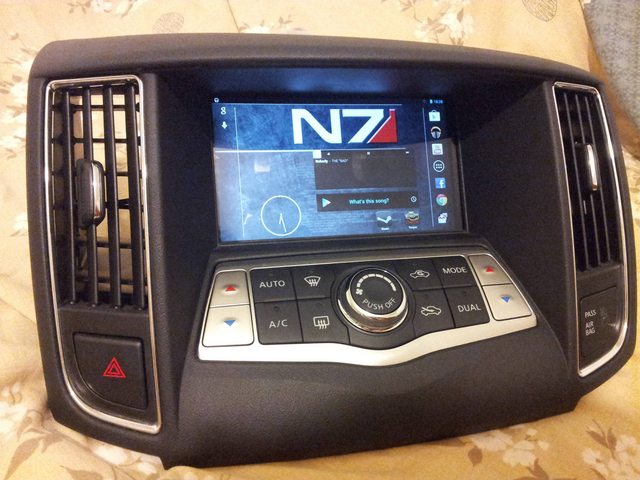
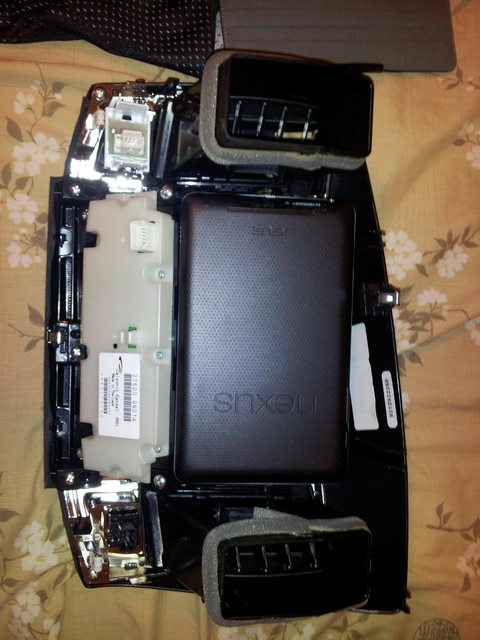
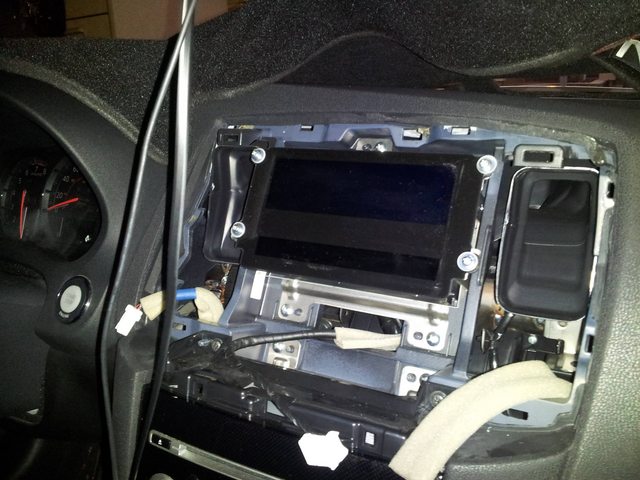
There's definitely room for play, although the face would need some slight cutting to accommodate the full screen. I'm thinking my idea to create a slot at the top is doable too, however, I would sacrifice a locking tab at the top to do so; I don't know how well the face would hold without that tab.
I've been playing with fiberglass on another idea as well (my first run). I'll post about it when I'm finished.
See the below images:
There's definitely room for play, although the face would need some slight cutting to accommodate the full screen. I'm thinking my idea to create a slot at the top is doable too, however, I would sacrifice a locking tab at the top to do so; I don't know how well the face would hold without that tab.
I've been playing with fiberglass on another idea as well (my first run). I'll post about it when I'm finished.


Senior Member
Joined: Jun 2012
Posts: 696
From: Honolulu, Hawaii
Sorry man, I'm not aiming to pull out the dash again any time soon but I will say there'd be about a half an inch of play after you removed the stock screens. That's enough room for a tablet for sure.
Getting power and an auxiliary cable to the unit is doable as there is space but I'm not sure how to get those cables to be "non visible" (i.e. tap into the auxiliary on the main unit and find a 5v source for the power).
At least when a proper dock comes in for the Nexus 7 that utilize the magnetic dock connectors, the power issue could be better dealt with without having to worry about routing a cable out to maybe the lighter socket.
Again, I'm not planning to pull the dash off again, but I'm sure someone's posted pics of the amber screens out and relocated.
The amber screens would have to be relocated if this mod was put into action. Probably in the glovebox.
At least when a proper dock comes in for the Nexus 7 that utilize the magnetic dock connectors, the power issue could be better dealt with without having to worry about routing a cable out to maybe the lighter socket.
Again, I'm not planning to pull the dash off again, but I'm sure someone's posted pics of the amber screens out and relocated.
The amber screens would have to be relocated if this mod was put into action. Probably in the glovebox.
Senior Member
Joined: Jun 2012
Posts: 696
From: Honolulu, Hawaii
I got some inspiration from this video a few wees back and tried my hand at it.
Please keep in mind, this is my very first time working with fiberglass. I've learned a lot from this run. Maybe when I'm up to it, I'll try again to make a cleaner piece.
Still working on it, but here's some progress pics.

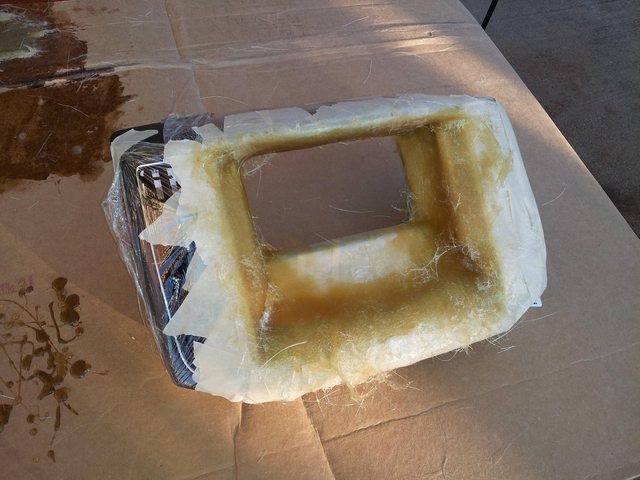
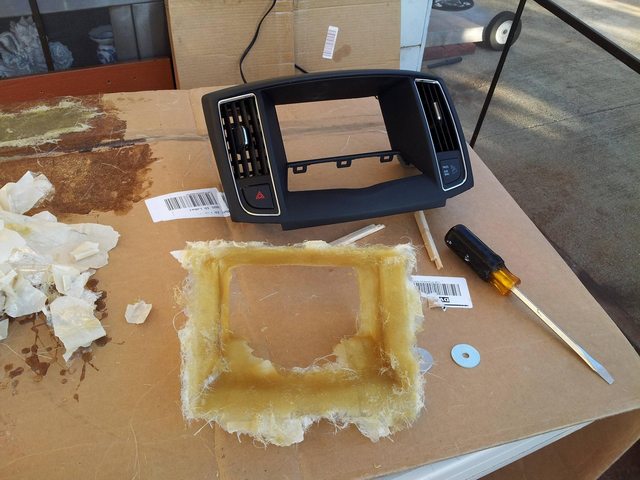
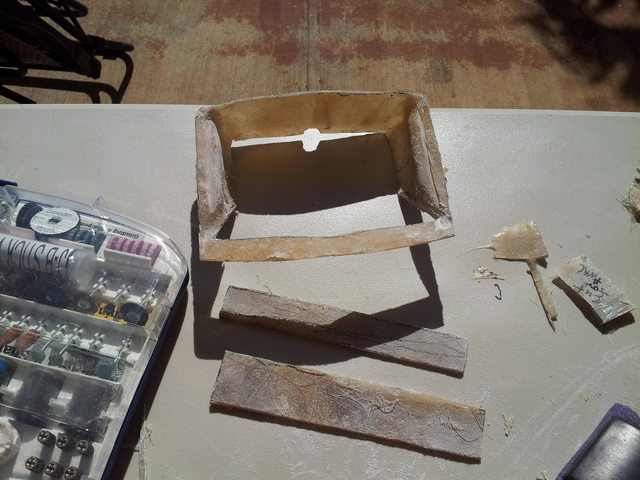
I'm still working on it and nowhere near complete but I'm sure you get the idea. Magnets have already been placed into the dash and magnets will be placed on the fiberglass piece. I'm at the filler/sander phase which I'm learning is pretty tough in itself. Still need to figure out how the tablet will be held in but it will likely be close to Soundman's setup.
Anyway, more updates as I find time to work on it.
Please keep in mind, this is my very first time working with fiberglass. I've learned a lot from this run. Maybe when I'm up to it, I'll try again to make a cleaner piece.
Still working on it, but here's some progress pics.
I'm still working on it and nowhere near complete but I'm sure you get the idea. Magnets have already been placed into the dash and magnets will be placed on the fiberglass piece. I'm at the filler/sander phase which I'm learning is pretty tough in itself. Still need to figure out how the tablet will be held in but it will likely be close to Soundman's setup.
Anyway, more updates as I find time to work on it.

Good luck on the project, looking good so far. On mp3car.com there is an android tablet section with some installs. As far as the tablet vs pc debate it depends on what you want, what most people want to be done can be done with a tablet install, there are even ways to get high quality sound from the tablet. Tablet is lacking if you want to run tuning programs for emanage and aem, hopefully that will change soon. I know pc tablets can run the programs but they are expensive.
You have to run way more components in a carpc where as the tablet is all in one, a simple power hook up vs smart power supplies,etc. Not everyone has to carry their entire music, photo and movie collection with them everyday so storage is not often an issue. The nexus 7 vs a carpc, the tablet setup is less expensive (high definition touch screen and quad-core processing). The tablet can be left on with a screen timeout, etc alot better options imo. The carpc is not obsolete, its just overkill for most folks.
You have to run way more components in a carpc where as the tablet is all in one, a simple power hook up vs smart power supplies,etc. Not everyone has to carry their entire music, photo and movie collection with them everyday so storage is not often an issue. The nexus 7 vs a carpc, the tablet setup is less expensive (high definition touch screen and quad-core processing). The tablet can be left on with a screen timeout, etc alot better options imo. The carpc is not obsolete, its just overkill for most folks.
Senior Member
Joined: Jun 2012
Posts: 696
From: Honolulu, Hawaii
Thanks, maxgtr2000. That website you mentioned is great. Lots of nice little ideas.
So here's where I'm at and I'm unsure what path to take here. The basic fiberglass frame is near complete and I have started the body filler work but I'm learning body filler and spot putty don't work like molding clay. (Eh! No laugh! Dis my first time, braddahs and sistahs).
My inexperience with fiberglass and sculpting has got me stumped on what to do next. Yes, I will continue to clean up the fiberglass and putty, sand, and paint it to look nice and appealing... But it still won't hold the tablet! I have spare pieces of fiberglass panels I've cut to use as holders, but I don't know how to secure the bastards onto the frame. I may just resolve the issue by drilling into it the pieces and frame and add some hardware. Bah. I'm sure you can see the dilemma now.
Anyhoo, some pics. Linked below if not posted.
Any thoughts, pointers on fiberglass/sculpting work would be much appreciated. Mahalos!
After shape cutting, pure trim/initial sanding.
http://imgur.com/aK2aKW6.jpg
First layer of spot putty. Eeep!
http://imgur.com/x1wU1uX.jpg
Last edited by Shipwreck; Jan 25, 2013 at 01:26 AM. Reason: Damn autocorrect on tablets.

Junior Member
Joined: Jan 2013
Posts: 78
I'm going to take pictures and put it on another forum as I progress.
Senior Member
Joined: Jun 2012
Posts: 696
From: Honolulu, Hawaii
I've also considered saying "screw it" and relocating the stock screens to create space for the tablet. There's definitely enough room. I've learned a bit about fiberglass as well, so it wouldn't be too hard to create a backing/mount for the tablet. The only issue after that is routing cables for power/auxiliary, but I'm thinking a bluetooth blackberry music gateway would easily take care of that.
Junior Member
Joined: Jan 2013
Posts: 78
Cool! Keep us posted!
I've also considered saying "screw it" and relocating the stock screens to create space for the tablet. There's definitely enough room. I've learned a bit about fiberglass as well, so it wouldn't be too hard to create a backing/mount for the tablet. The only issue after that is routing cables for power/auxiliary, but I'm thinking a bluetooth blackberry music gateway would easily take care of that.
I've also considered saying "screw it" and relocating the stock screens to create space for the tablet. There's definitely enough room. I've learned a bit about fiberglass as well, so it wouldn't be too hard to create a backing/mount for the tablet. The only issue after that is routing cables for power/auxiliary, but I'm thinking a bluetooth blackberry music gateway would easily take care of that.
For the mounting, I'm thinking about using an old double-din kit. I'm going to use one of the holder and use gorilla glue to glue my tablet down on top of it. I tried it and it fits almost perfectly over the opening behind the display. I might need to sand it down some. Plus the chassis held it up without any assistance. I'm going to take some pictures to show what I'm talking about.
I had everything in place but my stereo all the sudden, mysterious stopped working.

So I have to try again.
 I didn't think about using double sided tape. Thanks...

Junior Member
Joined: Jan 2013
Posts: 78
Okay, this is what I have done so far.
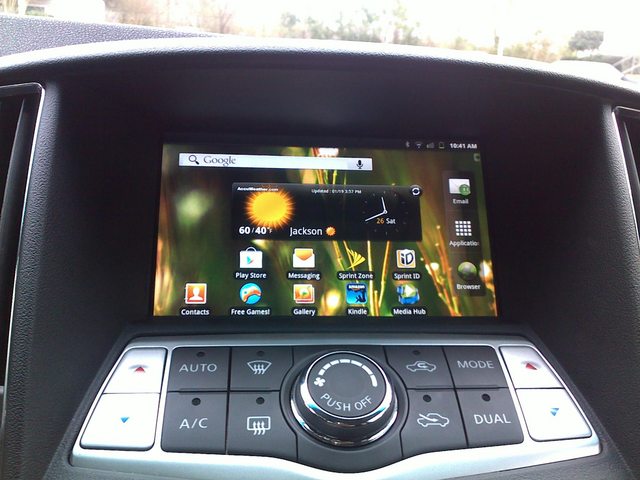
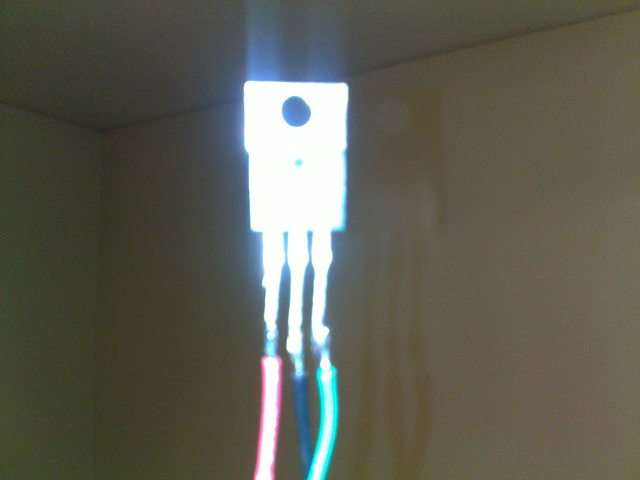
I used a 5volt regulator and hooked up the power cable to the 12v that goes to the stereo because my tablet will only charge if there is a 5v power supply. The input voltage is 12v but the output is 5v. I added some capacitors to get rid of some ripple shocks. Sorry for the bad picture below..
For the aux cable, I connect it directly to the aux plug in front of the radio.
This is the holder on the back of my tablet.
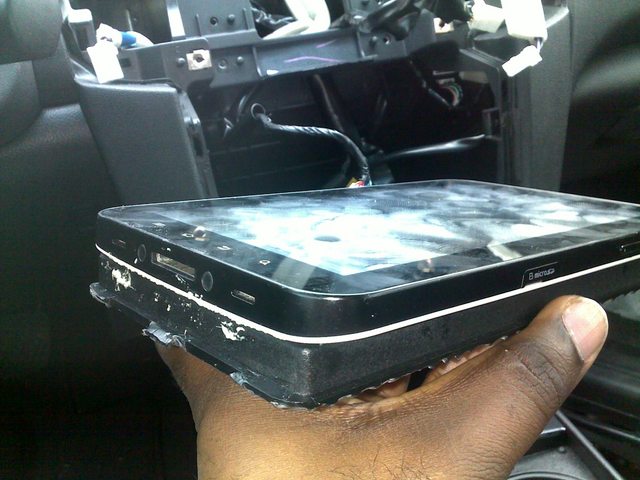
It fix nearly perfect over the gap on the back of the radio and the height of it fix quite nicely.
Sorry to jack this thread also..
I used a 5volt regulator and hooked up the power cable to the 12v that goes to the stereo because my tablet will only charge if there is a 5v power supply. The input voltage is 12v but the output is 5v. I added some capacitors to get rid of some ripple shocks. Sorry for the bad picture below..
For the aux cable, I connect it directly to the aux plug in front of the radio.
This is the holder on the back of my tablet.
It fix nearly perfect over the gap on the back of the radio and the height of it fix quite nicely.
Sorry to jack this thread also..
Last edited by tiger2380; Jan 26, 2013 at 04:55 PM.
Senior Member
Joined: Jun 2012
Posts: 696
From: Honolulu, Hawaii
Dang, looks great man. So is it in there permanently? Did you have to alter the dash piece? To get my Nexus 7 screen to fit perfectly, I found out I'd have to trim a bit of the screen opening on the dash.
Junior Member
Joined: Jan 2013
Posts: 78
How is your progress going?
Senior Member
Joined: Jun 2012
Posts: 696
From: Honolulu, Hawaii
I'm stuck from where my last post is, but primarily because I haven't found any real time to work on it. It will need another coat of putty to smooth out everything and fill airbubbles in the fiberglass. From there, it's figuring out how to actually have the tablet hold onto the frame.
The other option is redo the fiberglass. I'm a little less inclined to do this, but it'll be done differently and much more carefully if I do.
The other option is redo the fiberglass. I'm a little less inclined to do this, but it'll be done differently and much more carefully if I do.

Junior Member
Joined: Sep 2012
Posts: 50
Okay, this is what I have done so far.

I used a 5volt regulator and hooked up the power cable to the 12v that goes to the stereo because my tablet will only charge if there is a 5v power supply. The input voltage is 12v but the output is 5v. I added some capacitors to get rid of some ripple shocks. Sorry for the bad picture below..

For the aux cable, I connect it directly to the aux plug in front of the radio.
This is the holder on the back of my tablet.

It fix nearly perfect over the gap on the back of the radio and the height of it fix quite nicely.
Sorry to jack this thread also..
I used a 5volt regulator and hooked up the power cable to the 12v that goes to the stereo because my tablet will only charge if there is a 5v power supply. The input voltage is 12v but the output is 5v. I added some capacitors to get rid of some ripple shocks. Sorry for the bad picture below..
For the aux cable, I connect it directly to the aux plug in front of the radio.
This is the holder on the back of my tablet.
It fix nearly perfect over the gap on the back of the radio and the height of it fix quite nicely.
Sorry to jack this thread also..
Which tablet is that if I make ask? Thanks.
Junior Member
Joined: Jan 2013
Posts: 78
Junior Member
Joined: Jan 2013
Posts: 78
For the volume, it will always be at it highest. Since the tablet is plug into the aux jack, I can control the volume with my steering wheel.
There are some keys on my tablet but they are covered. Since they are covered, I install an android app called Button Savior. What that app does is it will display the buttons on the screen such as the home key, search, setting etc..
I can still get FM, use my CD player, etc because I didn't remove my stock radio, just my display.
I haven't placed the AC display anywhere yet. I got the entire display disconnected. My future goal is to buy an extra piece that goes below the radio and cut a hole for my AC display or just move the entire display into my glove box. Still don't know yet.
After I got everything together, I will write a step-by-step instruction.

Junior Member
Joined: Jan 2013
Posts: 78
Yeah I know right. My plan for that is to get a used micro-SD card, open it up and solder some wires to each pins. Get an SD-Card adapter and solder those wires that coming from the micro-sd card to the adapter. Plug in the micro-SD card into my tablet and run wires outside of the chassis. So when I want to update my media, I just can plug the sd-card into the adapter. So I will have an easy access to my sd-card. Once I do that, I will take some pictures.