


Ipad Mini in dash install?


Member
Joined: May 2011
Posts: 168
From: Brooklyn, NY
Thanks, 2themax11.
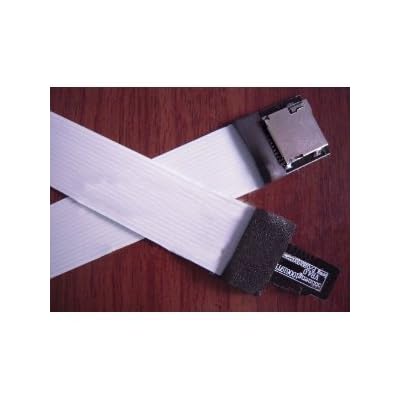
Yeah I know right. My plan for that is to get a used micro-SD card, open it up and solder some wires to each pins. Get an SD-Card adapter and solder those wires that coming from the micro-sd card to the adapter. Plug in the micro-SD card into my tablet and run wires outside of the chassis. So when I want to update my media, I just can plug the sd-card into the adapter. So I will have an easy access to my sd-card. Once I do that, I will take some pictures.
Yeah I know right. My plan for that is to get a used micro-SD card, open it up and solder some wires to each pins. Get an SD-Card adapter and solder those wires that coming from the micro-sd card to the adapter. Plug in the micro-SD card into my tablet and run wires outside of the chassis. So when I want to update my media, I just can plug the sd-card into the adapter. So I will have an easy access to my sd-card. Once I do that, I will take some pictures.


Junior Member
Joined: Sep 2012
Posts: 50
Thanks, 2themax11.
Yeah I know right. My plan for that is to get a used micro-SD card, open it up and solder some wires to each pins. Get an SD-Card adapter and solder those wires that coming from the micro-sd card to the adapter. Plug in the micro-SD card into my tablet and run wires outside of the chassis. So when I want to update my media, I just can plug the sd-card into the adapter. So I will have an easy access to my sd-card. Once I do that, I will take some pictures.
Yeah I know right. My plan for that is to get a used micro-SD card, open it up and solder some wires to each pins. Get an SD-Card adapter and solder those wires that coming from the micro-sd card to the adapter. Plug in the micro-SD card into my tablet and run wires outside of the chassis. So when I want to update my media, I just can plug the sd-card into the adapter. So I will have an easy access to my sd-card. Once I do that, I will take some pictures.
You could do that or make your life easier and just buy a huge micro sd card in the port on the tablet and leave it in there. Remember that on Android tablets you could literally do ANYTHING to it without a pc


Senior Member
Joined: Jun 2012
Posts: 696
From: Honolulu, Hawaii

Junior Member
Joined: Jan 2013
Posts: 78
Senior Member
Joined: Jun 2012
Posts: 696
From: Honolulu, Hawaii
You said it. I was gonna order another dash piece to fool around with (cut up, etc), but that costs about $164 bucks + shipping. Noooo thanks! If said cluster comes with the AC components, Hazard button, and passenger airbag indicator, then I can kidn of see why, though.
For that smaller piece you want, try making it?
For that smaller piece you want, try making it?
Junior Member
Joined: Jan 2013
Posts: 78
You said it. I was gonna order another dash piece to fool around with (cut up, etc), but that costs about $164 bucks + shipping. Noooo thanks! If said cluster comes with the AC components, Hazard button, and passenger airbag indicator, then I can kidn of see why, though.
For that smaller piece you want, try making it?
For that smaller piece you want, try making it?

Junior Member
Joined: Jan 2012
Posts: 34
Looking forward to seeing the completed project!


Newbie - Just Registered
Joined: Jun 2013
Posts: 1
You guys are awesome. Way to innovate Boring interior. I will be putting ina nexus 7 in the near future andi was thinking about the ac screen. .. is it possible to convert the screen froma different model of car (altima, infinity, etc.)?

Newbie - Just Registered
Joined: Mar 2014
Posts: 1
Okay, this is what I have done so far.

I used a 5volt regulator and hooked up the power cable to the 12v that goes to the stereo because my tablet will only charge if there is a 5v power supply. The input voltage is 12v but the output is 5v. I added some capacitors to get rid of some ripple shocks. Sorry for the bad picture below..

For the aux cable, I connect it directly to the aux plug in front of the radio.
This is the holder on the back of my tablet.

It fix nearly perfect over the gap on the back of the radio and the height of it fix quite nicely.
Sorry to jack this thread also..
I used a 5volt regulator and hooked up the power cable to the 12v that goes to the stereo because my tablet will only charge if there is a 5v power supply. The input voltage is 12v but the output is 5v. I added some capacitors to get rid of some ripple shocks. Sorry for the bad picture below..
For the aux cable, I connect it directly to the aux plug in front of the radio.
This is the holder on the back of my tablet.
It fix nearly perfect over the gap on the back of the radio and the height of it fix quite nicely.
Sorry to jack this thread also..

Junior Member
Joined: Dec 2014
Posts: 41
any new updates on this guys? i got a fully loaded 14. but the car could always use more,lol. thinking of getting a mini2 and hooking it up with this...
on the navi plastic frame above it. if i go tru with it ill post some pics.


Senior Member
Joined: Aug 2013
Posts: 1,129
any new updates on this guys? i got a fully loaded 14. but the car could always use more,lol. thinking of getting a mini2 and hooking it up with this...
on the navi plastic frame above it. if i go tru with it ill post some pics.
Senior Member
Joined: Jun 2012
Posts: 696
From: Honolulu, Hawaii
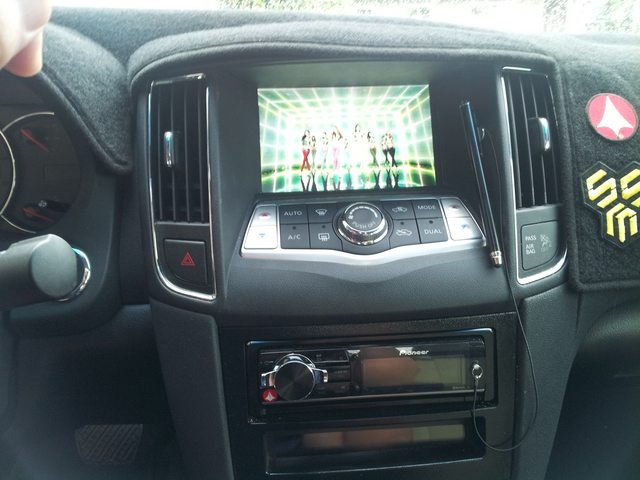
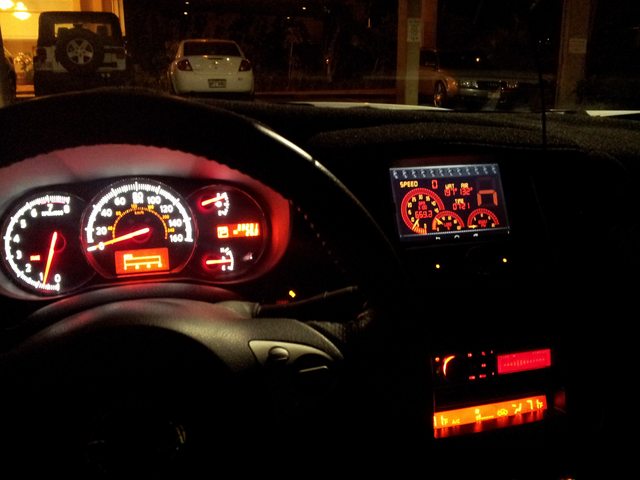
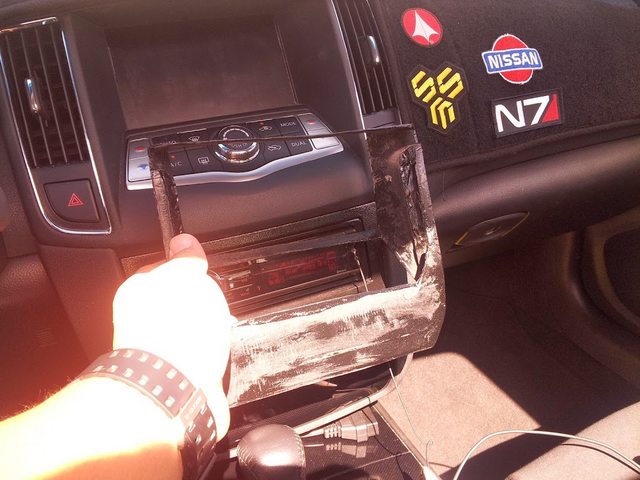
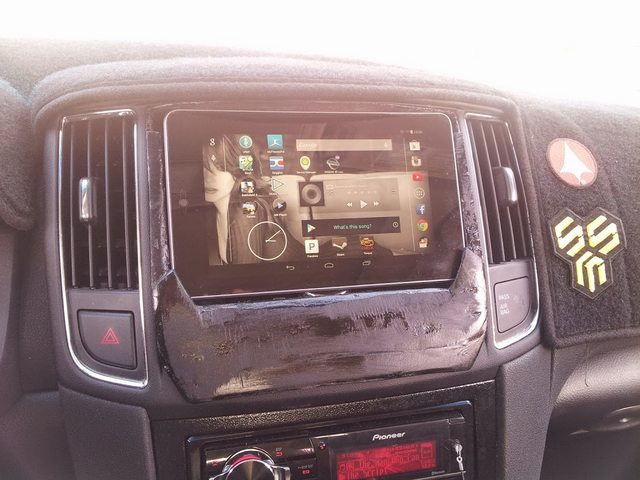
I've been running the tablet setup for about a year and a half now, and for the most part, it's just a nice upgrade. Still issues with charging while using the tablet for high process applications (mainly GPS navigation), but nothing to crazy. Charges quick enough on 2.1 amps. Custom mount is still in the works but we'll see where that goes. Made a second version that was lighter. Still perfecting my fiberglass skills.

Member
Joined: Jan 2015
Posts: 227
I have done this mod with a Nexus 7 Tablet, I believe an iPad mini will not fit if you want it to replace the orange screen without doing a lot of cutting. The nexus 7 fits perfect.
I soldered onto the power switch on/off and ran a tact switch to the bottom left of the steering wheel where there was an empty switch spot so I can power off/on if i need to. Added a higher amp 2.1 amp usb plug in place of the cig lighter in the compartment between the seats and ran the usb from the table to plug in there which also gives me access to unplug it easily and plug it into my laptop to add more music/movies, etc....
https://maxima.org/forums/7th-genera...er-screen.html


I soldered onto the power switch on/off and ran a tact switch to the bottom left of the steering wheel where there was an empty switch spot so I can power off/on if i need to. Added a higher amp 2.1 amp usb plug in place of the cig lighter in the compartment between the seats and ran the usb from the table to plug in there which also gives me access to unplug it easily and plug it into my laptop to add more music/movies, etc....
https://maxima.org/forums/7th-genera...er-screen.html
Last edited by brichi; Feb 16, 2015 at 05:46 AM.

Newbie - Just Registered
Joined: Sep 2023
Posts: 2
What wiring harness kits did you use for the single din pioneer. I have a 2011 maxima with bose and color screen without navigation I can't seem to find a wiring harness for it. I would like to use the factory amp for the door speakers

Thread
Thread Starter
Forum
Replies
Last Post
MaxLife17
8th Generation Maxima (2016-)
43
Jun 27, 2019 01:37 PM