7th Generation Maxima (2009-2015) Come in and talk about the 7th generation Maxima

Samsung Galaxy Tablet in 09 Maxima

Thread Tools
 
Search this Thread
 
Old Feb 9, 2013 | 07:16 AM
  #1  
STiiLO's Avatar
Thread Starter
Junior Member
 
Joined: Sep 2012
Posts: 50
Samsung Galaxy Tablet in 09 Maxima

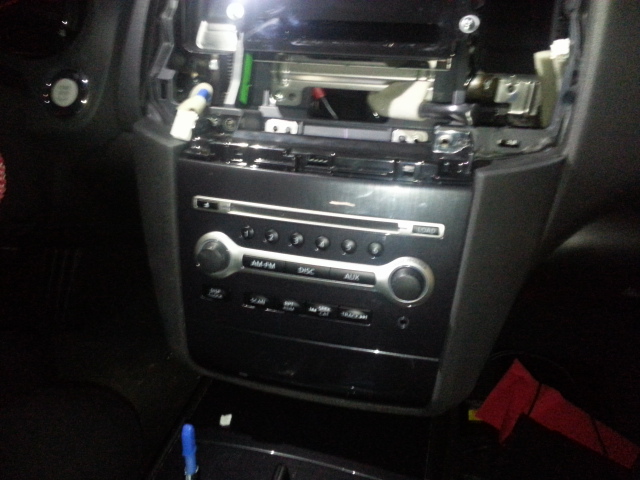
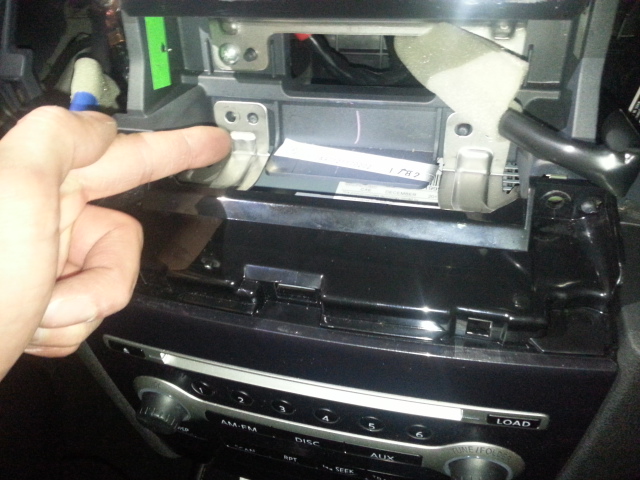
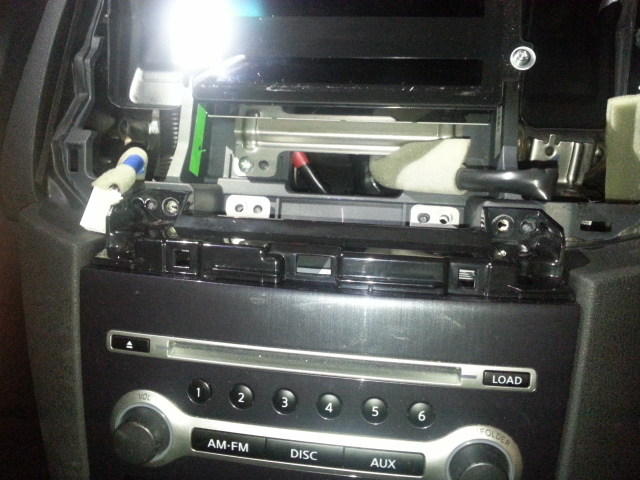
First person I seen that put the tablet in that location and gave me the idea was Tiger2380 so I put the Samsung galaxy Tablet in with a double din under it

Old Feb 9, 2013 | 07:28 AM
  #2  
Quinn'sMax's Avatar
Member
 
Joined: Aug 2009
Posts: 179
From: Houston
Very nice bro! I will be doing this mod soon.
Old Feb 9, 2013 | 08:31 AM
  #3  
Shipwreck's Avatar
Senior Member
 
Joined: Jun 2012
Posts: 696
From: Honolulu, Hawaii
[QUOTE=STiiLO;8724082]First person I seen that put the tablet in that location and gave me the idea was Tiger2380 so I put the Samsung galaxy Tablet in with a double din under it
/QUOTE]

Great job, STiiLO! This is what I had in mind initially but didn't like the idea if having the tablet permanently in there. I need to make time to finish my project.

I couldn't get the video to load for some reason. What unit did you install and where did you relocate the HVAC screen? Also, how was the Bluetooth calling compromised (if it was at all). Plenty of units have bt calling as an ootion , but I've never been too impressed with the call quality. The stock bt is hard to beat and call quality is clear.
Old Feb 9, 2013 | 08:38 AM
  #4  
STiiLO's Avatar
Thread Starter
Junior Member
 
Joined: Sep 2012
Posts: 50
Shipwreck HVAC unit is behind the tablet hidden for now until i do custom work on the piece under the radio. My car didn't come with factory bluetooth the bluetooth on the pioneer radio is wonderful and adding the tablet is very worth it man. I found my tablet for super cheap so thats why I didnt stress the fact that its staying in there. I got 7" samsung galaxy tablet
Old Feb 9, 2013 | 09:02 AM
  #5  
Shipwreck's Avatar
Senior Member
 
Joined: Jun 2012
Posts: 696
From: Honolulu, Hawaii
Originally Posted by STiiLO
Shipwreck HVAC unit is behind the tablet hidden for now until i do custom work on the piece under the radio. My car didn't come with factory bluetooth the bluetooth on the pioneer radio is wonderful and adding the tablet is very worth it man. I found my tablet for super cheap so thats why I didnt stress the fact that its staying in there. I got 7" samsung galaxy tablet
Gotcha. I was able to see the video and can tell it runs great as intended. Mine didn't come with BT streaming either, just calling. Pretty awesome in any case. If I was going permanent, I'd set up cables coming from the tablet so I could access the memory/USB. Did you power it like tiger2380 did?
Old Feb 9, 2013 | 09:38 AM
  #6  
STiiLO's Avatar
Thread Starter
Junior Member
 
Joined: Sep 2012
Posts: 50
Originally Posted by Shipwreck
Gotcha. I was able to see the video and can tell it runs great as intended. Mine didn't come with BT streaming either, just calling. Pretty awesome in any case. If I was going permanent, I'd set up cables coming from the tablet so I could access the memory/USB. Did you power it like tiger2380 did?
I used the USB from my pioneer radio and downloaded an app called "Caffeine" that turns the tablet on and stays on when its connected to power source (So when car turns on) and also I put a 32GB SD card in there I dont need to take it out again its an android tablet you can literally do everything from the tablet not needing a PC
Old Feb 9, 2013 | 09:40 AM
  #7  
Ghozt's Avatar
Senior Member
 
Joined: Nov 2010
Posts: 4,020
From: Maryland
nice, I got mine on a tablet mount but basically for the same purpose. love Google Navigation and Pandora
Old Feb 9, 2013 | 10:03 AM
  #8  
tiger2380's Avatar
Junior Member
 
Joined: Jan 2013
Posts: 78
Great Job bro. I just order a double din with bluetooth. The bluetooth will allow me to play Pandora via my tablet also.

I'm going to post a video when I'm all done too.
Old Feb 9, 2013 | 10:05 AM
  #9  
Ghozt's Avatar
Senior Member
 
Joined: Nov 2010
Posts: 4,020
From: Maryland
next step is figure out how to integrate a rear view camera with the video displaying on the tablet.
Old Feb 9, 2013 | 10:38 AM
  #10  
STiiLO's Avatar
Thread Starter
Junior Member
 
Joined: Sep 2012
Posts: 50
Ghozt, I love both of those and also I have the nba league pass so I get to watch the games on the move. Figuring out the rear view camera situation I know they have rear views with a wireless screen that comes with it ill research that. Tiger thanks man and thats great! What Radio are you getting?
Old Feb 9, 2013 | 01:01 PM
  #11  
tiger2380's Avatar
Junior Member
 
Joined: Jan 2013
Posts: 78
Originally Posted by STiiLO
Ghozt, I love both of those and also I have the nba league pass so I get to watch the games on the move. Figuring out the rear view camera situation I know they have rear views with a wireless screen that comes with it ill research that. Tiger thanks man and thats great! What Radio are you getting?
It's an Eonon G2226U. I mostly got it for the rear view cam, CD/DVD player and to replace my stock radio. It only costs like 220 dollar and it has great reviews. I'm going to use my tablet for Pandora, GPS, etc..

What radio did you get?
Old Feb 9, 2013 | 06:48 PM
  #12  
STiiLO's Avatar
Thread Starter
Junior Member
 
Joined: Sep 2012
Posts: 50
Originally Posted by tiger2380
It's an Eonon G2226U. I mostly got it for the rear view cam, CD/DVD player and to replace my stock radio. It only costs like 220 dollar and it has great reviews. I'm going to use my tablet for Pandora, GPS, etc..

What radio did you get?

The Pioneer 940BT
Old Feb 9, 2013 | 06:50 PM
  #13  
STiiLO's Avatar
Thread Starter
Junior Member
 
Joined: Sep 2012
Posts: 50
This is a little better picture of it
Attached Thumbnails Samsung Galaxy Tablet in 09 Maxima-photo-2-.jpg  
Old Feb 10, 2013 | 05:29 PM
  #14  
Jam_Roc's Avatar
Senior Member
 
Joined: Jan 2012
Posts: 354
good job on the tab install.
can you view gps nav on the it?
Old Feb 10, 2013 | 10:08 PM
  #15  
MADMAXXED's Avatar
Junior Member
 
Joined: Dec 2009
Posts: 38
Good job looks real neat. I'm guessing this is mainly for models with no navi. The only downside to this would be no input whatsoever and a dependancy on wifi. I had this same idea until I realize that a cheap Itouch would give same results when matched with factory navi and screen. Must say to have weather and social media widgets in my dash would be really really cool. I was also looking at the soundstream 9" screen, it gives video options...I hope Samsung realizes theirs a market for tablets in cars , only thing there missing are multiple A/V in and outs. But again , great job.
Old Feb 10, 2013 | 10:12 PM
  #16  
MADMAXXED's Avatar
Junior Member
 
Joined: Dec 2009
Posts: 38
Originally Posted by STiiLO
This is a little better picture of it
Can wait to see someone put a 10.1 tab in instead of a 7. Now that would be some mean looking gear.
Old Feb 11, 2013 | 05:27 AM
  #17  
Jig9798's Avatar
Senior Member
 
Joined: Nov 2012
Posts: 545
From: Mass.
https://www.google.com/url?sa=t&sour...ESwrR6hYQevJKg

Not exactly a 10.1 tab ... Close enough though.
Old Feb 12, 2013 | 09:37 AM
  #18  
Jam_Roc's Avatar
Senior Member
 
Joined: Jan 2012
Posts: 354
Is this what the back of todays head units look like?
Old Feb 12, 2013 | 10:25 AM
  #19  
Ghozt's Avatar
Senior Member
 
Joined: Nov 2010
Posts: 4,020
From: Maryland
yeah it'd probably be easier to fit in the Nexus 7" tablet or something. i wish the Sport/Tech people didnt have all the important **** up top or I'd have done this too. dont want to lose my reverse cam/stock GPS/HVAC screen/radio screen...
Old Mar 27, 2013 | 09:02 PM
  #20  
smokin5s's Avatar
Member
 
Joined: Jan 2012
Posts: 155
Originally Posted by Jam_Roc
Is this what the back of todays head units look like?
is that the rear of our factory head unit? it would be awesome to find a touch screen type of device that can do NAV, etc... but still retain all factory radio options for those of us who have the Tech Package with no NAV... That unit looks like it has an out and an in, so potentially that could be used to have the tablet see exactly what our stock units see as well as play audio from the tablet into the radio...
Old Mar 28, 2013 | 03:47 AM
  #21  
funnyman82's Avatar
Senior Member
 
Joined: Jul 2011
Posts: 613
From: Toronto, ON
That is not what the factory head unit looks like.... I wish it were the case tho...

This is an aftermarket head unit..
Old Mar 31, 2013 | 03:14 PM
  #22  
Lj boogie's Avatar
Newbie - Just Registered
 
Joined: Mar 2013
Posts: 2
Hi, I just did this mod. I have a problem getting my tablet to charge thru the usb. How are you powering your tablet with a usb? Im using the usb that the tablet came with.
Old Apr 1, 2013 | 07:46 AM
  #23  
doberman16's Avatar
Junior Member
 
Joined: Oct 2012
Posts: 20
Originally Posted by tiger2380
It's an Eonon G2226U. I mostly got it for the rear view cam, CD/DVD player and to replace my stock radio. It only costs like 220 dollar and it has great reviews. I'm going to use my tablet for Pandora, GPS, etc..

What radio did you get?
Wow, I have to thank you for posting that Eonon unit. I've never heard of the company, but their devices look really impressive for the price! If the reviews are as good as you say, this might be my next head unit!
Old Apr 2, 2013 | 02:20 PM
  #24  
GNCMaxima's Avatar
Senior Member
 
Joined: May 2012
Posts: 441
From: Dallas
http://www.frys.com/product/5978404?...H:MAIN_RSLT_PG

Could I use that to take out my amber screen then use some cd player with BT so I can stream my music and etc...?
Old Apr 2, 2013 | 04:42 PM
  #25  
Jam_Roc's Avatar
Senior Member
 
Joined: Jan 2012
Posts: 354
Can someone post pics of their head unit and monitor mirroring navigation.

Last edited by Jam_Roc; Apr 2, 2013 at 05:09 PM.
Old Apr 2, 2013 | 07:42 PM
  #26  
smokin5s's Avatar
Member
 
Joined: Jan 2012
Posts: 155
Is there a way to hook up a NAV unit to go through that screen or potentially replace the factory screen with a NAV screen if the screen has inputs to display what the factory screen displays (if what I'm typing even makes any sense)
Old Apr 3, 2013 | 06:57 AM
  #27  
Envymynissan's Avatar
Member
 
Joined: Aug 2012
Posts: 160
From: Houston, Tx
Originally Posted by Lj boogie
Hi, I just did this mod. I have a problem getting my tablet to charge thru the usb. How are you powering your tablet with a usb? Im using the usb that the tablet came with.
You need a 2 amp charger. Samsung's original car charger is 2 amps but is only available online. I found one at a local tmobile store.
Old Apr 3, 2013 | 09:48 AM
  #28  
Lj boogie's Avatar
Newbie - Just Registered
 
Joined: Mar 2013
Posts: 2
Originally Posted by Envymynissan
You need a 2 amp charger. Samsung's original car charger is 2 amps but is only available online. I found one at a local tmobile store.
Is that how you guys hooked up yours? I've seen another set up with the tablet connected directly to the radio usb. Too much rewiring for me to use a car charger.
Old Apr 3, 2013 | 04:48 PM
  #29  
GNCMaxima's Avatar
Senior Member
 
Joined: May 2012
Posts: 441
From: Dallas
I have a 2012 and the compartment im trying to take off is all one piece?

The radio/dvd area wont come off. Its all one piece? Im stuck
Name:  20130403_183147_zps3439a749.jpg
Views: 573
Size:  124.5 KB

Name:  20130403_183159_zps9141f9f6.jpg
Views: 482
Size:  146.6 KB

Name:  20130403_183207_zpsede0b588.jpg
Views: 545
Size:  157.6 KB
Old Apr 3, 2013 | 07:41 PM
  #30  
Jam_Roc's Avatar
Senior Member
 
Joined: Jan 2012
Posts: 354
http://forums.maxima.org/7th-generat...-easy-way.html
Old Apr 3, 2013 | 08:27 PM
  #31  
Shipwreck's Avatar
Senior Member
 
Joined: Jun 2012
Posts: 696
From: Honolulu, Hawaii
Niiice! I didn't see that thread, it would've been helpful (I pried from the top, cringing with every pop of a clip). When I removed the dash bezel, I made sure to disconnect the battery first - I think you're okay to remove the airbag indicator harness after that. I haven't had any apparent problems anyway.
Old Apr 3, 2013 | 09:05 PM
  #32  
GNCMaxima's Avatar
Senior Member
 
Joined: May 2012
Posts: 441
From: Dallas
Fml I unplugged the air sensor
Old Apr 3, 2013 | 10:33 PM
  #33  
GNCMaxima's Avatar
Senior Member
 
Joined: May 2012
Posts: 441
From: Dallas
Now my Airbag Light on my dash keeps blinking :/

Ill do my research on here cause I hope im not the only idiot that did this lol
Old Apr 7, 2013 | 10:59 PM
  #34  
STiiLO's Avatar
Thread Starter
Junior Member
 
Joined: Sep 2012
Posts: 50
Originally Posted by GNCMaxima
Now my Airbag Light on my dash keeps blinking :/

Ill do my research on here cause I hope im not the only idiot that did this lol
This was from this same forum "This is how you reset the airbag signal as I have done it several times when my uPac caused it to come on:

1. Turn the ingtion on (don't start the car)
2. Wait for the airbag light to turn off (about 5 seconds) and turn the ignition off
3. Wait for 1 second and turn the ingtion on (don't start the car)
4. Wait for the airbag light to turn off (about 5 seconds) and turn the ignition off
5. Wait for 1 second and turn the ingtion on (don't start the car)
6. Wait for the airbag light to turn off (about 5 seconds) and turn the ignition off
7. Wait for 1 second and turn the ingtion on (don't start the car)
8. Wait for the airbag light to turn off (about 5 seconds) and turn the ignition off
9. Start the vehicle and the light should be off.

Hope this helps and I know this works...

-Rich"
Old Apr 7, 2013 | 11:10 PM
  #35  
GNCMaxima's Avatar
Senior Member
 
Joined: May 2012
Posts: 441
From: Dallas
thank you stiilo. I'm going to try this right now. the blinking airbag light sucks!


Posted from Maxima.org App for Android
Old Apr 7, 2013 | 11:12 PM
  #36  
STiiLO's Avatar
Thread Starter
Junior Member
 
Joined: Sep 2012
Posts: 50
Originally Posted by GNCMaxima
thank you stiilo. I'm going to try this right now. the blinking airbag light sucks!


Posted from Maxima.org App for Android
Lmk how it goes
Old Apr 8, 2013 | 06:51 AM
  #37  
GNCMaxima's Avatar
Senior Member
 
Joined: May 2012
Posts: 441
From: Dallas
I tried it but it didn't work. I also noticed its not blinking as fast now have a 2012 =/


Posted from Maxima.org App for Android
Old Apr 8, 2013 | 11:06 AM
  #38  
GNCMaxima's Avatar
Senior Member
 
Joined: May 2012
Posts: 441
From: Dallas
actually the timing has to be pretty right on, it worked.Thank you!


Posted from Maxima.org App for Android
Old May 26, 2013 | 08:32 AM
  #39  
STiiLO's Avatar
Thread Starter
Junior Member
 
Joined: Sep 2012
Posts: 50
Originally Posted by Ghozt
next step is figure out how to integrate a rear view camera with the video displaying on the tablet.
Ghozt I was doing some research its possible to do it but your tablet might need a usb on it in order for it to work and also you would probably need someone that knows how to create an android app so that it triggers everytime the car is put in to reverse instead of you manually having to do it
Old May 26, 2013 | 10:45 AM
  #40  
Jam_Roc's Avatar
Senior Member
 
Joined: Jan 2012
Posts: 354
Originally Posted by STiiLO
Ghozt I was doing some research its possible to do it but your tablet might need a usb on it in order for it to work and also you would probably need someone that knows how to create an android app so that it triggers everytime the car is put in to reverse instead of you manually having to do it
Last thing would be for it to read our temp info.


All times are GMT -7. The time now is 04:07 PM.