


Quick help with tablet in dash install


Thread Starter
Senior Member
Joined: Aug 2013
Posts: 1,129
Quick help with tablet in dash install
This for a galaxy tab 3 7"
First and formost I installed all the necessary apps to function without having to control home or back buttons.
My question is, how are people mounting this to behind dash opening? I was think double sided tape around the inside edge of the opening, place the tablet there but I don't want to attempt this is if it's a fail. Sorry for newb question, but I never attempted anything like this, thanks guys
First and formost I installed all the necessary apps to function without having to control home or back buttons.
My question is, how are people mounting this to behind dash opening? I was think double sided tape around the inside edge of the opening, place the tablet there but I don't want to attempt this is if it's a fail. Sorry for newb question, but I never attempted anything like this, thanks guys

Senior Member
Joined: Jun 2012
Posts: 696
From: Honolulu, Hawaii
Double sided tape helps but I wouldn't rely on it totally (when I first tried that, the heat melted the tape and the tablet fell into the recess). I also made a base with an old PC game DVD case and some velcro, but this ended up working best:
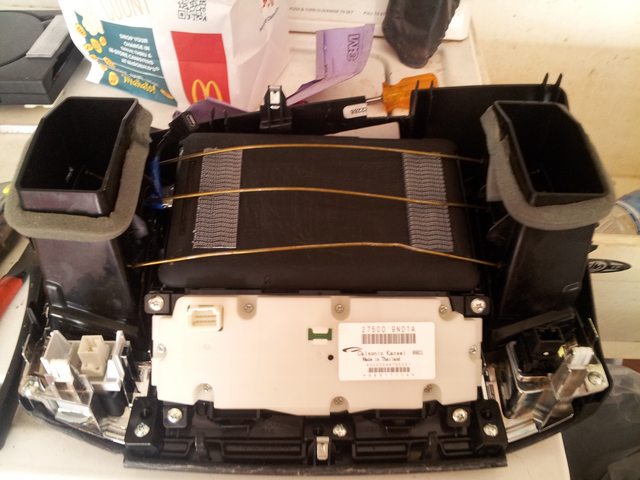
I drilled 3 holes on each side of the vent, just slightly passed the tablet, then inserted wire (from a wire hanger). It holds the tablet in tight. There's double sided tape along the edge as well to help keep the tablet from moving as well as prevent dust from coming in.
Of course, you could use L brackets or however else. This worked for me.
I drilled 3 holes on each side of the vent, just slightly passed the tablet, then inserted wire (from a wire hanger). It holds the tablet in tight. There's double sided tape along the edge as well to help keep the tablet from moving as well as prevent dust from coming in.
Of course, you could use L brackets or however else. This worked for me.
Thread Starter
Senior Member
Joined: Aug 2013
Posts: 1,129
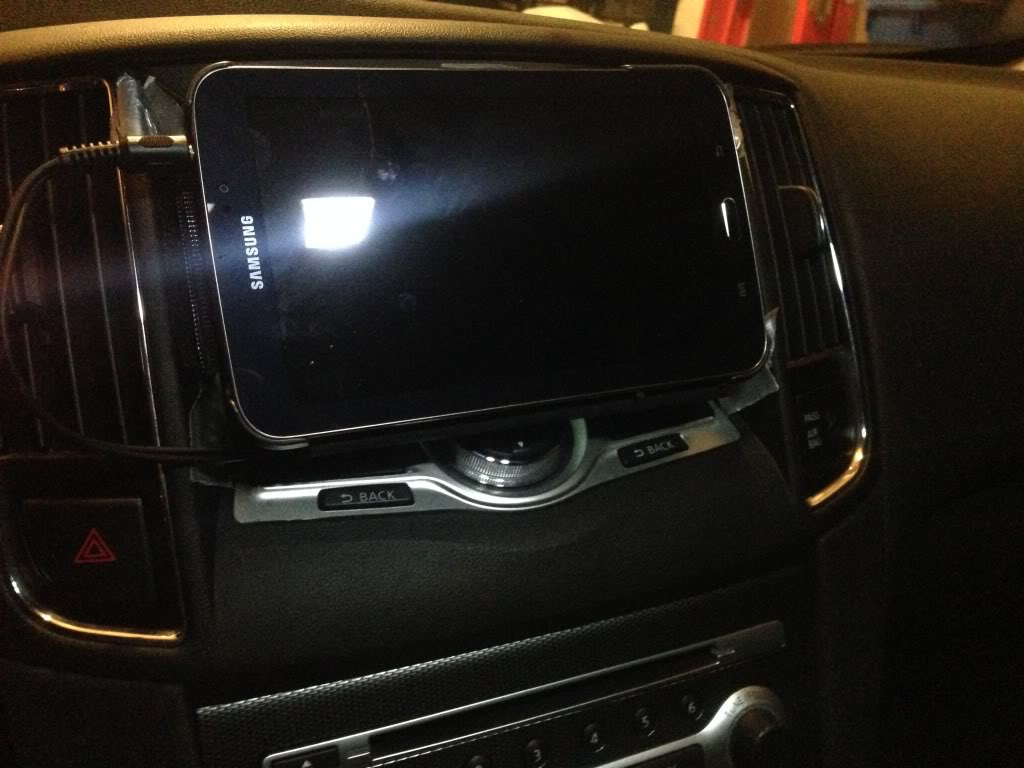
Thanks for the pic, and details...that'll def be helpful if the tape fails. I also disconnected the radio and hvac from the brackets, so it's sitting behind the tablet with the perfect amount of space between the bezel and is pretty snug. I'll get a pic tomorrow, it's dark and rainy right now
Senior Member
Joined: Jun 2012
Posts: 696
From: Honolulu, Hawaii
Thanks for the pic, and details...that'll def be helpful if the tape fails. I also disconnected the radio and hvac from the brackets, so it's sitting behind the tablet with the perfect amount of space between the bezel and is pretty snug. I'll get a pic tomorrow, it's dark and rainy right now

Senior Member
Joined: Jul 2011
Posts: 613
From: Toronto, ON
Wow shipwreck that's a full integrated install! So you must have the S model with the orange screen? I have an SV with colour screen so I cannot fully replace mine with my 7" tab. I was thinking about mounting some angles to the side and using some Velcro to attach my tab so it is remove able. The other option is for me to maybe cut a slot on the top of the shroud so I can slide the tab in infront of the screen..
Senior Member
Joined: Jun 2012
Posts: 696
From: Honolulu, Hawaii
Wow shipwreck that's a full integrated install! So you must have the S model with the orange screen? I have an SV with colour screen so I cannot fully replace mine with my 7" tab. I was thinking about mounting some angles to the side and using some Velcro to attach my tab so it is remove able. The other option is for me to maybe cut a slot on the top of the shroud so I can slide the tab in infront of the screen..
Thread Starter
Senior Member
Joined: Aug 2013
Posts: 1,129
Ya shipwreck I saw that video before and had an idea to do something like that, but with the 7" galaxy it isn't possible. I like the idea of being able to remove it anytime to use else where but I'm ok with it staying in the car. I got a good deal on the galaxy from best buy I couldn't pass up.
Senior Member
Joined: Jun 2012
Posts: 696
From: Honolulu, Hawaii
Gotcha, Tommy. You could figure out what case he used and build upon it or fabricate something yourself. I have my fiberglass frame ready to be shaped with body filler but never got around to it yet.

Thread Starter
Senior Member
Joined: Aug 2013
Posts: 1,129
Thread Starter
Senior Member
Joined: Aug 2013
Posts: 1,129
Thanks man, I like what u did, the idea of being able to take it out anytime is something I'd like...I'm one of those who regret buying the s model only because of the non color/nav screen
Senior Member
Joined: Jul 2011
Posts: 613
From: Toronto, ON
I'm new to the android and was wondering what is a good music player? I have used the one that comes with the tab 3 but I'm not sure how to scrub the track to rewind or forward to a certain spot and was wondering if there was a better player app available..

Junior Member
Joined: Sep 2013
Posts: 26
WinAmp works pretty well for me.
Thread Starter
Senior Member
Joined: Aug 2013
Posts: 1,129
I actually just disconnected the displays from the bracket and just left it floating behind the tablet, 2 reasons one I haven't figured out where I want to mount it and two it's actually added support for the tablet.
Junior Member
Joined: Sep 2013
Posts: 26
I'm thinking about doing something like your tablet install (Plus a double din radio below), but losing the climate controls is what is keeping me from doing so.

Thread Starter
Senior Member
Joined: Aug 2013
Posts: 1,129
Although I've gotten use to seeing what was going on with my climate control, to me it's not a big deal. I came from an Altima with manual controls so it's like the same. I also plan to add a double din down below, I have a dash kit for a single din for the max that I can try and modify to except a double din and use the pocket below for the climate display
Junior Member
Joined: Sep 2013
Posts: 26
Although I've gotten use to seeing what was going on with my climate control, to me it's not a big deal. I came from an Altima with manual controls so it's like the same. I also plan to add a double din down below, I have a dash kit for a single din for the max that I can try and modify to except a double din and use the pocket below for the climate display
How are you handling the power cable and audio out?
Thread Starter
Senior Member
Joined: Aug 2013
Posts: 1,129
Until I get a different unit, right now it's running thru the aux output and power thru USB to cigarette light but all the wires are tight and well hidden. This May end up being temporary until I get a double din(looking at the app radio 3) and if I get that the tablet will be pretty much useless but we'll see
Senior Member
Joined: Jun 2012
Posts: 696
From: Honolulu, Hawaii
No need the tech package.

Thread Starter
Senior Member
Joined: Aug 2013
Posts: 1,129
I don't have this anymore, just because I didn't like not having the hvac and radio info up top. I'm planning something different, but when the car turned on the charger turned on, also I used a app called button savior I believe it's called, so no need for the home and such
Senior Member
Joined: Jun 2012
Posts: 696
From: Honolulu, Hawaii
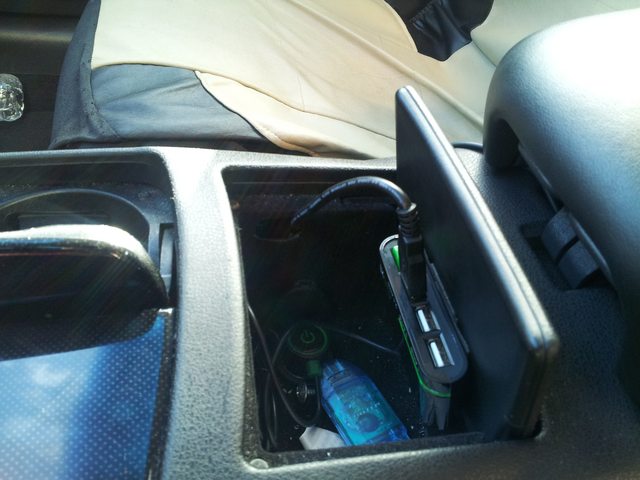
To "wake up" the unit when the screen times out, I can hit the power button through that hole or hit the power switch I have connected to the center console AC port off then on. The tablet will "awaken" when it is charging/not charging.
That green button next to the usb cable is the switch on that 2.1Amp charger.
Thread Starter
Senior Member
Joined: Aug 2013
Posts: 1,129
The unit is always on and "wakes up" when power from the center console port is activated on ignition. I did, however, cut a hole (yes... yes I did) just in case I needed to hard reset/recovery mode the tablet without having to completely remove it from the dash and mounting braces.
To "wake up" the unit when the screen times out, I can hit the power button through that hole or hit the power switch I have connected to the center console AC port off then on. The tablet will "awaken" when it is charging/not charging.
That green button next to the usb cable is the switch on that 2.1Amp charger.

To "wake up" the unit when the screen times out, I can hit the power button through that hole or hit the power switch I have connected to the center console AC port off then on. The tablet will "awaken" when it is charging/not charging.
That green button next to the usb cable is the switch on that 2.1Amp charger.
Also besides losing the control info, the main reason I dumped the galaxy is it was a gift, and I'm an apple person and just could not get use to it, I jailbreak everything of course
Senior Member
Joined: Jun 2012
Posts: 696
From: Honolulu, Hawaii
Maybe someone with a bit more electrical knowledge can chime in


Senior Member
Joined: May 2014
Posts: 302
From: Houston, TX
I use this from time to time, but notice a gradual drain on the battery - the 2.1amp charger can't seem to keep up charge vs the drain, even with the screen on in "idle" mode. I may try a 3 Amp charger in the future but I've heard this can cause damage and shorter overall battery life. It's also quite possible the current charger isn't charging at 2.1 amps. I never took a multimeter to it. Oh well.
Maybe someone with a bit more electrical knowledge can chime in
Maybe someone with a bit more electrical knowledge can chime in

Member
Joined: Apr 2010
Posts: 208
From: Indianapolis, IN
Here is how I did it. I fiberglassed the HVAC metal mount and created a magnet dock. I also modified a 2.1 amp charger to allow the nexus to see it as an AC charger and not a USB charger. You basically short the data cables. There are tons of write ups on it around the web.


Last edited by mjhuffer; Jul 30, 2014 at 11:14 AM.

Junior Member
Joined: Oct 2013
Posts: 47
2 questions real quick.
1) I also have a Tab 3 but when I plug it into my charger into the car it shows not charging, It only charges on the charger it came with what can I do about that,
2) How did you put your climate control screen on the bottom, is the top screen in 2 pieces because it looks like its just 1. If its 2 Pieces I would like to move it to the Very bottom where the carbon fiber plastic piece is only because I have a double din Kenwood.
1) I also have a Tab 3 but when I plug it into my charger into the car it shows not charging, It only charges on the charger it came with what can I do about that,
2) How did you put your climate control screen on the bottom, is the top screen in 2 pieces because it looks like its just 1. If its 2 Pieces I would like to move it to the Very bottom where the carbon fiber plastic piece is only because I have a double din Kenwood.
Senior Member
Joined: Jun 2012
Posts: 696
From: Honolulu, Hawaii
2 questions real quick.
1) I also have a Tab 3 but when I plug it into my charger into the car it shows not charging, It only charges on the charger it came with what can I do about that,
2) How did you put your climate control screen on the bottom, is the top screen in 2 pieces because it looks like its just 1. If its 2 Pieces I would like to move it to the Very bottom where the carbon fiber plastic piece is only because I have a double din Kenwood.
1) I also have a Tab 3 but when I plug it into my charger into the car it shows not charging, It only charges on the charger it came with what can I do about that,
2) How did you put your climate control screen on the bottom, is the top screen in 2 pieces because it looks like its just 1. If its 2 Pieces I would like to move it to the Very bottom where the carbon fiber plastic piece is only because I have a double din Kenwood.


Thread
Thread Starter
Forum
Replies
Last Post