8th Generation Maxima (2016-) Let's see what Nissan has to offer on the 8th generation Maxima

Phonebook not working correctly - Iphone 6

Thread Tools
 
Search this Thread
 
Old Jul 14, 2016 | 01:09 PM
  #1  
mattcox104's Avatar
Thread Starter
Newbie - Just Registered
 
Joined: Jul 2016
Posts: 1
Phonebook not working correctly - Iphone 6

When I press the phone button on the main screen (which shows 8 options I believe, quick call, phonebook etc), the Phonebook, Dial Number and Text Message buttons are grayed out and cannot be pressed. Is anyone else having the same issue? How can I fix it?
Old Jul 14, 2016 | 03:09 PM
  #2  
suzook's Avatar
Junior Member
 
Joined: Mar 2003
Posts: 87
Get an android....problem solved.
Old Jul 14, 2016 | 05:32 PM
  #3  
raven69david's Avatar
Member
 
Joined: Jun 2016
Posts: 131
From: San Antonio
Originally Posted by mattcox104
When I press the phone button on the main screen (which shows 8 options I believe, quick call, phonebook etc), the Phonebook, Dial Number and Text Message buttons are grayed out and cannot be pressed. Is anyone else having the same issue? How can I fix it?
No issues with an iPhone 6s Plus
Old Jul 15, 2016 | 07:21 AM
  #4  
JSROOKS's Avatar
Member
 
Joined: Feb 2016
Posts: 256
From: Arizona
If you are driving above a certain speed they are blocked.
Old Jul 15, 2016 | 03:29 PM
  #5  
P410P's Avatar
Newbie - Just Registered
 
Joined: Apr 2016
Posts: 5
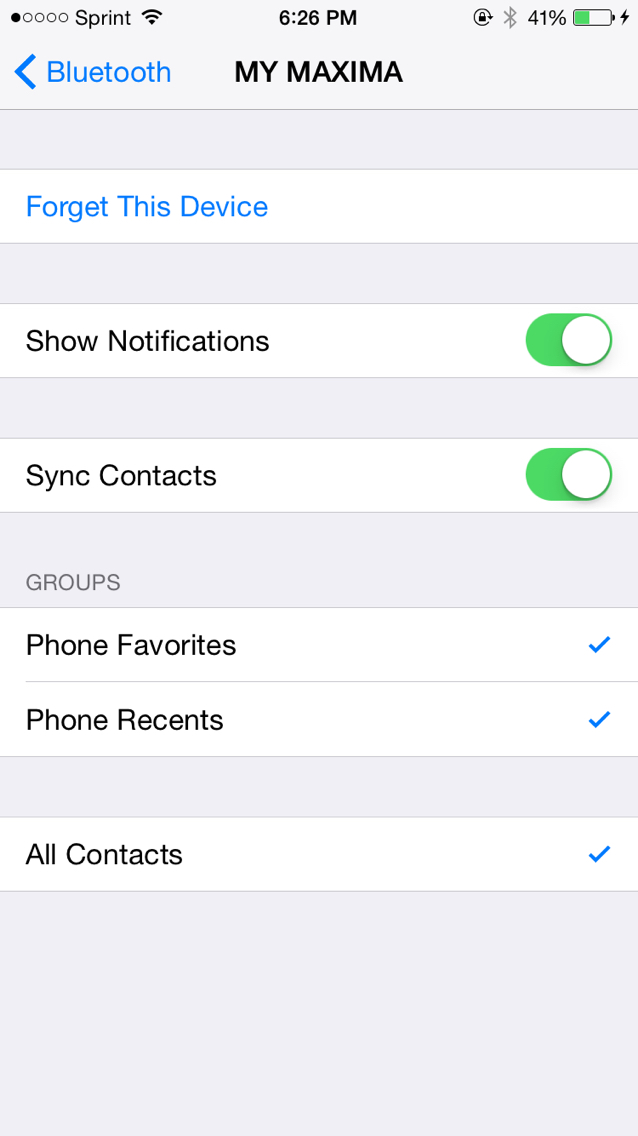
Do you have the Sync Contacts enabled on your Bluetooth settings? Phonebook not working correctly - Iphone 6-photo314.jpg
Related Topics
Thread
Thread Starter
Forum
Replies
Last Post
AZMaxima53
5th Generation Maxima (2000-2003)
14
Nov 27, 2016 12:13 PM
junito1
6th Generation Maxima (2004-2008)
0
Jun 28, 2016 10:53 AM
Chris Semler
7th Generation Maxima (2009-2015)
4
Jun 24, 2016 12:43 PM
Shock132
5th Generation Maxima (2000-2003)
5
Jun 20, 2016 08:26 PM


All times are GMT -7. The time now is 09:06 PM.