


Anyone have the AVHP4100DVD??


Thread Starter
Member
Joined: Jul 2008
Posts: 253
From: Tulsa, OK
Anyone have the AVHP4100DVD??
So I started out thinking to myself, I need a FM transmitter for my iPod, leading up to I need a new head unit (I currently have the stock bose with the 2002 max), which led me to the AVHP4100DVD. It looks like a good unit and it's sort of in my price range.
I'm curious though, what all would I need to buy along with this to make it work in my car (all stock audio equipment currently)? Would my steering wheel controls still work with this?
Here it is on Amazon
I'm curious though, what all would I need to buy along with this to make it work in my car (all stock audio equipment currently)? Would my steering wheel controls still work with this?
Here it is on Amazon

So I started out thinking to myself, I need a FM transmitter for my iPod, leading up to I need a new head unit (I currently have the stock bose with the 2002 max), which led me to the AVHP4100DVD. It looks like a good unit and it's sort of in my price range.
I'm curious though, what all would I need to buy along with this to make it work in my car (all stock audio equipment currently)? Would my steering wheel controls still work with this?
Here it is on Amazon
I'm curious though, what all would I need to buy along with this to make it work in my car (all stock audio equipment currently)? Would my steering wheel controls still work with this?
Here it is on Amazon
http://www.amazon.com/Metra-TurboWir...7427833&sr=8-1
http://www.amazon.com/PAC-Pioneer-St...d_bxgy_e_img_c
http://www.amazon.com/Scosche-NN1648...7428222&sr=8-1
There you go I did my good deed for the day
 next time search
Thread Starter
Member
Joined: Jul 2008
Posts: 253
From: Tulsa, OK
Thanks Jreed2008 for that list of stuff needed. I honestly did try searching for a while but found myself overwhelmed with info, especially when it came to car models, non bose and bose. So I really do appreciate you.
Thread Starter
Member
Joined: Jul 2008
Posts: 253
From: Tulsa, OK
Well I ended up going with the AVH-P3100DVD which is basically the same as the other one except it has a smaller screen (and cheaper). I'll post up some pics when it's in (should be by the end of next week).
Thats good to hear, if your going with the steering wheel controls double check PAC's website to see if your unit is compatiable to advoid any install issues
Thread Starter
Member
Joined: Jul 2008
Posts: 253
From: Tulsa, OK
I haven't ordered this part yet, I figure I can install everything else now and worry about that another time.
Yes disconnect the battery, problems would only exist if you short a ground wire during install that's why you need to disconnect the - side of the battery
Thread Starter
Member
Joined: Jul 2008
Posts: 253
From: Tulsa, OK
Thread Starter
Member
Joined: Jul 2008
Posts: 253
From: Tulsa, OK
Does anyone know if there's a guide to installing a new head unit in a 2002 maxima (with the bose stock unit)?
I'm going to do the install this weekend (hoping I get all the parts in the mail in time) and I'd like to get familiar with everything a little beforehand.
Oh, and I got the avh-p3100 in the mail earlier today, it looks sweet and I can't wait to get it in.
I'm going to do the install this weekend (hoping I get all the parts in the mail in time) and I'd like to get familiar with everything a little beforehand.
Oh, and I got the avh-p3100 in the mail earlier today, it looks sweet and I can't wait to get it in.
Thread Starter
Member
Joined: Jul 2008
Posts: 253
From: Tulsa, OK
I'm working at connecting the harness to the power cables the hu came with and I have a few wires left dangling.
On the power cable end of things, I have 8 wires (the manual lists these as connections to the speakers (2 for each speaker). Do I not use these 8 wires since I will be using the RCA cables from the harness?
Then I have 3 more from the power cables, mute, system remote control, and reverse gear input signal. I've come to the conclusion that these 3 will not be used, is that right?
On the harness side, I'm left with a blue "power antenna" wire, a ground wire (do I just ground this one?), and then on the other harness a blue/white "amp turn on" wire and finally a black/white "amp ground" wire. Any idea as to what I should do with these?
Thanks so much, I really do appreciate you all as I feel pretty lost at this at times.
On the power cable end of things, I have 8 wires (the manual lists these as connections to the speakers (2 for each speaker). Do I not use these 8 wires since I will be using the RCA cables from the harness?
Then I have 3 more from the power cables, mute, system remote control, and reverse gear input signal. I've come to the conclusion that these 3 will not be used, is that right?
On the harness side, I'm left with a blue "power antenna" wire, a ground wire (do I just ground this one?), and then on the other harness a blue/white "amp turn on" wire and finally a black/white "amp ground" wire. Any idea as to what I should do with these?
Thanks so much, I really do appreciate you all as I feel pretty lost at this at times.

Thread Starter
Member
Joined: Jul 2008
Posts: 253
From: Tulsa, OK
Nice, man I can't wait to put it in my car. Really all I can do now is work on the wiring harness since I haven't received the dash kit yet, was really hoping I was going to receive it today but probably wouldnt have been able to put it in anyway since it's snowing.. we're getting quite a bit of snow!
I'm working at connecting the harness to the power cables the hu came with and I have a few wires left dangling.
On the power cable end of things, I have 8 wires (the manual lists these as connections to the speakers (2 for each speaker). Do I not use these 8 wires since I will be using the RCA cables from the harness?
Then I have 3 more from the power cables, mute, system remote control, and reverse gear input signal. I've come to the conclusion that these 3 will not be used, is that right?
On the harness side, I'm left with a blue "power antenna" wire, a ground wire (do I just ground this one?), and then on the other harness a blue/white "amp turn on" wire and finally a black/white "amp ground" wire. Any idea as to what I should do with these?
Thanks so much, I really do appreciate you all as I feel pretty lost at this at times.
On the power cable end of things, I have 8 wires (the manual lists these as connections to the speakers (2 for each speaker). Do I not use these 8 wires since I will be using the RCA cables from the harness?
Then I have 3 more from the power cables, mute, system remote control, and reverse gear input signal. I've come to the conclusion that these 3 will not be used, is that right?
On the harness side, I'm left with a blue "power antenna" wire, a ground wire (do I just ground this one?), and then on the other harness a blue/white "amp turn on" wire and finally a black/white "amp ground" wire. Any idea as to what I should do with these?
Thanks so much, I really do appreciate you all as I feel pretty lost at this at times.
Thread Starter
Member
Joined: Jul 2008
Posts: 253
From: Tulsa, OK
Ground any wire that says ground and the Amp turn on needs to connect to the Amp turn on of the HU, you don't need the reverse wire or mute and honestly you don't need the power antenna wire(if used connnect to any 12v wire). Like you said above you will have the power cables from ur deck unused because your using the rca's Even though you don't have the trim you should test it out in the car first remeber to disconnect the battery than ground all wires to any metal(i used the deck mounting screws)
Thread Starter
Member
Joined: Jul 2008
Posts: 253
From: Tulsa, OK
Anyone else know if I can connect the blue/white wire from the harness (amp turn-on) to the blue/white (system remote control) on the hu cables?
The wire labeled system remote control has a different style connector on the end so would I just add another style that would connect to this on the harness wire?
Also, on the diagram in the manual that came with the unit, it says to connect the system remote control wire to "Connect to system control terminal of the power amp or
auto-antenna relay control terminal (max. 300 mA 12 V DC). " Would this be the same as connecting it to "amp turn on"?
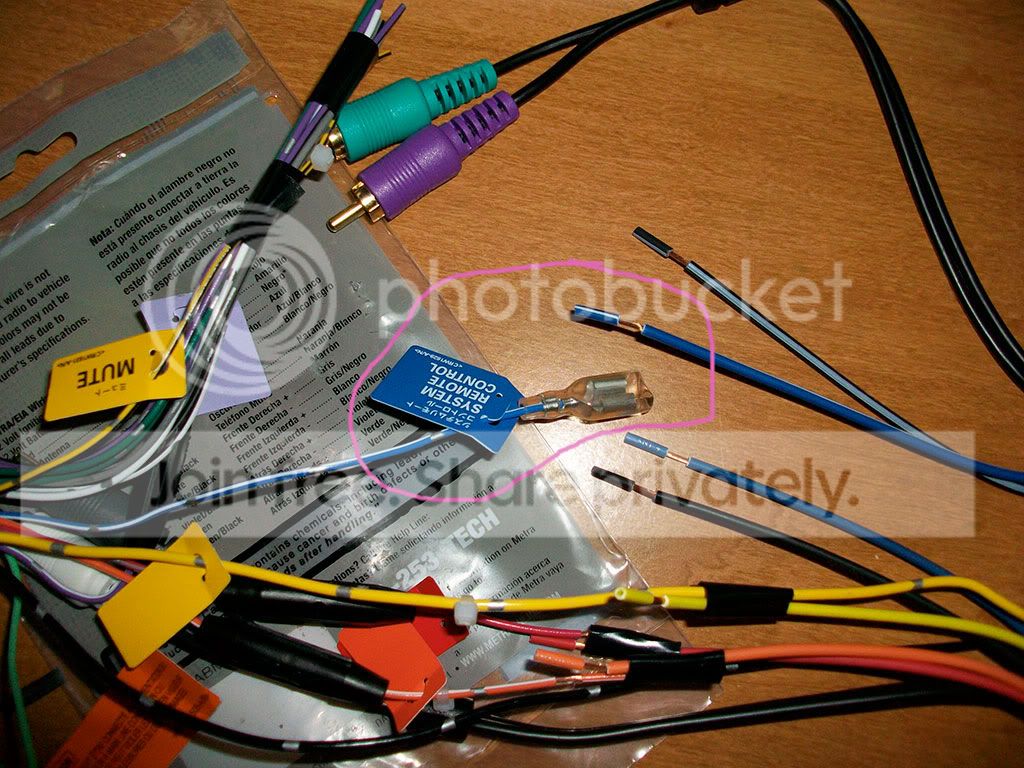
The wire labeled system remote control has a different style connector on the end so would I just add another style that would connect to this on the harness wire?
Also, on the diagram in the manual that came with the unit, it says to connect the system remote control wire to "Connect to system control terminal of the power amp or
auto-antenna relay control terminal (max. 300 mA 12 V DC). " Would this be the same as connecting it to "amp turn on"?
Last edited by OK.Eric; Mar 29, 2009 at 12:28 PM.
Thread Starter
Member
Joined: Jul 2008
Posts: 253
From: Tulsa, OK
I went ahead and connected those wires, and ended up having time this evening to test out the unit in my car, it worked! The only problem I ran into was with no sound coming out of the rear speakers. Turns out the rear RCAs default to outputting as sub, so I simply had to change it to output as rear speakers.
All I need now is the darn dash kit to get here!!
Oh and one more question about wiring...
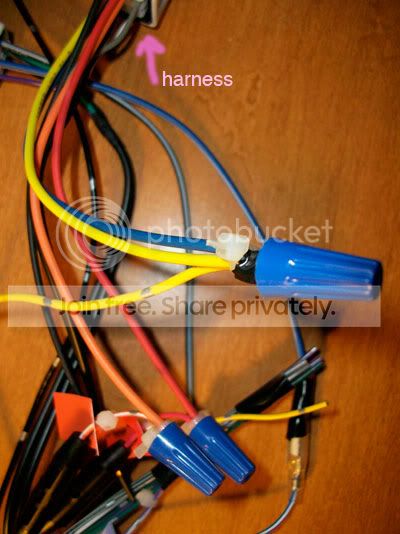
I have the power antenna wire (solid blue) coming out of the harness, you say I can connect it to any 12v source, so would splicing it with the yellow battery cable, also coming from the harness, work?
All I need now is the darn dash kit to get here!!
Oh and one more question about wiring...
I have the power antenna wire (solid blue) coming out of the harness, you say I can connect it to any 12v source, so would splicing it with the yellow battery cable, also coming from the harness, work?
Last edited by OK.Eric; Mar 29, 2009 at 08:41 PM.
I would imagine that the power antenna wire is not used on the Maxima, due to lack of actually antenna. I would just not hook it up, but you might wait for other responses from more knowledgable members.
Thread Starter
Member
Joined: Jul 2008
Posts: 253
From: Tulsa, OK
From what I've gathered, the power antenna cable is for the amplifier in the car for the antenna that is built into the vehicle.
Anyone know if this is true and if splicing into the yellow cable, also coming from the harness (+12v), would be suitable for this?
Thanks for the reply.
From what I've gathered, the power antenna cable is for the amplifier in the car for the antenna that is built into the vehicle.
Anyone know if this is true and if splicing into the yellow cable, also coming from the harness (+12v), would be suitable for this?
From what I've gathered, the power antenna cable is for the amplifier in the car for the antenna that is built into the vehicle.
Anyone know if this is true and if splicing into the yellow cable, also coming from the harness (+12v), would be suitable for this?
Thread Starter
Member
Joined: Jul 2008
Posts: 253
From: Tulsa, OK
Glad to hear you got it working but yes you can use the yellow cable or not. I had mine un-connected at first and didn't effect anything than last week decided to connect it and actually seems like I got a decrease in reception on Fm stations. It might just be all in my head but from what I read in the past power antenna is not neccisary.
It is ok to splice in with the yellow wire coming out of the harness though correct? Like this:
Last edited by OK.Eric; Mar 30, 2009 at 11:47 AM.
Thread Starter
Member
Joined: Jul 2008
Posts: 253
From: Tulsa, OK
Well I just finished installing it and it's awesome.
The only thing I haven't done yet is hook up that brake cable wire to allow me to watch video. I need an antenna adapter too (thought it was coming with the dash kit but didn't) so I figure I'll wait until then to do both at once.
I would prefer to bypass the brake sensor altogether to allow video to always play, anyone know how to do this with this particular stereo? If not does anyone know where to find the brake sensor wire?
The only thing I haven't done yet is hook up that brake cable wire to allow me to watch video. I need an antenna adapter too (thought it was coming with the dash kit but didn't) so I figure I'll wait until then to do both at once.
I would prefer to bypass the brake sensor altogether to allow video to always play, anyone know how to do this with this particular stereo? If not does anyone know where to find the brake sensor wire?
Again glad to hear, Oh yeah forgot bout the antenna adapter Lol that is seperate and since I helped you thus far I might as well give you the bypass information I have it in Pdf format and cant post here just pm me your email address
Thread Starter
Member
Joined: Jul 2008
Posts: 253
From: Tulsa, OK
Thanks, I really do appreciate you helping me out with this.
 No prob the forum is meant for helping and plus I was where you were only 8 months ago.