


The "CARPUTER" Thread - all with carpc's step inside.


Thread Starter
Senior Member
Joined: Apr 2005
Posts: 248
The "CARPUTER" Thread - all with carpc's step inside.
I've seen a few members on here in the past few months that have installed computers in the maxima. I figured we should start a thread with some useful information for people that still haven't done it but want to. (i've seen a lot of interest on this topic in other threads)
I don't know who was the first to put a pc in their maxima but I saw "Wariow's" project & decided to do this on my 4th gen.
First off - www.mp3car.com - A VERY useful site with tons of information about car pc's. You could do your project just by reading the site (I was able to do mine without actually registering - that's how much information is on there).
This thread hopefully will help you decide on the fabrication of the screen in your maxima. Especially if we get ideas from owners of each generation of Maximas.
There's different questions you should as yourself - Touchscreen or No Touchscreen. I highly suggest getting a touchscreen monitor for the ease of use mainly. I don't even use a mouse or a keyboard thanks to the touchscreen.
On the www.mp3car.com site there's a store where you can browse all kinds of screens, I picked one out from there & found it on e-bay for about $45 less, so browse around.
You should decide if you want to use the buttons on the monitor or not. I wanted to keep the buttons but because of my wood dash kit, I decided to just fabricate the screen into the dash without the buttons. In order to still be able to turn the monitor on and off, I had to relocate the remote control sensor. I basically unsoldered the sensor, extended the wire & hid it in the climate control. So the only way for me to turn the monitor on is to use the remote.
There's different ways of doing it, if you play around, you can get it to turn on when you turn the key to ACC. You should find info on the mp3car forum about this.
Laptop VS regular PC - that's for you to decide. there's a good thread on the mp3car forum talking about the pros and cons of each. I decided to use a laptop mainly because of power reasons and size. (although higher end car pc's are very small - but expensive).
COST - again, up to you. I used a laptop that I already had at home and a screen that cost $185; materials for fabrication were about $15.
I guess the best way to get some answers is just posting them here & I'm sure all that have already done this will express their opinions & will try to help out as much as they can. (hopefully)
Front Ends (the software) - I've almost tried them all and I like Road Runner the best so far. you can read about it on the mp3car forum.
You can get phone software, gps, OBDII software, and a bunch of other cool stuff.
I suggest getting a pc with bluetooth or getting a bluetooth dongle because it's very useful to have in the car. You can use your cell phone to connect to the internet, answer phone calls, write text messages, connect to your GPS - all using bluetooth technology.
OK, some pics.
This is the monitor I used - i cut off the buttons though.

First fitment tests.

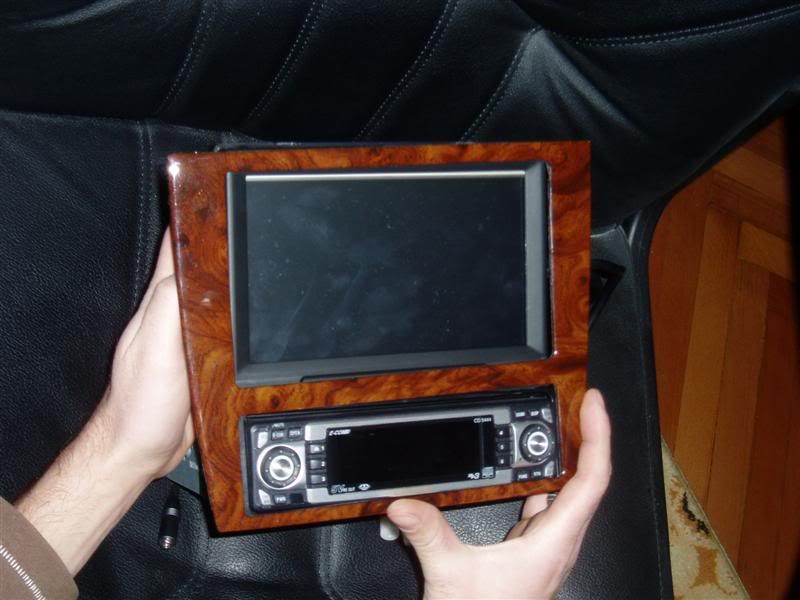
Work in progress.

After fabrication (plastic filler & a lot of sanding + paint).
I am not satisfied with the final look of my sanding skills but I did this about a month ago in a -20 degree weather in the garage since the wife didn't want me doing sanding in the house. I plan to do it again once it gets warm here.

I don't know who was the first to put a pc in their maxima but I saw "Wariow's" project & decided to do this on my 4th gen.
First off - www.mp3car.com - A VERY useful site with tons of information about car pc's. You could do your project just by reading the site (I was able to do mine without actually registering - that's how much information is on there).
This thread hopefully will help you decide on the fabrication of the screen in your maxima. Especially if we get ideas from owners of each generation of Maximas.
There's different questions you should as yourself - Touchscreen or No Touchscreen. I highly suggest getting a touchscreen monitor for the ease of use mainly. I don't even use a mouse or a keyboard thanks to the touchscreen.
On the www.mp3car.com site there's a store where you can browse all kinds of screens, I picked one out from there & found it on e-bay for about $45 less, so browse around.
You should decide if you want to use the buttons on the monitor or not. I wanted to keep the buttons but because of my wood dash kit, I decided to just fabricate the screen into the dash without the buttons. In order to still be able to turn the monitor on and off, I had to relocate the remote control sensor. I basically unsoldered the sensor, extended the wire & hid it in the climate control. So the only way for me to turn the monitor on is to use the remote.
There's different ways of doing it, if you play around, you can get it to turn on when you turn the key to ACC. You should find info on the mp3car forum about this.
Laptop VS regular PC - that's for you to decide. there's a good thread on the mp3car forum talking about the pros and cons of each. I decided to use a laptop mainly because of power reasons and size. (although higher end car pc's are very small - but expensive).
COST - again, up to you. I used a laptop that I already had at home and a screen that cost $185; materials for fabrication were about $15.
I guess the best way to get some answers is just posting them here & I'm sure all that have already done this will express their opinions & will try to help out as much as they can. (hopefully)
Front Ends (the software) - I've almost tried them all and I like Road Runner the best so far. you can read about it on the mp3car forum.
You can get phone software, gps, OBDII software, and a bunch of other cool stuff.
I suggest getting a pc with bluetooth or getting a bluetooth dongle because it's very useful to have in the car. You can use your cell phone to connect to the internet, answer phone calls, write text messages, connect to your GPS - all using bluetooth technology.
OK, some pics.
This is the monitor I used - i cut off the buttons though.
First fitment tests.
Work in progress.
After fabrication (plastic filler & a lot of sanding + paint).
I am not satisfied with the final look of my sanding skills but I did this about a month ago in a -20 degree weather in the garage since the wife didn't want me doing sanding in the house. I plan to do it again once it gets warm here.





This looks very interesting. I could have much fun playing with this, the software looks like it has a lot to mess with. This is prolly a dumb question but, how do you navigate through windows?
Edit: Nevermind i see that it is a touchscreen. Nice!
Edit: Nevermind i see that it is a touchscreen. Nice!
Originally Posted by VIP Maxima
prolly usin the lap top. lol
To mp3car forums!
 This looks like fun...


that's awesome man...few quick questions...how to you connect your laptop to the monitor and where do you put the laptop? how are you watching mtv or was this when you had it connected in your house?

Did you do navigation? Looks very nice. Also did you have bose? If so how do you hook it up to the system? I was going to do this but I couldn't figure out how to hook up the carputer to the bose even with a headunit.
Thread Starter
Senior Member
Joined: Apr 2005
Posts: 248
I have the laptop mounted under my seat (i only took it out to snap a pic). The monitor connects to the laptop just like any other external monitor. Additionally, touchscreen is controlled via USB, so the monitor has a power cable, a monitor cable & a USB cable.
I navigate through windows via touchscreen (that's the point).
I use Road Runner for the front end.
And "Liquid Smoke (By Liquid_Smoke)" is the skin. http://www.rrdownloads.net/ it's under the "SKINS" sections.
You can get the nissan logo from this thread (POST #27 has the link) The whole post is pretty useful so I suggest you read it if you're thinking about using RR; http://www.mp3car.com/vbulletin/showthread.php?t=65871
No MTV in the car - it's just a music video that i downloaded.
I have a bluetooth GPS reciever but I still haven't found good software that I would be satisfied with. For now I use AutoRoute 2006 Europe Edition - not bad but not great.
I don't have a BOSE system, but to get sound in your speakers from the PC all you have to do is use your AUX connection in your HU and connect it to your sound card.
You could spend $4000 on a project like this, but you could also have pretty much the same stuff for around $500-$600; My suggestion is get a touchscreen for about $200 and buy a laptop with a cracked/broken screen of e-bay (you don't need a screen anyway) - you can get a nice one for around $300-$350; then just get a bluetooth dongle & wifi (if you laptop doesn't already have it).
- Jay
I navigate through windows via touchscreen (that's the point).
I use Road Runner for the front end.
And "Liquid Smoke (By Liquid_Smoke)" is the skin. http://www.rrdownloads.net/ it's under the "SKINS" sections.
You can get the nissan logo from this thread (POST #27 has the link) The whole post is pretty useful so I suggest you read it if you're thinking about using RR; http://www.mp3car.com/vbulletin/showthread.php?t=65871
No MTV in the car - it's just a music video that i downloaded.
I have a bluetooth GPS reciever but I still haven't found good software that I would be satisfied with. For now I use AutoRoute 2006 Europe Edition - not bad but not great.
I don't have a BOSE system, but to get sound in your speakers from the PC all you have to do is use your AUX connection in your HU and connect it to your sound card.
You could spend $4000 on a project like this, but you could also have pretty much the same stuff for around $500-$600; My suggestion is get a touchscreen for about $200 and buy a laptop with a cracked/broken screen of e-bay (you don't need a screen anyway) - you can get a nice one for around $300-$350; then just get a bluetooth dongle & wifi (if you laptop doesn't already have it).
- Jay



what steps did you take to get power to your laptop? Did you use a convertor, or did you do something else?
I have almost the same setup, but the convertor i was using seems to have fried. My laptop is a Dell Inspiron 9100 that I got as a company gift (it is teh suX0r for personal use, but recycling it into a carputer FTW!). It's a 2.8ghz P4 HT and it sucks up A LOT of power. Capacitor perhaps?
I have almost the same setup, but the convertor i was using seems to have fried. My laptop is a Dell Inspiron 9100 that I got as a company gift (it is teh suX0r for personal use, but recycling it into a carputer FTW!). It's a 2.8ghz P4 HT and it sucks up A LOT of power. Capacitor perhaps?


Supporting Maxima.org Member

Joined: Nov 2005
Posts: 380
Great Job J, Everything you have stated is absolutly correct.....and trust me theres alot more. I tried to get a group buy going on one of these and no one really had much of an intrest on it......but now that you started a new thread for it i can maybe start a new group buy.
Mp3 car is a wonderful site, i have just taken it to a new level and actually put a patent on my car puters. Now since i am a max owner i only want to share the wealth and offer everyone here a great deal on a car puter.
If anyone has any questions please feel free to ask and below is a pic of a package system for the "beginner" but wouldnt insult the "novice" users as well.
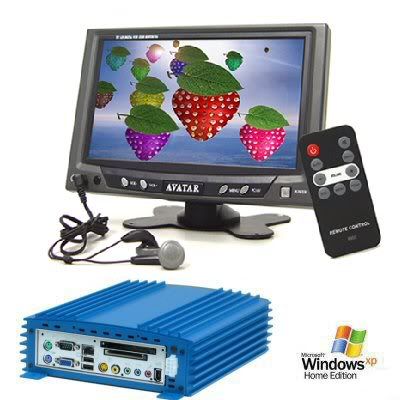
Please feel free to PM me with any questions and pricing and options.
Thanks,
Chef
Mp3 car is a wonderful site, i have just taken it to a new level and actually put a patent on my car puters. Now since i am a max owner i only want to share the wealth and offer everyone here a great deal on a car puter.
If anyone has any questions please feel free to ask and below is a pic of a package system for the "beginner" but wouldnt insult the "novice" users as well.
Please feel free to PM me with any questions and pricing and options.
Thanks,
Chef

Senior Member
Joined: Aug 2005
Posts: 289
From: Atlanta
i need to take some better pictures - these are from last summer
http://thewolfweb.com/photos/00417543.jpg
http://thewolfweb.com/photos/00417547.jpg
i think the hotlinking may be blocked after a certain amount of attempts
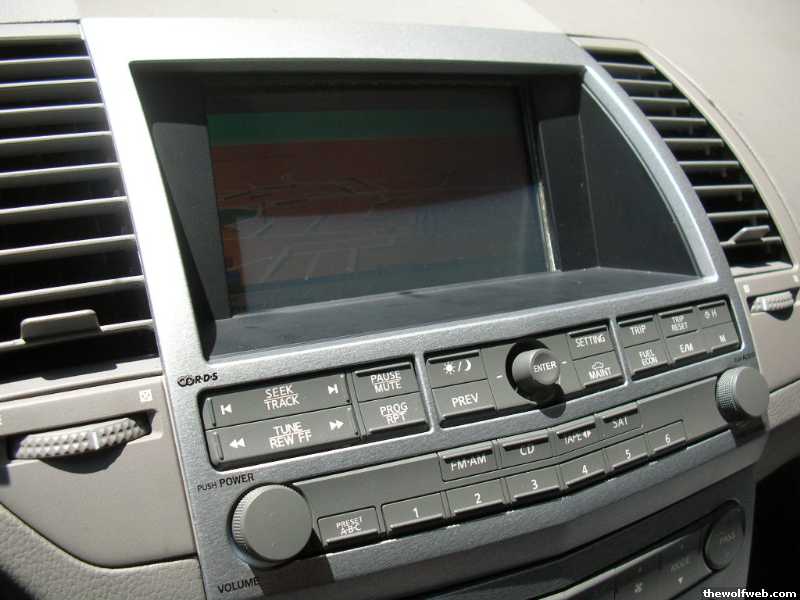
http://thewolfweb.com/photos/00417543.jpg
http://thewolfweb.com/photos/00417547.jpg
i think the hotlinking may be blocked after a certain amount of attempts

Thread
Thread Starter
Forum
Replies
Last Post
BPuff57
Advanced Suspension, Chassis, and Braking
33
Apr 16, 2020 05:15 AM