


Best place to mount aftermarket Sat. radio


Thread Starter
Senior Member
Joined: Jun 2006
Posts: 119
Best place to mount aftermarket Sat. radio
I had an aftermarket XM radio (XM SkyFi) mounted on top of the dash of my Titan. Well the Titan was traded for the Max and I really miss my Sat. radio but cant seem to find a good place to mount/install it. I really dont want to start cutting or hacking at my dash to get this thing in but I also dont want it to look "ghetto" with wires and brackets and $hit showing all over the place.
Now I wish I just would have gotten it with the car but my salesman said that since I already had mine that I should save $400 and use what I have.
Stupid question.....If you have the factory XM/Sirius unit, does it display the names of the songs and artist and name of the station/channel?? Or does it just display something like "XM Ch. 13"?? I like the display of my SkyFi, and the color too (lights up orange like everything else in the Max)
Now I wish I just would have gotten it with the car but my salesman said that since I already had mine that I should save $400 and use what I have.
Stupid question.....If you have the factory XM/Sirius unit, does it display the names of the songs and artist and name of the station/channel?? Or does it just display something like "XM Ch. 13"?? I like the display of my SkyFi, and the color too (lights up orange like everything else in the Max)


Thread Starter
Senior Member
Joined: Jun 2006
Posts: 119
Originally Posted by MAXDOUT04
Hide it in the center console
Either way, I don't really want to "hide" it. I want to see it. I like to see the name of the song/artist, etc. That's why I asked if the stock radio's display that info.

Member
Joined: Sep 2002
Posts: 43
i had a guy at Best Buy do my install.. i have a Sirius Roadmate Replay.. it's a cool unit.. he put it to the left of the steering wheel, and hid all the wires, you only see "1" cable, cause he taped the Power and Antenna Cable together and just about 3 inches show and go into the side panel.
It's mounted where, in New Jersey anyway, the Inspection Sticks go, just above it.
I can take pictures tomorrow and show you if you would like.. let me know..
-Frank
It's mounted where, in New Jersey anyway, the Inspection Sticks go, just above it.
I can take pictures tomorrow and show you if you would like.. let me know..
-Frank
Thread Starter
Senior Member
Joined: Jun 2006
Posts: 119
Originally Posted by fmtek
i had a guy at Best Buy do my install.. i have a Sirius Roadmate Replay.. it's a cool unit.. he put it to the left of the steering wheel, and hid all the wires, you only see "1" cable, cause he taped the Power and Antenna Cable together and just about 3 inches show and go into the side panel.
It's mounted where, in New Jersey anyway, the Inspection Sticks go, just above it.
I can take pictures tomorrow and show you if you would like.. let me know..
-Frank
It's mounted where, in New Jersey anyway, the Inspection Sticks go, just above it.
I can take pictures tomorrow and show you if you would like.. let me know..
-Frank


Senior Member
Joined: Jun 2004
Posts: 951
I had mine in the bottom of the dash, the little pocket, but then put it in the arm rest. Now switched to a XM radio Nissan receiver. I like the receiver and paid a bit over 230 bucks for it since I was prewired. Took my XM Roady and put it in the wifes car. I like the stock Nissan receiver.....but volume output is kinda weak for some reason. Still happy with it though. Would show ya a pic but my website died a few months ago.



Member
Joined: Feb 2006
Posts: 89
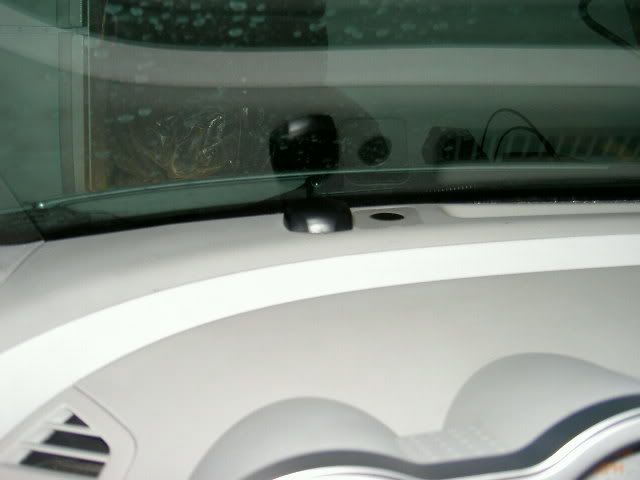
Sorry... forgot about the antenna. It is mounted on the front of my dash. I get just as good of reception with it on my dash as I did in my old car mounted outside. The "acquiring signal" is b/c it was in my garage when I took the photo.


Thread
Thread Starter
Forum
Replies
Last Post
mikeg75
4th Generation Maxima (1995-1999)
12
Nov 30, 2015 05:12 PM
A32goldylocks
4th Generation Maxima (1995-1999)
8
Sep 16, 2015 01:33 PM