


Compact Flash folders not showing correct directory structure...any ideas?


Thread Starter
Member
Joined: May 2009
Posts: 169
Compact Flash folders not showing correct directory structure...any ideas?
Hi everyone...
So when I dump a bunch of music on the Compact Flash card, I organize it all nicely to make it easier...i.e. a folder on the root called "Classical", another called "Pop", another called "80's and Funk", etc., then have subfolders in each of these that have the name of the artist, etc. and then another sub with the actual tracks in it. When I look at the folder structure on my PC, everything looks good, nice and organized. When I access it from the car, some of the subfolders and showing up at the root level while others stay intact and show as I would expect. I'm not sure how many of you us the CF that much..seems like a lot of people just use their IP or music box. In my case, I don't have an iPod and the Music Box, while cool bounds me to having to have a physical CD, which is not always cool as most of my collection is already in MP3 format. Anyway, I'll stop rambling..just wondering if anyone else has noticed this weirdness with the folder/subfolder structure on the CF card. I've tried multiple cards just to rule anything welrd out with one of my CF cards.
Thanks !
So when I dump a bunch of music on the Compact Flash card, I organize it all nicely to make it easier...i.e. a folder on the root called "Classical", another called "Pop", another called "80's and Funk", etc., then have subfolders in each of these that have the name of the artist, etc. and then another sub with the actual tracks in it. When I look at the folder structure on my PC, everything looks good, nice and organized. When I access it from the car, some of the subfolders and showing up at the root level while others stay intact and show as I would expect. I'm not sure how many of you us the CF that much..seems like a lot of people just use their IP or music box. In my case, I don't have an iPod and the Music Box, while cool bounds me to having to have a physical CD, which is not always cool as most of my collection is already in MP3 format. Anyway, I'll stop rambling..just wondering if anyone else has noticed this weirdness with the folder/subfolder structure on the CF card. I've tried multiple cards just to rule anything welrd out with one of my CF cards.
Thanks !

Senior Member
Joined: Feb 2009
Posts: 1,847
From: Central Florida
I noticed it too. My solution, however much I hated it, was to get an IPOD. That seemed to work better for me, especially as I have difficulty removing the CF card. I only remove the IPOD when I need to add new media but the Max seems to control it very well (IPOD Classic) and not have any file/folder/directory issues.

Junior Member
Joined: May 2008
Posts: 64
From: Southern CA
I can't explain the folders, except maybe try deleting the one at the root level and re-trying. But as far as the songs go, the car will organize the songs in the folders by time of file creation instead of by file name.
Try dragging the files into the correct folder in order you want them played back one at a time. I know it sux, but it works. Unfortunately, future additions will go to the end unless you want to delete all the files in the one folder you are adding to and start over. Hope this makes sense.
I have a feeling the player is getting confused by the bulk uploading.
Try dragging the files into the correct folder in order you want them played back one at a time. I know it sux, but it works. Unfortunately, future additions will go to the end unless you want to delete all the files in the one folder you are adding to and start over. Hope this makes sense.
I have a feeling the player is getting confused by the bulk uploading.
Thread Starter
Member
Joined: May 2009
Posts: 169
Since learning that the max capacity on the CF our car can handle is 2GB, I'm thinking my original issue here may be that I had over 2GB of music on the card (it is a 4GB card) and maybe it was showing some of the folders and not others. Not sure but my theory at this point.

Junior Member
Joined: Aug 2009
Posts: 26
From: Ottawa
While it is too bad that we are limited to 2Gb cards, that's still a lot of music and they are cheaper to boot. Now, if we could use the big, high speed CF cards that photographers use....naw, I still don't know that many songs. Ha! Ha!

Junior Member
Joined: Aug 2008
Posts: 41
I noticed it too. My solution, however much I hated it, was to get an IPOD. That seemed to work better for me, especially as I have difficulty removing the CF card. I only remove the IPOD when I need to add new media but the Max seems to control it very well (IPOD Classic) and not have any file/folder/directory issues.
I experienced the same thing when trying the CF. Bought an 8gb card only to learn the max will only read 2gb. I too got an ipod for this reason. The manual does attempt to explain the folder structure for the CF and it is simply easier to deal with the ipod, or just fill up the onboard drive.


Member
Joined: Mar 2010
Posts: 251
From: Walls, MS

Newbie - Just Registered
Joined: May 2010
Posts: 5
From: Sandusky, Ohio
Frequently Asked Questions for GROM-USB2
Functionality
How many root folders/virtual playlists ?
Usually 6. On Toyota, new Honda and Nissan you can have up to 99 folders.
We recommend using smaller drives with manageable number of folders ~20 and change them. GROM will remember 4 sticks and will be able to restore all positions in up to 20 folders for them all.
How many files per directory ?
We have tested with ~1000 files in a directory. So technically no limits but be aware that it might take longer to switch between files and proper ordering may not be possible.
What formats/bitrates it supports ?
MP3 layer 1,2,3 bitrate up to 320Kbps
WMA (no DRM) bitrate up to 384Kbps
AAC/MP4/iTunes+ (no DRM). Bitrate up to 384Kbps
OGG/Vorbis bitrate up to 384Kbps
How do I switch between USB/AUX/Ext ?
Switch to CDC (GROM mode)
1. Press FM (or AM), wait for 1 second.
2. Press CD/MODE/DISC. You should hear announce of the currently active mode.
3. Press > (next track button).
4. Voice will announce the mode. If mode is not desired, repeat #3
5. Wait for 2 seconds for selected mode to become active
What limits GROM-USB2 have ?
Positions preserved for 4 different USB sticks
Positions preserved for 20 playlists per USB stick
Random will work for 2000 files only, the rest may not shuffle properly or repeat during play
Can GROM-USB2 power up my portable HDD ?
Yes. It is able to provide steady 1A @ 5V which is enough for the most portable hard drives
I see iPod on one of the ports. Is iPod can be connected ?
Yes. iPod can be connected using our custom C-IPD2 cable. It will charge, control and playback your music directly through the USB2 interface. Check our store or add to your cart along with USB2 module
How many tracks device support ?
USB2 has been tested with ~10000 tracks on a drive (~80GB) with 20 playlists (root folders)
All supported stereos are not able to show the track number larger than 99. It is normal and will not affect the track currently playing. In case if you play track 1467, the stereo will show Track# 67
Should I name folders in certain way and place all files into the same folder ?
No. We do not recommend using 1 directory for all your files. It will make it hard to preserve the file sequence.
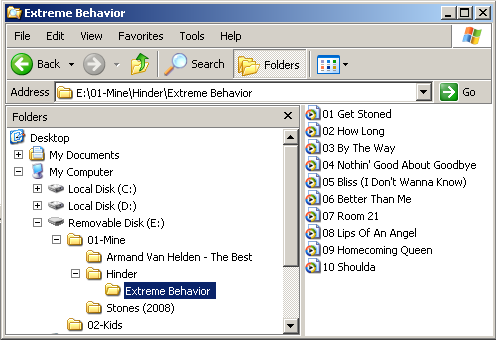
It is better to organize your music like: Playlist -> Artist -> Album as shown below
Folder "01-Mine" will be mapped to the first DISK and all files inside directory "Extreme Behavior" will play in ascending order (01, 02, 03 etc) and will not mix up with any other album.
I see that device supports CONFIG file. What is it ?
Config file functionality allow to remap some buttons or adjust behavior of the device. More information is available here
Functionality
How many root folders/virtual playlists ?
Usually 6. On Toyota, new Honda and Nissan you can have up to 99 folders.
We recommend using smaller drives with manageable number of folders ~20 and change them. GROM will remember 4 sticks and will be able to restore all positions in up to 20 folders for them all.
How many files per directory ?
We have tested with ~1000 files in a directory. So technically no limits but be aware that it might take longer to switch between files and proper ordering may not be possible.
What formats/bitrates it supports ?
MP3 layer 1,2,3 bitrate up to 320Kbps
WMA (no DRM) bitrate up to 384Kbps
AAC/MP4/iTunes+ (no DRM). Bitrate up to 384Kbps
OGG/Vorbis bitrate up to 384Kbps
How do I switch between USB/AUX/Ext ?
Switch to CDC (GROM mode)
1. Press FM (or AM), wait for 1 second.
2. Press CD/MODE/DISC. You should hear announce of the currently active mode.
3. Press > (next track button).
4. Voice will announce the mode. If mode is not desired, repeat #3
5. Wait for 2 seconds for selected mode to become active
What limits GROM-USB2 have ?
Positions preserved for 4 different USB sticks
Positions preserved for 20 playlists per USB stick
Random will work for 2000 files only, the rest may not shuffle properly or repeat during play
Can GROM-USB2 power up my portable HDD ?
Yes. It is able to provide steady 1A @ 5V which is enough for the most portable hard drives
I see iPod on one of the ports. Is iPod can be connected ?
Yes. iPod can be connected using our custom C-IPD2 cable. It will charge, control and playback your music directly through the USB2 interface. Check our store or add to your cart along with USB2 module
How many tracks device support ?
USB2 has been tested with ~10000 tracks on a drive (~80GB) with 20 playlists (root folders)
All supported stereos are not able to show the track number larger than 99. It is normal and will not affect the track currently playing. In case if you play track 1467, the stereo will show Track# 67
Should I name folders in certain way and place all files into the same folder ?
No. We do not recommend using 1 directory for all your files. It will make it hard to preserve the file sequence.
It is better to organize your music like: Playlist -> Artist -> Album as shown below
Folder "01-Mine" will be mapped to the first DISK and all files inside directory "Extreme Behavior" will play in ascending order (01, 02, 03 etc) and will not mix up with any other album.
I see that device supports CONFIG file. What is it ?
Config file functionality allow to remap some buttons or adjust behavior of the device. More information is available here

Thread
Thread Starter
Forum
Replies
Last Post
AaronL
5th Generation Maxima (2000-2003)
15
Nov 15, 2020 11:52 AM