


Nissan Maxima S plus Iphone Equals......


Thread Starter
Junior Member
Joined: Jan 2011
Posts: 35
From: Chicagoland Area
Nissan Maxima S plus Iphone Equals......
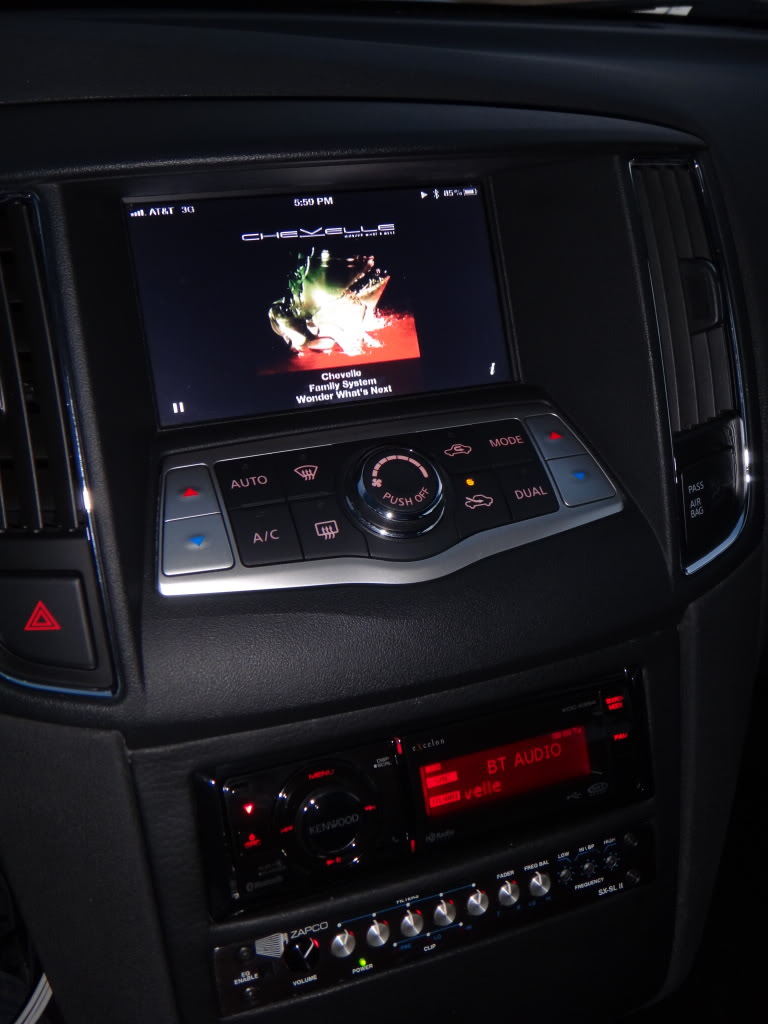
Hey guys just want to share my on going experiment with my display in my maxima. I own an S model. I decided to go with no navi or bose since It was going to be ripped out anyway. Audio comes first for me. So heres my ongoing progress. I removed the orange Display. Took it apart and rewired air conditioner display to the glove box. Making a little box for it. I then mounted a 7" aftermarket display right where the other display was. Looks factory. Took my Iphone 4S jailbroken, composite cable, and 1 hour later bam.
http://www.youtube.com/watch?v=XR_eesnH3Cg
See the video. Im playing around with Pandora. Pretty cool. I can control with steering wheel controls. My kenwood unit displays Track info and I can change tracks without even touching the iphone through Bluetooth. Its not wired directly to the radio at all. It also works to display Navigation and any apps that display properly.
Lets see what else I can do with another hour...... Any suggestions?
http://www.youtube.com/watch?v=XR_eesnH3Cg
See the video. Im playing around with Pandora. Pretty cool. I can control with steering wheel controls. My kenwood unit displays Track info and I can change tracks without even touching the iphone through Bluetooth. Its not wired directly to the radio at all. It also works to display Navigation and any apps that display properly.
Lets see what else I can do with another hour...... Any suggestions?

Member
Joined: Feb 2012
Posts: 105
From: Miami,Fl
Hey guys just want to share my on going experiment with my display in my maxima. I own an S model. I decided to go with no navi or bose since It was going to be ripped out anyway. Audio comes first for me. So heres my ongoing progress. I removed the orange Display. Took it apart and rewired air conditioner display to the glove box. Making a little box for it. I then mounted a 7" aftermarket display right where the other display was. Looks factory. Took my Iphone 4S jailbroken, composite cable, and 1 hour later bam.
http://www.youtube.com/watch?v=XR_eesnH3Cg
See the video. Im playing around with Pandora. Pretty cool. I can control with steering wheel controls. My kenwood unit displays Track info and I can change tracks without even touching the iphone through Bluetooth. Its not wired directly to the radio at all. It also works to display Navigation and any apps that display properly.
Lets see what else I can do with another hour...... Any suggestions?
http://www.youtube.com/watch?v=XR_eesnH3Cg
See the video. Im playing around with Pandora. Pretty cool. I can control with steering wheel controls. My kenwood unit displays Track info and I can change tracks without even touching the iphone through Bluetooth. Its not wired directly to the radio at all. It also works to display Navigation and any apps that display properly.
Lets see what else I can do with another hour...... Any suggestions?

Junior Member
Joined: Feb 2012
Posts: 51
From: NY
Awesome install I have a similar set up with the stock screen (composite cable to center console video inputs) I see your jail broken and have tvout and springboard rotator running those are the only recommendations id make. Next step: 7 inch secondary touch screen Interface for iPhone! I saw one online but they're expensive
Thread Starter
Junior Member
Joined: Jan 2011
Posts: 35
From: Chicagoland Area

Thread Starter
Junior Member
Joined: Jan 2011
Posts: 35
From: Chicagoland Area
bryansuavo- I will get you the model number for it. It fits perfect and I just used brackets with factory screw holes that hold the air vents and the air control module.
JBling- I lick my finger then test the air. If its too cold its two steps up on auto. If its too hot two steps down. Im always at 70 degrees auto. So no need to change, If I need to verify I peek in my glove box where the displays are at.
Thanks again for the compliments.
JBling- I lick my finger then test the air. If its too cold its two steps up on auto. If its too hot two steps down.
Im always at 70 degrees auto. So no need to change, If I need to verify I peek in my glove box where the displays are at. Thanks again for the compliments.


Member
Joined: Oct 2011
Posts: 200
From: Miami, FL
bryansuavo- I will get you the model number for it. It fits perfect and I just used brackets with factory screw holes that hold the air vents and the air control module.
JBling- I lick my finger then test the air. If its too cold its two steps up on auto. If its too hot two steps down. Im always at 70 degrees auto. So no need to change, If I need to verify I peek in my glove box where the displays are at.
Thanks again for the compliments.
JBling- I lick my finger then test the air. If its too cold its two steps up on auto. If its too hot two steps down.
Im always at 70 degrees auto. So no need to change, If I need to verify I peek in my glove box where the displays are at. Thanks again for the compliments.
yeah let me know cause i have an idea i want to do with it.. thanks.


Junior Member
Joined: Aug 2009
Posts: 20
Hey guys just want to share my on going experiment with my display in my maxima. I own an S model. I decided to go with no navi or bose since It was going to be ripped out anyway. Audio comes first for me. So heres my ongoing progress. I removed the orange Display. Took it apart and rewired air conditioner display to the glove box. Making a little box for it. I then mounted a 7" aftermarket display right where the other display was. Looks factory. Took my Iphone 4S jailbroken, composite cable, and 1 hour later bam.
http://www.youtube.com/watch?v=XR_eesnH3Cg
See the video. Im playing around with Pandora. Pretty cool. I can control with steering wheel controls. My kenwood unit displays Track info and I can change tracks without even touching the iphone through Bluetooth. Its not wired directly to the radio at all. It also works to display Navigation and any apps that display properly.
Lets see what else I can do with another hour...... Any suggestions?
http://www.youtube.com/watch?v=XR_eesnH3Cg
See the video. Im playing around with Pandora. Pretty cool. I can control with steering wheel controls. My kenwood unit displays Track info and I can change tracks without even touching the iphone through Bluetooth. Its not wired directly to the radio at all. It also works to display Navigation and any apps that display properly.
Lets see what else I can do with another hour...... Any suggestions?
dope Mod!...I'm assuming if you just plug in a ipod nano you will see podcast, music display on that screen?....and when you get a chance please post pic of heater controls in glove box?.... thanks and keep up the good work!


Thread Starter
Junior Member
Joined: Jan 2011
Posts: 35
From: Chicagoland Area
Ok everyone,
I will post pics of everything. Please be patient, I have a foot injury.
Pain medication keeps me a house prisoner.
Thanks again for the compliments and I will write up how to and material list.
I will post pics of everything. Please be patient, I have a foot injury.
Pain medication keeps me a house prisoner.
Thanks again for the compliments and I will write up how to and material list.


Thread Starter
Junior Member
Joined: Jan 2011
Posts: 35
From: Chicagoland Area
I just wanted to post the monitor model before I can post the install and my attempted write up. Im attaching a link so you can view it.
Farenheit model T-7000MHR
THE MONITOR THAT EVERYONE KEEPS ASKING FOR LOL
I will be posting soon all my pictures I have. Im searching for my build pics.

I really did not anticipate everyone asking how it was done but hey doesn't hurt to share right?...
Farenheit model T-7000MHR
THE MONITOR THAT EVERYONE KEEPS ASKING FOR LOL
I will be posting soon all my pictures I have. Im searching for my build pics.
I really did not anticipate everyone asking how it was done but hey doesn't hurt to share right?...
Member
Joined: Oct 2011
Posts: 200
From: Miami, FL
I just wanted to post the monitor model before I can post the install and my attempted write up. Im attaching a link so you can view it.
Farenheit model T-7000MHR
THE MONITOR THAT EVERYONE KEEPS ASKING FOR LOL
I will be posting soon all my pictures I have. Im searching for my build pics.
I really did not anticipate everyone asking how it was done but hey doesn't hurt to share right?...
Farenheit model T-7000MHR
THE MONITOR THAT EVERYONE KEEPS ASKING FOR LOL
I will be posting soon all my pictures I have. Im searching for my build pics.
I really did not anticipate everyone asking how it was done but hey doesn't hurt to share right?...
thanks man.. i had another one in mind but its twice as much. .thats why i didnt do this before.. but i am going to get to this in a few weeks.. after i buy all the other stuff i need.. i want to hook up the CPU of the car to it so i can see RPM.. . A/F Ratio.. all that.


Junior Member
Joined: Jan 2009
Posts: 23
From: Brooklyn
bump
does anyone have any input on how this was done? given that the op has not replied in a month, i'm assuming he forgot about this thread. i'm really not crazy on having two screens in my car, a little to much in my opinion especially if the top screen is only there to display the temperature. as far as the amber screen goes i could do without it, seeing as i have the AC on the coolest temp in the summer and warmest temp in the winter. anyone have any similar installs chime in, would gladly appreciate it.
does anyone have any input on how this was done? given that the op has not replied in a month, i'm assuming he forgot about this thread. i'm really not crazy on having two screens in my car, a little to much in my opinion especially if the top screen is only there to display the temperature. as far as the amber screen goes i could do without it, seeing as i have the AC on the coolest temp in the summer and warmest temp in the winter. anyone have any similar installs chime in, would gladly appreciate it.
Last edited by Compusmurf; Feb 7, 2013 at 05:32 AM.


Member
Joined: Apr 2012
Posts: 126
From: Boston Ma,
Where did u get the dash kit? Looking to install a touchscreen display I have an insane system In my maxima SV being controlled by a alpine PXA- H800 with the Controller i just ordered a set of BC coilovers & waiting to slam it before I post some pics... 20" staggered deep lip stainless rims please let me know thanks..


Senior Member
Joined: Jan 2012
Posts: 354
I am guessing the screen is wired to the ipod/iphone and wireless to the head unit. The monitor mimics the iphone and sends audio via BT to the headunit. No $h!t, yeah I know, thats what he wrote up top. So no new info here from me.
How come in this world of monitor theres only one like the t-7000mhr? I am looking for one with more screen power but built similar.
How come in this world of monitor theres only one like the t-7000mhr? I am looking for one with more screen power but built similar.

Junior Member
Joined: Nov 2011
Posts: 86
From: The Great States
I am guessing the screen is wired to the ipod/iphone and wireless to the head unit. The monitor mimics the iphone and sends audio via BT to the headunit. No $h!t, yeah I know, thats what he wrote up top. So no new info here from me.
How come in this world of monitor theres only one like the t-7000mhr? I am looking for one with more screen power but built similar.
How come in this world of monitor theres only one like the t-7000mhr? I am looking for one with more screen power but built similar.
Everything are set except for that bracket he mentioned. How did he managed to attached the monitor to the top console? What type of bracket was he talking about?
Senior Member
Joined: Jan 2012
Posts: 354
I got that part so far. I have a pioneer receiver replacing the old stock radio. I'm going to mirror the video up top to the monitor.
Everything are set except for that bracket he mentioned. How did he managed to attached the monitor to the top console? What type of bracket was he talking about?
Everything are set except for that bracket he mentioned. How did he managed to attached the monitor to the top console? What type of bracket was he talking about?
Junior Member
Joined: Nov 2011
Posts: 86
From: The Great States
So the stock bracket that is currently holding the amber screen would works right?
Junior Member
Joined: Nov 2011
Posts: 86
From: The Great States
I bought the Pioneer AVIC X930BT and have already installed it...here are a few pix of it:
http://forums.maxima.org/8415684-post9.html
Now my stock upper amber screen is just empty and gross looking...will buy the mentioned monitor and put the temperature screen in the glove box...
http://forums.maxima.org/8415684-post9.html
Now my stock upper amber screen is just empty and gross looking...will buy the mentioned monitor and put the temperature screen in the glove box...