


2004 maxima w/bose wo/nav aux input?


Thread Starter
Newbie - Just Registered
Joined: Jan 2013
Posts: 12
2004 maxima w/bose wo/nav aux input?
anyone know a way i can add an aux input to my bose audio? i'm wondering if anyone has tapped into the cassette input to the bose system and used this???
thanks!
thanks!

Senior Member
Joined: Jun 2007
Posts: 670


Junior Member
Joined: Jan 2013
Posts: 37

Junior Member
Joined: Jun 2010
Posts: 70
From: Miramar Ca
Supporting Maxima.org Member

Joined: Feb 2005
Posts: 240
I went to a local audio shop and got an I pod kit for my car a 2005 SL. The kit had an AUX input too. I hooked up the AUX to a Belkin bluetooth hands free kit and now I stream off the phone and never miss a call. I have the Bose w/navi. It can be done.


Joined: Nov 2010
Posts: 18
To those who have the factory bose system with the casset player, it is possible to add an axilary cable directly to the head unit and have high quality audio play form it. I installed it in my maxima. I'll take a pic if anyone is interested.
Junior Member
Joined: Jan 2013
Posts: 37
Please do, very interested. Although, I have the cassette player, I am very happy with it.
 .
.Problem is, this guy will probably never post again on this board and follow through with a writeup. Or will he?

I remember there was a howto for the 4th gen bose HU which involved some minor soldering. Maybe he did something similar. Please share it if possible man.
Joined: Nov 2010
Posts: 18
Of course people are interested. In fact, that is exactly what the OP is asking for .
Problem is, this guy will probably never post again on this board and follow through with a writeup. Or will he?
I remember there was a howto for the 4th gen bose HU which involved some minor soldering. Maybe he did something similar. Please share it if possible man.
.Problem is, this guy will probably never post again on this board and follow through with a writeup. Or will he?
I remember there was a howto for the 4th gen bose HU which involved some minor soldering. Maybe he did something similar. Please share it if possible man.
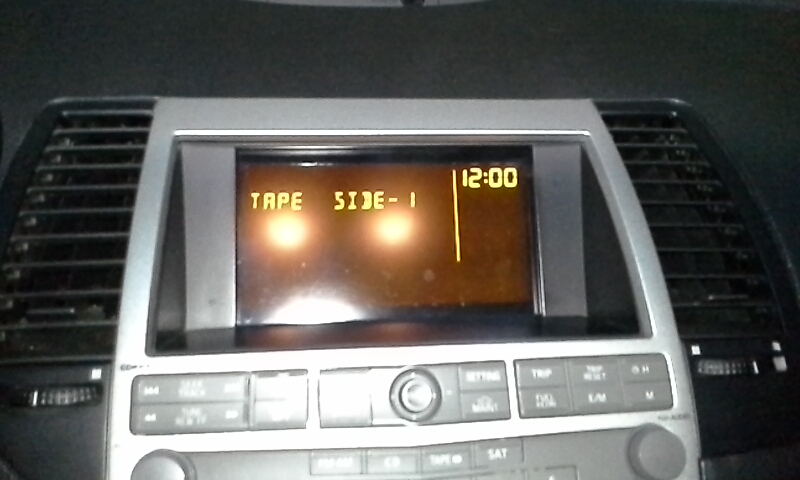
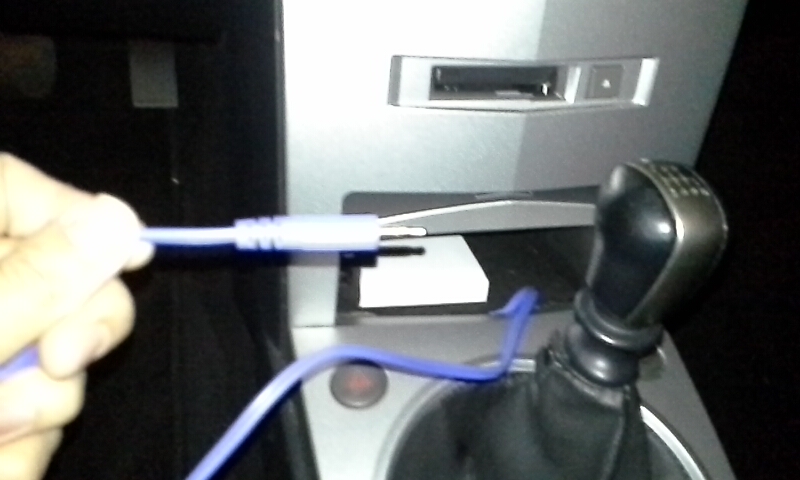
Take apart the stereo, from the top remove the four or five little screws from the casset unit inside the stereo. take a look at the circuit board on the casset unit and somewhere toward the bottom there are these three unused solder points that look like pins. Some where next to it you can see the words in white that read AUX INPUT. That is were you solder the auxilary wires into. I hope you guys can figure out how to solder it there. It is labeled left chanel, right chanel and ground. After you put it back in, you can just lay the wire to come out the streo though the already exiting holes, get creative. Then when you put it all together get one of those casset adapters and take out the wire and the little transmission head inside it. the point is to use the casset as a dummy tape. put it in and press the casset button like you are going to listen to a casset now connect the new auxilary cable to your device and balance the volume on the devide and on the head unit. Usually about 75% on the devide will work.
That sums up what i did and works for me. I have an '06 without navigation.
I can try to make a write up but i have to take it all appart to take pics. Yeah i know, i should of made a write up when i was doing it but i was really dedicated to it that i realized i forgot to make a write up when it was all done. I thought of all the people here on the forums when i did it but i guess i just kept it to my self.

If anyone still wants a write up, please motivate me. and i might red-o it in a few days, unless some one else dares to do it.
Last edited by nissguy82; Feb 8, 2013 at 05:17 PM.

Nice work man, I like how you stashed the wire in the pocket. Much respect for following up with guidance and pictures. I'm sure this can help out some people who want a creative, cost effective alternative to the retail aux adapters.
Thanks again and nice job.
Thanks again and nice job.
Thread Starter
Newbie - Just Registered
Joined: Jan 2013
Posts: 12
No, I'm still here. Yes what the guy with the 4th gen Maxima that soldered the wire to the unit is exactly what i did. Yes, the 2004-2006 maxima stereos work sililar (i mean same pricipal). I was bored one day and decided to take my whole head unit appart to see what i can do to add an aux, i even saw that other wirteup and decided to see if i could do the same. You can do it too.
Take apart the stereo, from the top remove the four or five little screws from the casset unit inside the stereo. take a look at the circuit board on the casset unit and somewhere toward the bottom there are these three unused solder points that look like pins. Some where next to it you can see the words in white that read AUX INPUT. That is were you solder the auxilary wires into. I hope you guys can figure out how to solder it there. It is labeled left chanel, right chanel and ground. After you put it back in, you can just lay the wire to come out the streo though the already exiting holes, get creative. Then when you put it all together get one of those casset adapters and take out the wire and the little transmission head inside it. the point is to use the casset as a dummy tape. put it in and press the casset button like you are going to listen to a casset now connect the new auxilary cable to your device and balance the volume on the devide and on the head unit. Usually about 75% on the devide will work.
That sums up what i did and works for me. I have an '06 without navigation.
I can try to make a write up but i have to take it all appart to take pics. Yeah i know, i should of made a write up when i was doing it but i was really dedicated to it that i realized i forgot to make a write up when it was all done. I thought of all the people here on the forums when i did it but i guess i just kept it to my self.
If anyone still wants a write up, please motivate me. and i might red-o it in a few days, unless some one else dares to do it.
Take apart the stereo, from the top remove the four or five little screws from the casset unit inside the stereo. take a look at the circuit board on the casset unit and somewhere toward the bottom there are these three unused solder points that look like pins. Some where next to it you can see the words in white that read AUX INPUT. That is were you solder the auxilary wires into. I hope you guys can figure out how to solder it there. It is labeled left chanel, right chanel and ground. After you put it back in, you can just lay the wire to come out the streo though the already exiting holes, get creative. Then when you put it all together get one of those casset adapters and take out the wire and the little transmission head inside it. the point is to use the casset as a dummy tape. put it in and press the casset button like you are going to listen to a casset now connect the new auxilary cable to your device and balance the volume on the devide and on the head unit. Usually about 75% on the devide will work.
That sums up what i did and works for me. I have an '06 without navigation.
I can try to make a write up but i have to take it all appart to take pics. Yeah i know, i should of made a write up when i was doing it but i was really dedicated to it that i realized i forgot to make a write up when it was all done. I thought of all the people here on the forums when i did it but i guess i just kept it to my self.
If anyone still wants a write up, please motivate me. and i might red-o it in a few days, unless some one else dares to do it.
so you are using the cassette player input to the system, connecting a 3.5mm stereo male cable in parallel with the tape\cassette player output to the bose yes? thanks again. i bought a cassette adapter (i haven't used one of these in years!) and now i remember why. they are just awful : (
Thread Starter
Newbie - Just Registered
Joined: Jan 2013
Posts: 12
add this to the aux input and you have a cheap bluetooth rigg : )
http://www.parts-express.com/pe/show...number=320-353
http://www.parts-express.com/pe/show...number=320-353

Junior Member
Joined: May 2012
Posts: 20
This is really cool, I had no idea this could be done. What kind of auxiliary cable are you supposed to buy? The only ones I have ever seen are aux to aux, but that one in the picture above looks like it splits off so you can solder it. Is it just a regular aux cable with the end cut off or something special?
There is mention of three connections (left, right, ground) but I only see two wires in the picture above? Or is that little tiny thing that looks like a string the third wire?
There is mention of three connections (left, right, ground) but I only see two wires in the picture above? Or is that little tiny thing that looks like a string the third wire?
Joined: Nov 2010
Posts: 18
This is really cool, I had no idea this could be done. What kind of auxiliary cable are you supposed to buy? The only ones I have ever seen are aux to aux, but that one in the picture above looks like it splits off so you can solder it. Is it just a regular aux cable with the end cut off or something special?
There is mention of three connections (left, right, ground) but I only see two wires in the picture above? Or is that little tiny thing that looks like a string the third wire?
There is mention of three connections (left, right, ground) but I only see two wires in the picture above? Or is that little tiny thing that looks like a string the third wire?
Look closely, the ground wire in his picture is very thin.
Junior Member
Joined: May 2012
Posts: 20
add this to the aux input and you have a cheap bluetooth rigg : )
http://www.parts-express.com/pe/show...number=320-353
http://www.parts-express.com/pe/show...number=320-353
Perfect! Thanks, think I'll give this a go!

Newbie - Just Registered
Joined: Mar 2013
Posts: 2
From: Montreal, Qc
No, I'm still here. Yes what the guy with the 4th gen Maxima that soldered the wire to the unit is exactly what i did. Yes, the 2004-2006 maxima stereos work sililar (i mean same pricipal). I was bored one day and decided to take my whole head unit appart to see what i can do to add an aux, i even saw that other wirteup and decided to see if i could do the same. You can do it too.
Take apart the stereo, from the top remove the four or five little screws from the casset unit inside the stereo. take a look at the circuit board on the casset unit and somewhere toward the bottom there are these three unused solder points that look like pins. Some where next to it you can see the words in white that read AUX INPUT. That is were you solder the auxilary wires into. I hope you guys can figure out how to solder it there. It is labeled left chanel, right chanel and ground. After you put it back in, you can just lay the wire to come out the streo though the already exiting holes, get creative. Then when you put it all together get one of those casset adapters and take out the wire and the little transmission head inside it. the point is to use the casset as a dummy tape. put it in and press the casset button like you are going to listen to a casset now connect the new auxilary cable to your device and balance the volume on the devide and on the head unit. Usually about 75% on the devide will work.
That sums up what i did and works for me. I have an '06 without navigation.
I can try to make a write up but i have to take it all appart to take pics. Yeah i know, i should of made a write up when i was doing it but i was really dedicated to it that i realized i forgot to make a write up when it was all done. I thought of all the people here on the forums when i did it but i guess i just kept it to my self.
If anyone still wants a write up, please motivate me. and i might red-o it in a few days, unless some one else dares to do it.
Take apart the stereo, from the top remove the four or five little screws from the casset unit inside the stereo. take a look at the circuit board on the casset unit and somewhere toward the bottom there are these three unused solder points that look like pins. Some where next to it you can see the words in white that read AUX INPUT. That is were you solder the auxilary wires into. I hope you guys can figure out how to solder it there. It is labeled left chanel, right chanel and ground. After you put it back in, you can just lay the wire to come out the streo though the already exiting holes, get creative. Then when you put it all together get one of those casset adapters and take out the wire and the little transmission head inside it. the point is to use the casset as a dummy tape. put it in and press the casset button like you are going to listen to a casset now connect the new auxilary cable to your device and balance the volume on the devide and on the head unit. Usually about 75% on the devide will work.
That sums up what i did and works for me. I have an '06 without navigation.
I can try to make a write up but i have to take it all appart to take pics. Yeah i know, i should of made a write up when i was doing it but i was really dedicated to it that i realized i forgot to make a write up when it was all done. I thought of all the people here on the forums when i did it but i guess i just kept it to my self.
If anyone still wants a write up, please motivate me. and i might red-o it in a few days, unless some one else dares to do it.
10x thanks you ! Have try about 5 cassette to aux adapter but all sound like crap! Even the monster one 39.99$
I have try this and it Work like a charm! Sound at max on my iphone and no problem! Cant imagine it will sound as goood as this!!! Amazing for a free solution!

Thanks !!!!!!!!!
And thanks to (ehunni7989) for the picture !
Have a good day everyone and keep up the good work

Newbie - Just Registered
Joined: Mar 2013
Posts: 1
From: New Egypt, NJ
I also have 05 Maxima with Bose cd and cassette. if i took it somewhere professional they can hook up an AUX cable directly to my stock unit? Please reply, trying to go get all this taken care of by Friday. Thanks

Junior Member
Joined: Jul 2011
Posts: 29
I've gone through a couple of those tape adapters, and this one has the best overall sound quality,


Junior Member
Joined: May 2012
Posts: 20
Just wanted to thank nissguy82 and ehunni7989 for the guidance and pictures! I did this last night and it works like a charm! The only thing I've noticed is the tape is quite loud, but maybe I just have to try a different tape.
Thanks again!
Thanks again!
Joined: Nov 2010
Posts: 18
Can you describe how the tape is loud?

Newbie - Just Registered
Joined: Sep 2013
Posts: 1
Auxiliary Install
I soldered in a 3.5 mm cable and ran it through the back of the storage box. Instead of wasting money on the auxiliary cassette, I bought a blank cassette for 86 cents and pulled all of the tape out of it. It works the same way (activates the tape deck).

Newbie - Just Registered
Joined: Dec 2011
Posts: 14
From: South Central US
So I did this mod and have an issue. This thing works only on an iPhone 4 and down. It does not work with an iPhone 5 or a Galaxy S3. I also tried it with a MP3 player, it worked fine. Neither phone will not even recognize the headset input. Not sure why, maybe a ground issue. Does anyone have ideas?
Joined: Nov 2010
Posts: 18
"So I did this mod and have an issue. This thing works only on an iPhone 4 and down. It does not work with an iPhone 5 or a Galaxy S3. I also tried it with a MP3 player, it worked fine. Neither phone will not even recognize the headset input. Not sure why, maybe a ground issue. Does anyone have ideas?"
Its not the stereo. I had the same problem. samsungs do not work. HTC, Iphones, ipods and others will work. I think it has to do with eighter the way the headphone jack inside the phone is configured with the microphone inside the jack or it has to do with the resistance that the phone detects when you plug in some headphone. for example when you plug in a set of headphones the phone can detect the resistance from the speakers.
Its not the stereo. I had the same problem. samsungs do not work. HTC, Iphones, ipods and others will work. I think it has to do with eighter the way the headphone jack inside the phone is configured with the microphone inside the jack or it has to do with the resistance that the phone detects when you plug in some headphone. for example when you plug in a set of headphones the phone can detect the resistance from the speakers.

Senior Member
Joined: May 2006
Posts: 2,460
From: Bremerton, WA
you should just get a bluetooth receiver and install it. http://www.ebay.com/itm/3-5mm-Wireless-Bluetooth-Receiver-Stereo-Audio-Simple-For-iPod-iPhone-MP3-MP4-PC-/350828587855?pt=Other_Tablet_eReader_Accessories&var=&hash=item51af036b4f then you need this http://www.ebay.com/itm/Car-Cigarette-Dual-USB-Charger-Adapter-for-iPad-3-2-iPhone-4S-4-Galaxy-i9100-HTC-/130960289282?pt=Other_Tablet_eReader_Accessories&hash=item1e7dd76e02

What's the best way to get Bluetooth hooked up? I want to be able to use my phone capabilities, and audio streaming. I have an iPhone 5S and due to the lightning cable audio streaming is possible but very expensive (BestBuy want $350 installed)

Newbie - Just Registered
Joined: Nov 2013
Posts: 2
Why not just get a bluetooth fm transmitter. Maybe looks a little goofy, buy so easy.
I think a lot of these have usb charger built in...
I think a lot of these have usb charger built in...


Newbie - Just Registered
Joined: Jun 2015
Posts: 2
After all done Service Engine Soon lights came on :(
Guys, I really need help. I bought 2004 nissan maxima automatic. And did this whole aux input trick as described. I was so afraid to do this everything but I convinced myself to do this and it stucked at the point when I took out the cassette deck out of the chassis, I found 4 box type sockets and on black round antenna cable...what I am supposed to do after that? I was thinking that I was doing something wrong so I put it back all in nicely and setup back everything as the original.
The problem I got is SERVICE ENGINE LIGHT comes on....and it remains on since last 2 days.... I checked all oil levels, and fuel gas cap as suggested on youtube, but how it comes on after this all stereo thing? Anxiously waiting for any help or I have to go to mechanic and they charge me atleast $50!
Excuse for my bad English.
Mujtaba
The problem I got is SERVICE ENGINE LIGHT comes on....and it remains on since last 2 days.... I checked all oil levels, and fuel gas cap as suggested on youtube, but how it comes on after this all stereo thing? Anxiously waiting for any help or I have to go to mechanic and they charge me atleast $50!
Excuse for my bad English.
Mujtaba