


New owner here...


Thread Starter
Newbie - Just Registered
Joined: Jul 2014
Posts: 5
New owner here...
Hi all,
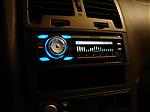
Just picked up a 2012 Maxima last week and am loving it! Still learning the ins and outs of the car and was wondering if you all could help me out with something. In the attached picture, what is the oval shaped "button" on the right side? It seems to be spring loaded, but I can't figure out what it is/does. Thanks a million
Just picked up a 2012 Maxima last week and am loving it! Still learning the ins and outs of the car and was wondering if you all could help me out with something. In the attached picture, what is the oval shaped "button" on the right side? It seems to be spring loaded, but I can't figure out what it is/does. Thanks a million

Senior Member
Joined: Feb 2014
Posts: 500
From: CT
Hi all,
Just picked up a 2012 Maxima last week and am loving it! Still learning the ins and outs of the car and was wondering if you all could help me out with something. In the attached picture, what is the oval shaped "button" on the right side? It seems to be spring loaded, but I can't figure out what it is/does. Thanks a million
Just picked up a 2012 Maxima last week and am loving it! Still learning the ins and outs of the car and was wondering if you all could help me out with something. In the attached picture, what is the oval shaped "button" on the right side? It seems to be spring loaded, but I can't figure out what it is/does. Thanks a million
Welcome to the forum btw!


Thread Starter
Newbie - Just Registered
Joined: Jul 2014
Posts: 5
That's the funny part; I did go through the manual and couldn't find an answer. For whatever reason, I think the manual for the Maxima is much more poorly written than the one for my Titan.




Senior Member
Joined: May 2014
Posts: 302
From: Houston, TX
The infamous fobgina.  Welcome aboard!
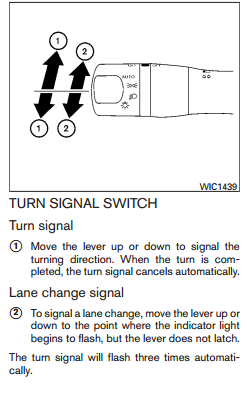
Speaking of which, can you check if your Maxima is able to perform the following task? Seems to be a hit or miss in this part of the forum. And for all the other members, yes I am still wondering why it is in the manual if it does not work and why somebody has it working on their car!
Welcome aboard!Speaking of which, can you check if your Maxima is able to perform the following task? Seems to be a hit or miss in this part of the forum. And for all the other members, yes I am still wondering why it is in the manual if it does not work and why somebody has it working on their car!

Senior Member
Joined: Oct 2010
Posts: 1,326
From: WA
The answer to your question resides in the "quick reference guide". The guide is separate from the OM.
Thread Starter
Newbie - Just Registered
Joined: Jul 2014
Posts: 5
Thanks for the quick responses guys/gals! These forums look like a great place to share information. I look forward to receiving (and eventually giving) great info!
Daaavid: I'll give that auto lane change thingie a try tomorrow and post my "findings".
Daaavid: I'll give that auto lane change thingie a try tomorrow and post my "findings".

Junior Member
Joined: Jun 2009
Posts: 61
The infamous fobgina. Welcome aboard!
Speaking of which, can you check if your Maxima is able to perform the following task? Seems to be a hit or miss in this part of the forum. And for all the other members, yes I am still wondering why it is in the manual if it does not work and why somebody has it working on their car!

Welcome aboard!Speaking of which, can you check if your Maxima is able to perform the following task? Seems to be a hit or miss in this part of the forum. And for all the other members, yes I am still wondering why it is in the manual if it does not work and why somebody has it working on their car!
I have this feature on my 14' SV and thought it was a standard on all Nissans.

Thread
Thread Starter
Forum
Replies
Last Post
doctorpullit
8th Generation Maxima (2016-)
21
Oct 28, 2019 10:58 PM
mkaresh
8th Generation Maxima (2016-)
21
Mar 12, 2018 06:48 PM
Forge277
1st & 2nd Generation Maxima (1981-1984 and 1985-1988)
12
Jun 13, 2016 09:26 PM