


After market NAV install


After market NAV install
I just purchased an Alpine DVD Nav from ebay along with an Alpine 7" touchscreen monitor for it. Based on pics posted by some members where they moved the stock info screen down in front of the shift ****, I plan to put the 7" touchscreen where the info screen was.
QUESTIONS: I have an installer who is willing to work with me but has never done this type of project before:
1. IS IT HARD TO MOVE THE INFO SCREEN DOWN TO THE COMPARTMENT IN FRONT OF THE SHIFT ****?
2. IS THER ENOUGH WIRING FOR THE INFO SCREEN TO BE MOVED, OR DO I NEED TO EXTEND THE WIRING?
3. HOW LONG DOES THIS INSTALL PROJECT TAKE?
thanks in advance.

QUESTIONS: I have an installer who is willing to work with me but has never done this type of project before:
1. IS IT HARD TO MOVE THE INFO SCREEN DOWN TO THE COMPARTMENT IN FRONT OF THE SHIFT ****?
2. IS THER ENOUGH WIRING FOR THE INFO SCREEN TO BE MOVED, OR DO I NEED TO EXTEND THE WIRING?
3. HOW LONG DOES THIS INSTALL PROJECT TAKE?
thanks in advance.



Senior Member
Joined: Jan 2006
Posts: 145
1. It is very simple to relocate
2. There is just enough to do the job
3. The relocation job should take about 10 minutes, As for installing the touchscreen that all depends on how you plan on installing it. I ended up having to attach my touchscreen to the actual bezel rather than the bracket that held the factory display.
You should have just installed a carpc and that would have given you lots more than just GPS. I have one running my GPS,MP3's,DVD's,wireless internet,Games,Music videos...) and the entire system including touchscreen cost me just over $1000. I did all the work myself and everyone thinks it came from the factory that way. I love it
2. There is just enough to do the job
3. The relocation job should take about 10 minutes, As for installing the touchscreen that all depends on how you plan on installing it. I ended up having to attach my touchscreen to the actual bezel rather than the bracket that held the factory display.
You should have just installed a carpc and that would have given you lots more than just GPS. I have one running my GPS,MP3's,DVD's,wireless internet,Games,Music videos...) and the entire system including touchscreen cost me just over $1000. I did all the work myself and everyone thinks it came from the factory that way. I love it


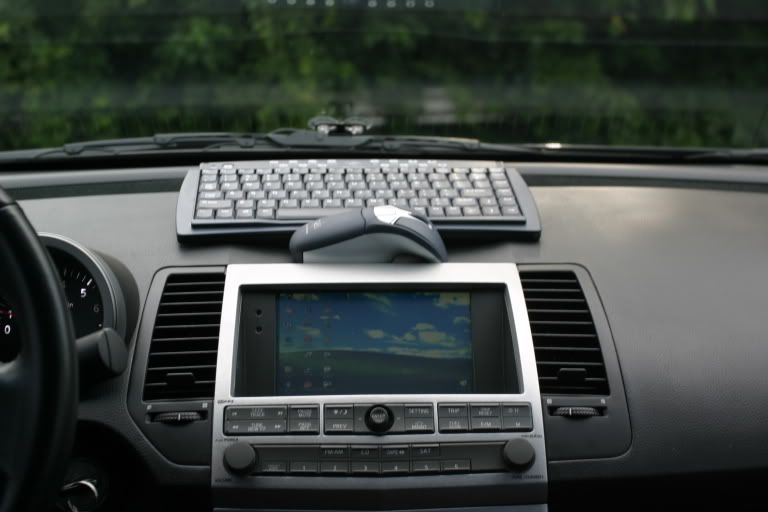
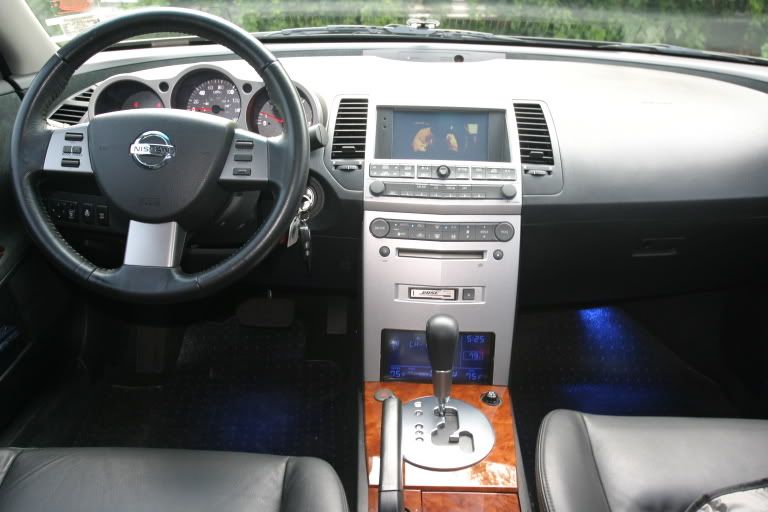
Bestbuy was going to charge me 100.00 just to remove the factory screen down in front of the shift ****.... 
So i went back into the install area and talked to one of the guys, he said if I bought him lunch he would do it for free... So i said hell yeah as long as your not gay....
It looks pretty easy to remove and install...
So i went back into the install area and talked to one of the guys, he said if I bought him lunch he would do it for free... So i said hell yeah as long as your not gay....
It looks pretty easy to remove and install...

Senior Member
Joined: Jan 2006
Posts: 145
unmatched, you and I have a very similar set up except I'm using a mini pc. What are you using to get the sound to your headunit?
I swapped out my factory radio but thinking about switching back and adding the pac adaptor
I swapped out my factory radio but thinking about switching back and adding the pac adaptor
Originally Posted by hpric
unmatched, you and I have a very similar set up except I'm using a mini pc. What are you using to get the sound to your headunit?
I swapped out my factory radio but thinking about switching back and adding the pac adaptor
I swapped out my factory radio but thinking about switching back and adding the pac adaptor

Senior Member
Joined: Jan 2006
Posts: 145
I'll take some pics with my camera phone during lunch and post them up. I see you have the Bose system, I was told I could still use the pac adapter even wothout the Bose but will lose my presets on one of my ABC bands which is fine with me. Do you have control of your mp3's via the steering wheel controls?

Originally Posted by I VIK I
if i put a carputer in, is there any way I can get rid of the stock screen and have everyting displayed on the carputer screen?
Originally Posted by hpric
I'll take some pics with my camera phone during lunch and post them up. I see you have the Bose system, I was told I could still use the pac adapter even wothout the Bose but will lose my presets on one of my ABC bands which is fine with me. Do you have control of your mp3's via the steering wheel controls?
Here are some updated pics, I used my camera phone so please excuse the quality;


Junior Member
Joined: Nov 2006
Posts: 54
So the carputer sounds like the way to go. I was checking out ebay, and I saw a nice looking system, but how do I know if the screen will fit or not? The one that I was looking at is here. Do you guys think the screen will fit in the info screen location?
Originally Posted by Mr. Cummings
So the carputer sounds like the way to go. I was checking out ebay, and I saw a nice looking system, but how do I know if the screen will fit or not? The one that I was looking at is here. Do you guys think the screen will fit in the info screen location?
That pc looks good, especially if you can get it for under $400.

Newbie - Just Registered
Joined: Nov 2006
Posts: 10
Originally Posted by UnMaTcHeD
I started another thread a while ago with more detail about my carputer.
Great looking install there. I am unable to seach the site. Can you link to the thread you have with more details on this cool upgrade??
Cheers, Rob

Originally Posted by Fastmax05
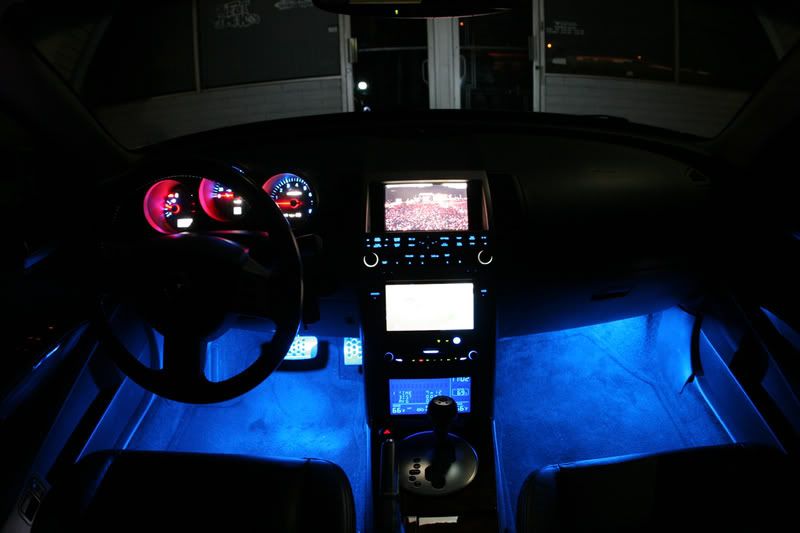
how many led's are there that light up the screen??
There are a lot of them, they are all soldered in as well. Look here for more info:http://www.6thgenmaxima.org/welcome.html
(scroll down)
Originally Posted by ottotekteecher
Great looking install there. I am unable to seach the site. Can you link to the thread you have with more details on this cool upgrade??
Cheers, Rob
Cheers, Rob
Senior Member
Joined: Jan 2006
Posts: 145
Ok, I've uploaded some pics, you can check them out here.
http://i116.photobucket.com/albums/o...BlueDevil7.jpg
http://i116.photobucket.com/albums/o...BlueDevil6.jpg
http://i116.photobucket.com/albums/o...BlueDevil4.jpg
http://i116.photobucket.com/albums/o...BlueDevil1.jpg
http://i116.photobucket.com/albums/o...BlueDevil2.jpg
http://i116.photobucket.com/albums/o...AlpineSkin.jpg
http://i116.photobucket.com/albums/o13/hpric/Carpc.jpg
I'll upload some more of the pc and all the other toys soon
http://i116.photobucket.com/albums/o...BlueDevil7.jpg
http://i116.photobucket.com/albums/o...BlueDevil6.jpg
http://i116.photobucket.com/albums/o...BlueDevil4.jpg
http://i116.photobucket.com/albums/o...BlueDevil1.jpg
http://i116.photobucket.com/albums/o...BlueDevil2.jpg
http://i116.photobucket.com/albums/o...AlpineSkin.jpg
http://i116.photobucket.com/albums/o13/hpric/Carpc.jpg
I'll upload some more of the pc and all the other toys soon

Senior Member
Joined: Jan 2006
Posts: 145


Originally Posted by povartrader
is there any cutting involved to make the info screen fit in that area where the cubby hole in front of the shifter is?

Senior Member
Joined: Jan 2006
Posts: 145
It's not that difficult. I believe Unmatched had his system installed by a professional installer but I did my own because I wanted to know how everything was hooked up and configured just in case something went wrong and I had to fix it. I actually found it to be more fun than frustration.
I did all my research at www.mp3car.com believe me when I tell you that all your questions have already been asked there so its a great place to start.
Some things you'll need are
1. pc (tons of choices but remember to keep it simple)
2. 7" Touchscreen
3. Power Supply
I did all my research at www.mp3car.com believe me when I tell you that all your questions have already been asked there so its a great place to start.
Some things you'll need are
1. pc (tons of choices but remember to keep it simple)
2. 7" Touchscreen
3. Power Supply