


Replacing NAV Screen?


I don't think anyone has tried that one, most of us don't have the stock NAV who have shuffled the screens around.
It's probably would be a bit of work.
What would you plan to do with the stock NAV screen then?
It's probably would be a bit of work.
What would you plan to do with the stock NAV screen then?

Thread Starter
Member
Joined: Feb 2007
Posts: 77
Well I want to mount a Mac Mini in the glove box. I found an adapter that will let me plug in two component sources into the stock NAV screen here: http://www.tvandnav2go.com/
It's a PNP solution for $250.
But I'm getting word over at mp3car.com that converting the Macs DVI output to RCA (via Apples adapter) will drop the video quality significantly, to the point where text is unreadable.
So this has me wondering if I can buy an aftermarket screen and somehow still input Nissan's NAV. I just paid 1800+ for the damn thing I'd like to continue to use it.
It's a PNP solution for $250.
But I'm getting word over at mp3car.com that converting the Macs DVI output to RCA (via Apples adapter) will drop the video quality significantly, to the point where text is unreadable.
So this has me wondering if I can buy an aftermarket screen and somehow still input Nissan's NAV. I just paid 1800+ for the damn thing I'd like to continue to use it.
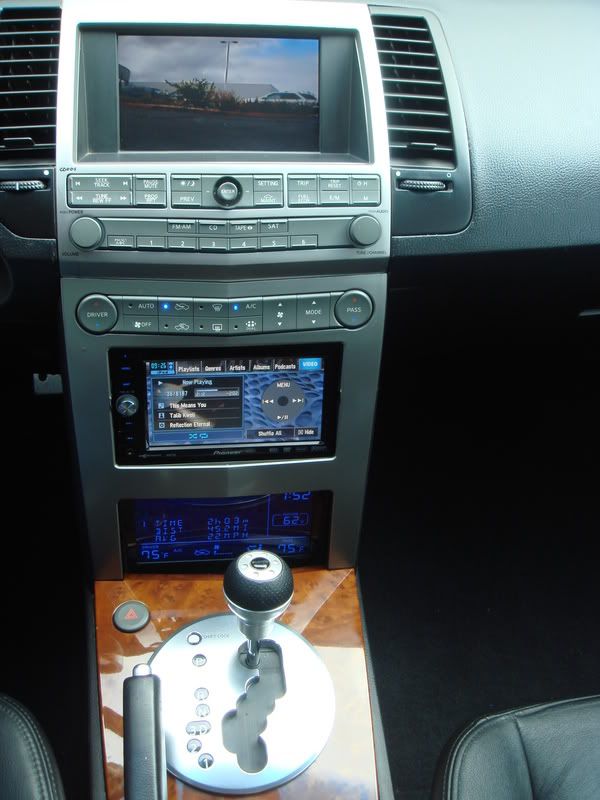
Yeah the tvandnav2go was going to be my next suggestion, what you could do is add a touch screen where the stock CD and Tape are now and keep the NAV screen where it is. It would look somewhat like my setup:

Thread Starter
Member
Joined: Feb 2007
Posts: 77
I think my next step is going to be to plug my Mac Mini into a TV via RCA and play with the quality. If I can get the quality decent or better than this may be all for nothing.
Otherwise, I will have to look into a VGA monitor, which brings me back to my original question about using an aftermarket screen with the factory NAV still functional.
Otherwise, I will have to look into a VGA monitor, which brings me back to my original question about using an aftermarket screen with the factory NAV still functional.

Joined: May 2005
Posts: 10,197
From: Displaced New Yorker in Southern, MD
Originally Posted by jsmithsole
Yeah the tvandnav2go was going to be my next suggestion, what you could do is add a touch screen where the stock CD and Tape are now and keep the NAV screen where it is. It would look somewhat like my setup:

Originally Posted by ladams02
The 07's don't have a tape deck and there isn't as much real estate available for a mod like that. That's a little more customizing than I want to do. Real nice setup tho!
Oops, didn't know you had an '07...nevermind.

Senior Member
Joined: May 2005
Posts: 103
Originally Posted by jsmithsole
Yeah the tvandnav2go was going to be my next suggestion, what you could do is add a touch screen where the stock CD and Tape are now and keep the NAV screen where it is. It would look somewhat like my setup:
i want to know does any of your factory radio controls work with your aftermarket deck or are they pretty much useless... factory volume, cd, steering wheel volume...
the controls will be useless unless you get the pac adapter for that unit.
its a few wires and resistors need to be soldered and a quick program of it and the basic controls like vol, skip foward/ backward will work.
its a few wires and resistors need to be soldered and a quick program of it and the basic controls like vol, skip foward/ backward will work.
Senior Member
Joined: May 2005
Posts: 103
Originally Posted by Tek-Niq
the controls will be useless unless you get the pac adapter for that unit.
its a few wires and resistors need to be soldered and a quick program of it and the basic controls like vol, skip foward/ backward will work.
its a few wires and resistors need to be soldered and a quick program of it and the basic controls like vol, skip foward/ backward will work.
cool... i'll keep that in mind
Senior Member
Joined: May 2005
Posts: 103
Originally Posted by Tek-Niq
just so you do't get the wrong idea, only the controls on the steering wheel will work with that adapter, the console controls will be good as dead.
too bad there isn't something to replace them with

Thread Starter
Member
Joined: Feb 2007
Posts: 77
I think the nav2go is what I'm looking for. If I can't get a decide signal out of the Mac Mini (after converting to RCA) then I will go after a mini PC with a video card that outputs a good picture with composite out.
a computer will give best video either way, if you are just looking to get video out the video card wich is S-video or something better than rca, the easiest wat to do it is look on ebay or so for a S-video / rca cable.
it is a wire with S-video on one end and rca on the other.
I don't know if you knew that, but I'll put it out there anyway.
it is a wire with S-video on one end and rca on the other.
I don't know if you knew that, but I'll put it out there anyway.
Thread Starter
Member
Joined: Feb 2007
Posts: 77
Originally Posted by Tek-Niq
a computer will give best video either way, if you are just looking to get video out the video card wich is S-video or something better than rca, the easiest wat to do it is look on ebay or so for a S-video / rca cable.
it is a wire with S-video on one end and rca on the other.
I don't know if you knew that, but I'll put it out there anyway.
it is a wire with S-video on one end and rca on the other.
I don't know if you knew that, but I'll put it out there anyway.
I'm not sure if you will loose video output going to rca, but either way you are still getting the signal from the pc. the computers video card will be a better quality vs a head unit with video output any day, no matter the cable.
there are screens with S-video inputs, infact my clarion flip down, and my visor screens have them. there's actual monitors for cars specially for the mini mac or car pc, that hook up exacly like your home computer, and they run about 8"-10" wide. they can be touch screen also, the price is going up as I type, but you make the choice.
there are screens with S-video inputs, infact my clarion flip down, and my visor screens have them. there's actual monitors for cars specially for the mini mac or car pc, that hook up exacly like your home computer, and they run about 8"-10" wide. they can be touch screen also, the price is going up as I type, but you make the choice.
Thread Starter
Member
Joined: Feb 2007
Posts: 77
Well I want to keep my stock screen (and nav) so RCA is my only option with the nav2tv adapter. I want to use my mac mini, but I keep reading that dropping the quality from dvi to rca out of the mac is horrible and unreadable. So this has me looking for a pc with the rca out option. I think this will be the way to go. If anyone knows of a way to get decent output from a mac using apples dvi to rca converter I'd greatly appreciate it. Thanks for the help fellas.. I'll keep you posted as my install goes.


Newbie - Just Registered
Joined: Apr 2007
Posts: 2
Heeeeellllllpppppp
I have the PAC aai-nis interface and i got my ipod connected to it. Ive got the 2005 maxima. how do i make the steering wheel work with the ipod?? i want to be able to send out commands to change songs and sheeaat. please help

Thread
Thread Starter
Forum
Replies
Last Post
Maxima30
5th Generation Maxima (2000-2003)
2
Sep 7, 2015 06:13 PM