


Installed new headunit


Thread Starter
Junior Member
Joined: Jun 2012
Posts: 79
From: Metro Atlanta
Installed new headunit
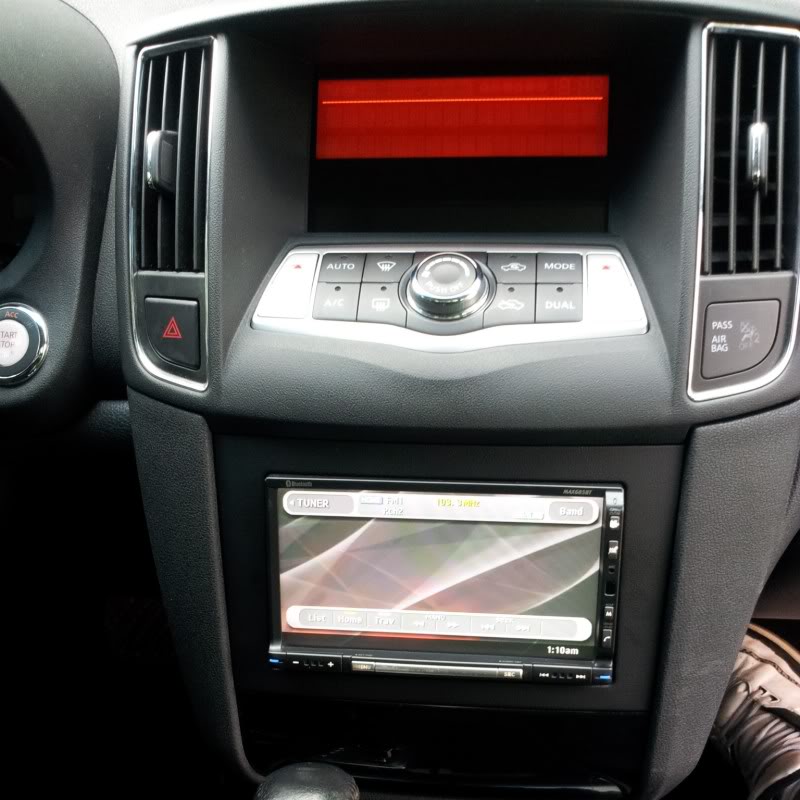
Changed out the factory hu with a Clarion double din. Now I have Bluetooth audio to go along with the Bluetooth phone. Headunit also has and iPod hookup, and a few other hookups i plan on using. Have not decided what i am going to do with the top display yet but i'm brainstorming.


Member
Joined: Aug 2012
Posts: 160
From: Houston, Tx
I'm in the same dilemma... Some folks went with a tablet, which is cool, but with the Texas heat and some other bugs of tethering for internet plus having the buttons hidden inside the dash kept me away from that option. I think I will go with a 7 inch monitor if I can find a way to mirror my phone (android/samsung). The ac display will have to be relocated, and that can be done by extending the wires. Not impossible, but if you want it done right it can get pricey.
Thread Starter
Junior Member
Joined: Jun 2012
Posts: 79
From: Metro Atlanta
Its the Clarion MAX685BT it is a few years old but has a lot of options. Bluetooth phone and audio, USB plug that can be used for iPod or memory stick, also has an RCA input. It also has a 2nd zone output that im going to use in the Maxima. 50x4 amp that makes the factory speakers sound 10x better. Looking to change out the speakers just have not decided on what to go with yet. The HVAC display is still in the factory location for now, thinking about moving it to right above the radio when i get a tablet to install in the place of the top display.


Senior Member
Joined: Jun 2012
Posts: 696
From: Honolulu, Hawaii
Its the Clarion MAX685BT it is a few years old but has a lot of options. Bluetooth phone and audio, USB plug that can be used for iPod or memory stick, also has an RCA input. It also has a 2nd zone output that im going to use in the Maxima. 50x4 amp that makes the factory speakers sound 10x better. Looking to change out the speakers just have not decided on what to go with yet. The HVAC display is still in the factory location for now, thinking about moving it to right above the radio when i get a tablet to install in the place of the top display.
Not sure how you're gonna move the HVAC above the radio... maybe below like Quinn recently did. The screen unit is actually quite bulky.
Thread Starter
Junior Member
Joined: Jun 2012
Posts: 79
From: Metro Atlanta
Looked that up on Crutchfield; Looks like a high quality receiver there! Didn't realize it's also a DVD player as well. Too bad they don't sell it anymore. It notes navigation as "optional," that's interesting... are there downloadable applications on this thing?
Not sure how you're gonna move the HVAC above the radio... maybe below like Quinn recently did. The screen unit is actually quite bulky.
Not sure how you're gonna move the HVAC above the radio... maybe below like Quinn recently did. The screen unit is actually quite bulky.

Newbie - Just Registered
Joined: Jul 2013
Posts: 3
Replace Headunit
Like many maxima s owners I'd like to replace the head unit with a unit that provides gps, bluetooth, etc but don't want to have two screens. I found this aftermarket unit that provides many functions / features and it uses the oem screen area. Has anyone installed this unit?
http://www.cargpsnet.com/nissan-maxi...-tv-p-714.html
http://www.diycardvd.com/2010-2012-n...em-p-3238.html
http://www.cargpsnet.com/nissan-maxi...-tv-p-714.html
http://www.diycardvd.com/2010-2012-n...em-p-3238.html

Junior Member
Joined: Jan 2013
Posts: 78
Like many maxima s owners I'd like to replace the head unit with a unit that provides gps, bluetooth, etc but don't want to have two screens. I found this aftermarket unit that provides many functions / features and it uses the oem screen area. Has anyone installed this unit?
http://www.cargpsnet.com/nissan-maxi...-tv-p-714.html
http://www.diycardvd.com/2010-2012-n...em-p-3238.html
http://www.cargpsnet.com/nissan-maxi...-tv-p-714.html
http://www.diycardvd.com/2010-2012-n...em-p-3238.html
Last edited by tiger2380; Jul 8, 2013 at 05:17 PM.
Senior Member
Joined: Jun 2012
Posts: 696
From: Honolulu, Hawaii
Like many maxima s owners I'd like to replace the head unit with a unit that provides gps, bluetooth, etc but don't want to have two screens. I found this aftermarket unit that provides many functions / features and it uses the oem screen area. Has anyone installed this unit?
http://www.cargpsnet.com/nissan-maxi...-tv-p-714.html
http://www.diycardvd.com/2010-2012-n...em-p-3238.html
http://www.cargpsnet.com/nissan-maxi...-tv-p-714.html
http://www.diycardvd.com/2010-2012-n...em-p-3238.html
If some of the HUs on the market were a bit better, I'd have went that route and gotten a double din one with dvd functionality, gps nav, rear camera, etc.
Yes I know there's a few great ones out there but I settled for a decent but affordable single din and a tablet, saving me at least $200 for the same functionality (minus the dvd player)



Junior Member
Joined: Jul 2011
Posts: 61
From: Tampa Florida
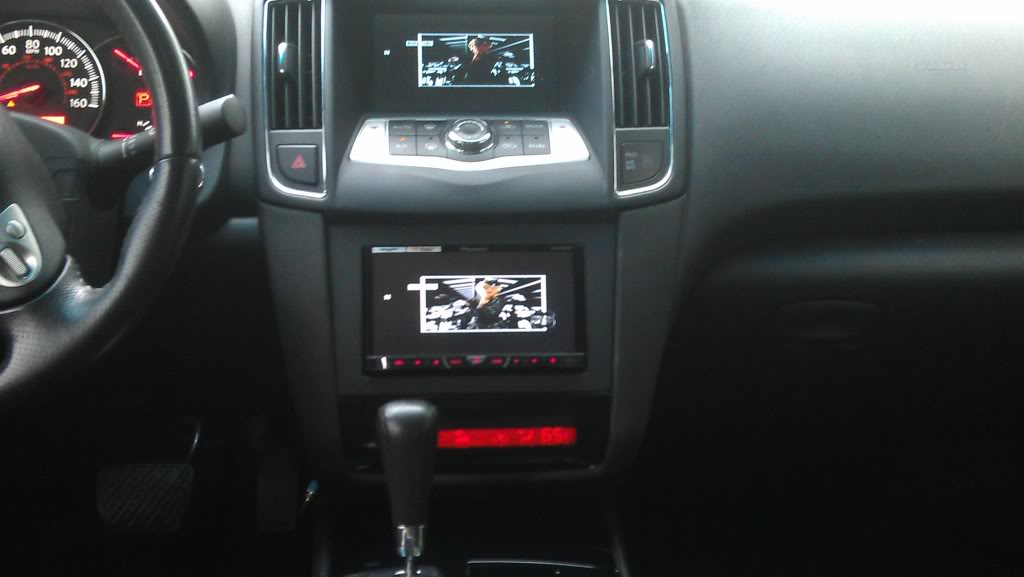
i have the after market head unit. however my car wasn't the navigation package so i didnt have to relocate anything. i have a pioneer double din in the vehicle. the AC information is still present on the amber screen up top, you only loose the mpg,time duration, and i belive the clock and whatever else is on there previous to your after market set up. this aftermarket install is base on your preference im okay with the amber screen being there and my double din showing movies or what not. so to each is own.

Junior Member
Joined: Nov 2013
Posts: 37
From: Maryland
I'm curious as to why you didn't just use the factory Nav unit. You would have had bluetooth streaming and wouldn't have lost any functionality. I'd like to upgrade from the non-nav to nav. Is there a parts list to accomplish this?

Member
Joined: Feb 2013
Posts: 119
From: Charleston
And there's not much point buying it at these prices for just the control unit lol
http://www.courtesyparts.com/kb_search_result.php?keywords=[25915P]+\%28a35&cPath=8300_8308_8342_8363
Last edited by escblads; Nov 26, 2013 at 04:16 PM.

Junior Member
Joined: Jun 2009
Posts: 72

Hi nice set up I have the same Pioneer BH4400 radio in mines aswell...How did you hook up and move the ac / heater part to the bottom, also is that the factory screen on top or did you get a monitor for the top part as I dont see the black strip line that seperates the AC and Radio functions.
Can you submit a clearer picture perhaps...I would like to utilize the top screen aswell inconjuction with my Pioneer BH400 to show 2 screens as yours
Thanks u rock
Willie

Member
Joined: Aug 2009
Posts: 179
From: Houston
Thanks bro. I actually have the pioneer avh-x5500bhs. As far as the ac/heater part, I extended the wiring so I could move it down to the bottom piece. Some have relocated it to the glove box but I wanted to see mine all the time without having to look in the glove box. I machined the bottom piece so the ac/heater screen would fit in there snug. The top screen is an after market screen I put in the top and connected it to my h/u.


Thread
Thread Starter
Forum
Replies
Last Post
MaxLife17
8th Generation Maxima (2016-)
43
Jun 27, 2019 01:37 PM