


My 2K1 AE


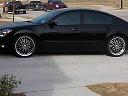


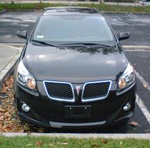


 car looking cleaan.I like the wheels.Im wondering if some tint wud spoil the look.Great max man.Good Job.!!!


Thanks everyone..
lol, but the pictures make the car look really good.. It rained the previous day, and the front bumper DEFINITELY isnt clean.. and the leather on the driver seat is worn in the common place.. and this is my Daily Driver!
lol, but the pictures make the car look really good.. It rained the previous day, and the front bumper DEFINITELY isnt clean.. and the leather on the driver seat is worn in the common place.. and this is my Daily Driver!


Nice AE! Sterling mist FTW! I've got one just like it except mine is frost cloth and a 5spd. So the reason I quoted the picture is this: The only time I can get my odometer to come on is when the key is in the on position. Also when this happens, the fuel gauge moves up to show how much fuel is left. Is this 5spd specific? Does the odometer come on for autos w/out the key in the on position (for instance if the driver door is open)? Just curious.
lol, I turned it onto ON, then took the key out.. It shows the odometer for a short period of time.. in which i took a pic of.. thats my favorite pic actually. it looks really cool lol

Nice AE it reminds me of somebody elses AE. Oh yeah mine! I have the same color too exept I have a black leather interior and its a 5speed. Good to know there's another AE here in Texas. I live on the southwest of Houston.
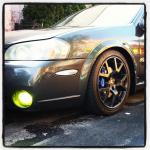
Ahh, i see you have the stock rims still too.. hey, if you ever change them out, ill buy one off of you, my cousin's 4th gen needs new rims, and i broke one of mine in half... lol that car only has like.. 40k on it :P
I would sell it to you but I'm not planing on buying new rims for a long time from now. Hey Is the track open there on Saturdays?


Yes i did.. Using the CHDK Firmware hack, that lets you capture pictures in RAW, meaning no processing via the camera.. I converted it into a DNG (Digital Negative) then just changed white balance with photoshop, instead of having the camera adjusting the pic itself.. Ill post a example in a second... I didn't edit the pictures in anyway other than changing the White Balance in photoshop... When you load a DNG into PS, it gives you some menu..
Taking in RAW is better because, it actually retains more of the details captured, where as it is lost during processing via the camera itself..
CHDK Wiki - http://chdk.wikia.com/wiki/Main_Page
Original

RAW without touching it (Converted to JPEG with PS)

RAW with Custom WB

I hope it isnt considered cheating, if i used this way to show my car on the forum..
CHDK Wiki - http://chdk.wikia.com/wiki/Main_Page
Original
RAW without touching it (Converted to JPEG with PS)
RAW with Custom WB
I hope it isnt considered cheating, if i used this way to show my car on the forum..
Last edited by FlipCpt45; Jun 11, 2008 at 09:49 PM.

Senior Member
Joined: Jan 2003
Posts: 493
thats what i was thinking too, the only think i don't like about the stillen back, the sides are okay, but the back is too fat, which makes the whole back fat. The AE on the other hand is nice and sleek, doesnt make the back too big
Ya the stillen has that weird gap in the rear...

 no cheating, just skill. I need to try and load up that firmware on my Canon as well.. been meaning to for a while - it really expands the capability of your device.
Those don't appear to be the stock AE's.
Beautiful car - very nice condition.

Yes i did.. Using the CHDK Firmware hack, that lets you capture pictures in RAW, meaning no processing via the camera.. I converted it into a DNG (Digital Negative) then just changed white balance with photoshop, instead of having the camera adjusting the pic itself.. Ill post a example in a second... I didn't edit the pictures in anyway other than changing the White Balance in photoshop... When you load a DNG into PS, it gives you some menu..
Q. I've shot some RAW pictures. How do I process them?
A. When you have a RAW file from your cam, you can
* convert it to the standardized DNG digital negative format using the DNGForPowerShot converter. The DNG files then can be processed with nearly every RAW converter on the market, including Adobe Lightroom and Apple Aperture (read notes on the bottom).
(Note that DNG4PS will copy the EXIF data from the RAW file's corresponding JPG file to the new DNG file. The RAW files themselves do not contain any EXIF-header info until this is done. If you are using some of the new builds of CHDK with features like shutter-speed and aperture overrides then the original JPG EXIF header, from which this data is taken for the DNG RAW file's EXIF-header, may not reflect these new values that are outside of the normal bounds of your Powershot's EXIF information. A small utility was created that allows you to process your JPG files to update appropriate EXIF fields with these non-standard CHDK override shutter-speed, aperture, and ISO values. You can find the latest version of this utility at the new CHDK Forum at the end of this discussion thread Converting CHDK EXIF info to Standard EXIF. Read the full thread on how to install and use it as it also requires the installation of EXIFTool and copying then renaming the main "exiftool(-k).exe" file to just "exiftool.exe". Installation and usage info is on a link in that thread to the original Auto ISO Patcher that was edited for this purpose.) Direct link to the executable: Auto CHDK to EXIF v1.2.zip - 0.20MB
* convert it to the DNG format using DNG4PS-2 (homepage) converter. It is newer and much more optimized and feature packed. Supports a number of Canon Powershot models and the Windows, Linux and MacOSX platforms.
* process the RAW files directly with appropriate converters. Right now, this applies to converters which are based on David Coffin's DCRaw. Here are four free examples:
o UFRaw
o Raw Therapee
o Picasa 2.7 and above
o Faststone Image Viewer displays the RAW files if you want to browse them A very good image viewer/converter. It also has most of the usual editing tools (brightness, constrast, gamma, hue, rotations, cropping, etc.).
o Xnview, a free image viewer/editor, also handles RAW files well and is available for many platforms (Win/Mac/Linux). It has advanced filtering/editing functions.
* Use BreezeBrowser($), good for producing proof sheets, batch renaming photos
[Note that the above mentioned steps may not work for all cameras yet. Especially the A640 CHDK program was just recently added, so the RAW converters may not support it yet.
If you know that it works or have further information, please delete this paragraph]
The A630 and A640 are first mentioned in DCRaw (http://www.cybercom.net/~dcoffin/dcraw/) source code at version 8.70 (current as of May 7, 2007 is version 8.72), so may be supported (I don't have these cameras to test with). If you want to use DCRaw directly (from command line), you can download the source code from the above link and compile, or download binaries for both Windows and Mac OS X from http://www.insflug.org/raw/.
The A570, A630 and A640 is also supported in Raw Therapee (http://www.rawtherapee.com/). Its available for Windows and Linux.
DNG For PowerShot supports A610, A620, A630, A640, A710 IS, S2 IS, S3 IS since v1.1
DNG4PS-2 (v0.2.2beta-24) supported cameras: A610, A620, A630*, A640, A710 IS, S2 IS*, S3 IS, A700*, G7*, A560*, A570 IS*, IXUS 700*, IXUS 70*, IXUS 800*, A720 IS, S5 IS, IXUS 950, A650 IS, A460, SD800 IS, A530, A540.
* - supported without correct color camera profile. If you have correct camera profile for one of these cameras or you want to calculate it, read this forum topic.
There is also a hack for RawShooter (thanks PhotoHans). Examine a DNG file to obtain the exact name eg. 'PowerShotS3IS' (no spaces) open RawShooter.exe in an editor and change 'PowerShot G5 ' to PowershotS3IS and save. Make sure file length is unchanged and make a backup before you begin.
These are some Mac programs which read the RAW files (.CRW) produced by CHDK. From least to most hassle (and decreasing expense):
* RAW Developer $120
Fast, sweet WB & other options.
* PhotoLine 32 PC & Mac, Euro $59
An extremely capable editor, better than PhotoShop in many ways. Full RAW file support, interpolation methods, WB, contrast, clipping, color correction, contrast, auto-white-point, clipping limits, assign ICC color-profiles, define curves on all or each channel, save favorite presets, etc. Does not export to DNG format, but DNG format is only needed by other less-capable editors so you don't need this feature. You do all your RAW editing right within PhotoLine. Converting to DNG format is only needed for those editors that can't deal with CHDK's unique RAW format natively. PhotoLine is not thus encumbered.
* RAW Photo Processor (RPP) - FREE
Promising. Slower; its WB options not yet satisfactory for some. Does not export to DNG format.
* dcRAW - FREE
Does many conversions, great for automation, but you're working blind. This page gives examples of its parameters.
* DCRawUI - Windows - FREE
This is a GUI-Version of the above mentioned dcRAW. Works with my A710is (and I guess with most other Powershots)
These export JPG, and some TIFF and DNG
A. When you have a RAW file from your cam, you can
* convert it to the standardized DNG digital negative format using the DNGForPowerShot converter. The DNG files then can be processed with nearly every RAW converter on the market, including Adobe Lightroom and Apple Aperture (read notes on the bottom).
(Note that DNG4PS will copy the EXIF data from the RAW file's corresponding JPG file to the new DNG file. The RAW files themselves do not contain any EXIF-header info until this is done. If you are using some of the new builds of CHDK with features like shutter-speed and aperture overrides then the original JPG EXIF header, from which this data is taken for the DNG RAW file's EXIF-header, may not reflect these new values that are outside of the normal bounds of your Powershot's EXIF information. A small utility was created that allows you to process your JPG files to update appropriate EXIF fields with these non-standard CHDK override shutter-speed, aperture, and ISO values. You can find the latest version of this utility at the new CHDK Forum at the end of this discussion thread Converting CHDK EXIF info to Standard EXIF. Read the full thread on how to install and use it as it also requires the installation of EXIFTool and copying then renaming the main "exiftool(-k).exe" file to just "exiftool.exe". Installation and usage info is on a link in that thread to the original Auto ISO Patcher that was edited for this purpose.) Direct link to the executable: Auto CHDK to EXIF v1.2.zip - 0.20MB
* convert it to the DNG format using DNG4PS-2 (homepage) converter. It is newer and much more optimized and feature packed. Supports a number of Canon Powershot models and the Windows, Linux and MacOSX platforms.
* process the RAW files directly with appropriate converters. Right now, this applies to converters which are based on David Coffin's DCRaw. Here are four free examples:
o UFRaw
o Raw Therapee
o Picasa 2.7 and above
o Faststone Image Viewer displays the RAW files if you want to browse them A very good image viewer/converter. It also has most of the usual editing tools (brightness, constrast, gamma, hue, rotations, cropping, etc.).
o Xnview, a free image viewer/editor, also handles RAW files well and is available for many platforms (Win/Mac/Linux). It has advanced filtering/editing functions.
* Use BreezeBrowser($), good for producing proof sheets, batch renaming photos
[Note that the above mentioned steps may not work for all cameras yet. Especially the A640 CHDK program was just recently added, so the RAW converters may not support it yet.
If you know that it works or have further information, please delete this paragraph]
The A630 and A640 are first mentioned in DCRaw (http://www.cybercom.net/~dcoffin/dcraw/) source code at version 8.70 (current as of May 7, 2007 is version 8.72), so may be supported (I don't have these cameras to test with). If you want to use DCRaw directly (from command line), you can download the source code from the above link and compile, or download binaries for both Windows and Mac OS X from http://www.insflug.org/raw/.
The A570, A630 and A640 is also supported in Raw Therapee (http://www.rawtherapee.com/). Its available for Windows and Linux.
DNG For PowerShot supports A610, A620, A630, A640, A710 IS, S2 IS, S3 IS since v1.1
DNG4PS-2 (v0.2.2beta-24) supported cameras: A610, A620, A630*, A640, A710 IS, S2 IS*, S3 IS, A700*, G7*, A560*, A570 IS*, IXUS 700*, IXUS 70*, IXUS 800*, A720 IS, S5 IS, IXUS 950, A650 IS, A460, SD800 IS, A530, A540.
* - supported without correct color camera profile. If you have correct camera profile for one of these cameras or you want to calculate it, read this forum topic.
There is also a hack for RawShooter (thanks PhotoHans). Examine a DNG file to obtain the exact name eg. 'PowerShotS3IS' (no spaces) open RawShooter.exe in an editor and change 'PowerShot G5 ' to PowershotS3IS and save. Make sure file length is unchanged and make a backup before you begin.
These are some Mac programs which read the RAW files (.CRW) produced by CHDK. From least to most hassle (and decreasing expense):
* RAW Developer $120
Fast, sweet WB & other options.
* PhotoLine 32 PC & Mac, Euro $59
An extremely capable editor, better than PhotoShop in many ways. Full RAW file support, interpolation methods, WB, contrast, clipping, color correction, contrast, auto-white-point, clipping limits, assign ICC color-profiles, define curves on all or each channel, save favorite presets, etc. Does not export to DNG format, but DNG format is only needed by other less-capable editors so you don't need this feature. You do all your RAW editing right within PhotoLine. Converting to DNG format is only needed for those editors that can't deal with CHDK's unique RAW format natively. PhotoLine is not thus encumbered.
* RAW Photo Processor (RPP) - FREE
Promising. Slower; its WB options not yet satisfactory for some. Does not export to DNG format.
* dcRAW - FREE
Does many conversions, great for automation, but you're working blind. This page gives examples of its parameters.
* DCRawUI - Windows - FREE
This is a GUI-Version of the above mentioned dcRAW. Works with my A710is (and I guess with most other Powershots)
These export JPG, and some TIFF and DNG
Side picture, i wish I had my digital camera on me that day, it was beautiful after it rained here..
Taken with my cell phone

FTL stock front wheel gap, SOON, i will be dropped on Illuminas + Eibachs.. I have to buy new tires for the rear (It rubs right now on bumps way too much, I accidentally put bigger tires on the back.. lol)
Taken with my cell phone
FTL stock front wheel gap, SOON, i will be dropped on Illuminas + Eibachs.. I have to buy new tires for the rear (It rubs right now on bumps way too much, I accidentally put bigger tires on the back.. lol)
Last edited by FlipCpt45; Jun 18, 2008 at 10:24 PM.

Thread
Thread Starter
Forum
Replies
Last Post
TallTom
5th Generation Maxima (2000-2003)
57
Oct 14, 2025 05:16 PM